






Definition and Meaning of the Application - Facility Profile
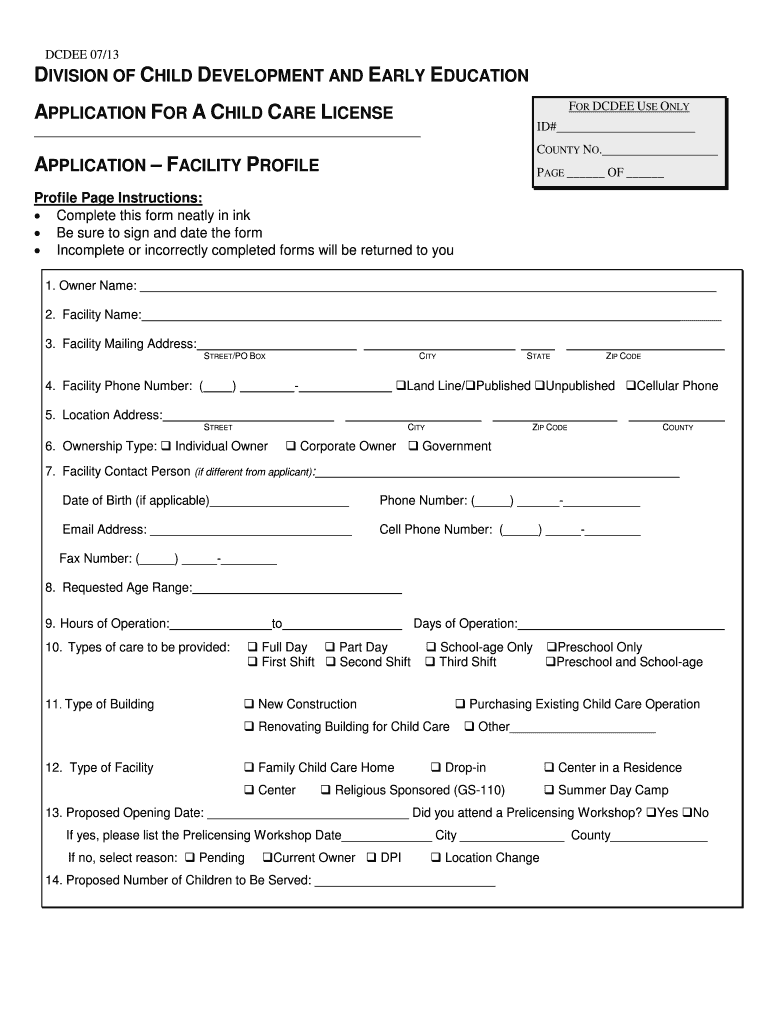
The "Application - Facility Profile" is an essential document used for applying for official licenses, particularly in sectors like child care and early education within the United States. Primarily, it acts as a detailed dossier containing critical information about a facility. This encompasses ownership details, operational specifics, types of services offered, and other vital statistics required for regulatory compliance. Understanding the nature and purpose of this application helps ensure its precision and efficiency in processing.
Key Components of the Facility Profile
- Ownership Type: Includes details on whether the facility is privately owned, part of a chain, or a franchise.
- Contact Information: Comprehensive details for the facility, such as phone number, email, and postal address.
- Operational Hours: The exact times the facility is operational each day.
- Service Types: A list of the various services provided, like full-day or part-time care options.
- Proposed Opening Date: When the facility anticipates starting operations, essential for future planning and approval timelines.
Steps to Complete the Application - Facility Profile
Completing the "Application - Facility Profile" necessitates a step-by-step approach to ensure no detail is overlooked. Here’s a detailed guide:
- Gather Facility Information: Compile detailed ownership, contact, and service information.
- Verify Regulatory Requirements: Check with local and state guidelines to ensure your facility meets all legal prerequisites.
- Complete Operational Details: Include specifics about hours of operation and services offered.
- Legal Acknowledgments: Confirm residency status and other legal declarations as required.
- Review and Attach Documents: Double-check all details for accuracy and attach any supplementary documents like proof of ownership.
- Submit the Form: Depending on jurisdiction, forms can be submitted online, via mail, or in person.
How to Obtain the Application - Facility Profile
Obtaining the "Application - Facility Profile" is generally straightforward and can vary slightly depending on the state or local jurisdiction. Below are common methods:
- Online Download: Many state websites offer the application form for download as a PDF.
- Local Agencies: Visit the relevant local or state office, such as the Department of Child Services or equivalent.
- Request by Mail: Some organizations may also provide forms upon request via mail, which can be convenient for those without reliable internet access.
Required Documents for Submission
When submitting your "Application - Facility Profile," there are numerous supporting documents you may need to provide:
- Proof of Ownership: Depending on your ownership model, this could be a deed or lease agreement.
- Insurance Certificates: Often required to demonstrate regulatory compliance and protect stakeholders.
- Fire and Safety Certifications: These documents ensure your facility meets safety standards.
- Identification: Copies of driver's licenses or business IDs for verification purposes.
Important Terms Related to Application - Facility Profile
Understanding essential terms related to the "Application - Facility Profile" can significantly aid in accurate completion and compliance. These include:
- Residency Status: Verifies the legal status of individuals associated with the facility.
- Legal Qualifications: Necessary qualifications under state laws to operate a facility.
- Operational Scope: Specific limitations and capabilities of the services your facility intends to offer.
Legal Use of the Application - Facility Profile
The "Application - Facility Profile" serves several legal purposes, thereby ensuring a facility's compliance with state and federal laws. Important considerations include:
- Verification: The application acts as an official record confirming your facility meets all necessary regulations and standards.
- Licensing: Essential for obtaining licenses to operate legally within specific jurisdictions.
- Accountability: Provides a recorded acknowledgement of legal responsibilities and regulations by the facility's management.
Penalties for Non-Compliance
Non-compliance with the "Application - Facility Profile" can lead to serious consequences:
- Fines and Fees: Failure to submit or incorrect submission of the application may result in financial penalties.
- License Revocation: Operating without a completed profile can result in losing your business license.
- Legal Action: Persistent non-compliance might invite lawsuits or other legal actions from state or federal authorities.
Software Compatibility and Tools
Completing and managing the "Application - Facility Profile" effectively can be aided through the use of compatible software:
- Document Software: Tools like DocHub help edit and manage the application digitally, enhancing accuracy and storage.
- Cloud Services: Utilize platforms like Google Drive for easy sharing and collaborative completing of the document.
- Legal Software: Solutions that integrate compliance checks can preemptively prevent errors and omissions in form completion.
State-Specific Rules for the Application - Facility Profile
Different states may have distinct rules concerning the "Application - Facility Profile." It’s vital to:
- Consult Local Guidelines: Always reference the guidelines offered by your specific state for nuances or additional requirements.
- Adapt to State Laws: Tailor certain sections of the application to meet state-imposed standards or additional certifications.
- State Agencies: Reach out to state-specific resources or liaisons who can provide assistance and direction tailored to your area.