




Here's how it works



How to use or fill out Adolescent Intake Form - Counselor Children Teens with our platform

- Click ‘Get Form’ to open the Adolescent Intake Form in the editor.
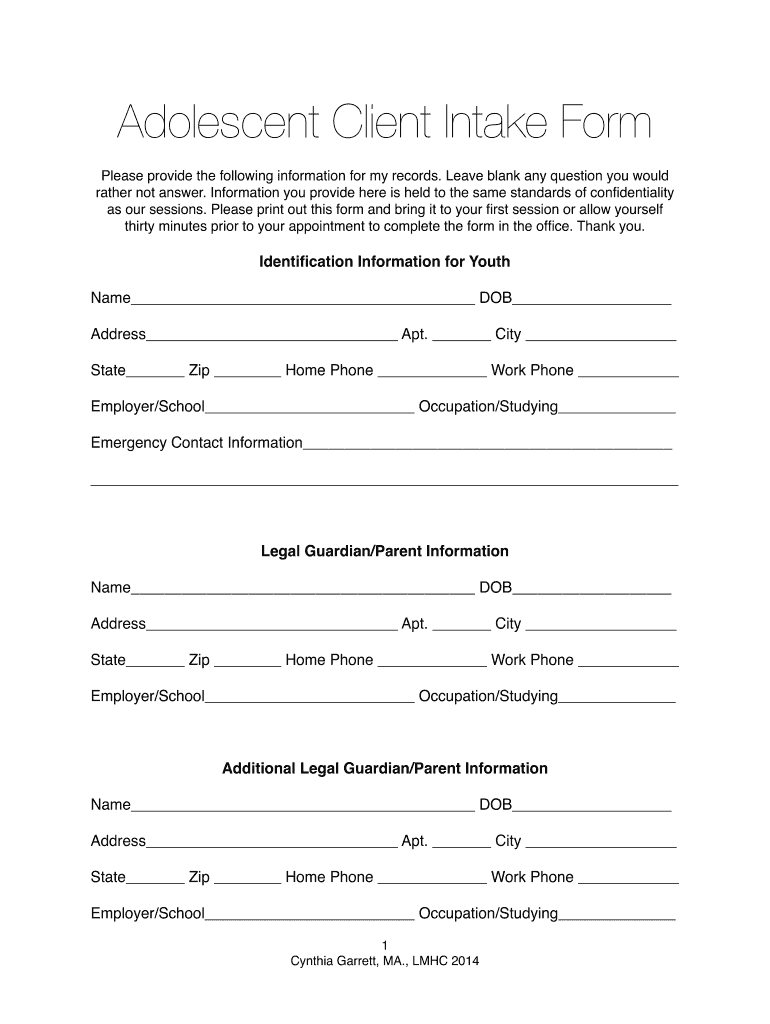
- Begin by filling out the Identification Information for Youth section. Provide the youth's name, date of birth, address, and contact information. This ensures accurate records and helps establish a connection.
- Next, complete the Legal Guardian/Parent Information sections. Include names, addresses, and contact details for guardians or parents involved in the youth's life.
- In the Referral Information section, indicate how you heard about these services. This helps counselors understand your journey to seeking help.
- Proceed to Family Information. Describe living arrangements and relationships using the provided scale to assess dynamics within the household.
- Fill out Youth Medical Information by providing details about primary physicians and any medical history relevant to counseling.
- Complete sections on Substance Use and Counseling Information by answering questions regarding behaviors that may impact therapy.
- Finally, review all entries for accuracy before saving or printing your completed form for submission.
Start using our platform today to easily fill out your Adolescent Intake Form online for free!
It's free
See more Adolescent Intake Form - Counselor Children Teens versions
Got questions?
How can I eSign my intake questions for child therapy in Word?
Microsoft Word doesn’t have signing tools to generate valid eSignatures and enforceable documents. Fortunately, DocHub is an online eSignature-compliant editor that works with various document formats, including .doc files. Sign in to your account and add the Word version of your intake questions for child therapy from your device and cloud, or URL - our editor will automatically convert it into an editable PDF. Make all essential adjustments in your document and click Sign to generate your own legally-binding eSignature. You will find four signing options from which to choose.
How do you complete adolescent intake form on iOS?
You need only a web connection and a web browser to fill out your adolescent intake form by using an iOS phone. Open the DocHub website and authenticate. Then, add your document or select it from the list in your dashboard. Then use our editing instruments to fill out your form and preserve all your modifications. You may also send it to a specified recipient straight away.
How do I create a client intake in Word?
How do you address resistance in therapy?
Why is intake assessment important?
Security and compliance
At DocHub, your data security is our priority. We follow HIPAA, SOC2, GDPR, and other standards, so you can work on your documents with confidence.
Learn more


