Definition and Meaning
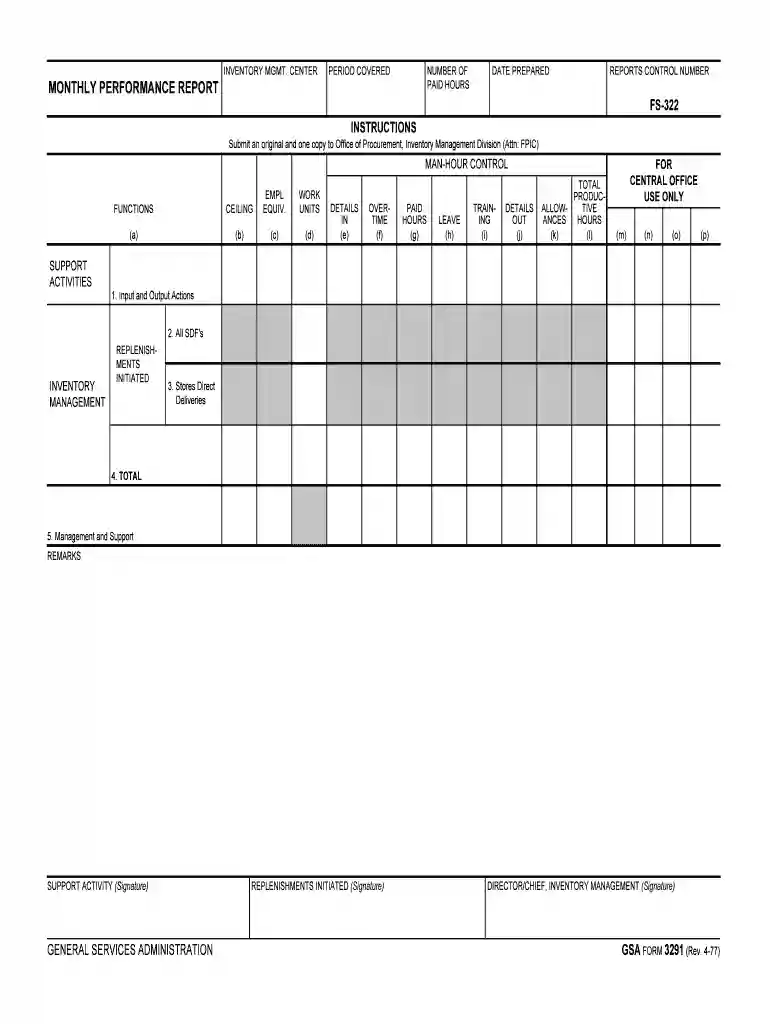
The "monthly performance report - GSA" is designed to capture the operational efficiency and productivity levels within the Inventory Management Center. It provides a comprehensive overview of paid work hours, man-hour controls, support activities, and functions related to inventory management. The report is instrumental in assessing performance metrics crucial for maintaining compliance with procurement procedures, ensuring that organizational standards are consistently met.
Components and Structure
- Input/Output Actions: This section records the flow of inventory and related activities, providing insights into inventory turnover rates and storage efficiency.
- Replenishments Initiated: Tracks orders placed to replenish stock, which is essential for preventing shortages and maintaining supply chain continuity.
Importance of Accurate Reporting
Maintaining precise records in the monthly performance report ensures accountability and helps identify areas for operational improvement. Accurate data supports strategic decision-making and enhances overall management effectiveness.
How to Use the Monthly Performance Report - GSA
The monthly performance report is a tool for monitoring and evaluating various aspects of inventory management. Users typically follow a structured approach to utilize this report effectively.
Preparation and Review
- Gathering Data: Collect necessary data, including work hours, inventory changes, and replenishment orders.
- Verification: Ensure all information is accurate before entering it into the report. Validation against existing records can prevent discrepancies.
Completion and Analysis
- Input Data: Fill in sections with relevant data using previously collected information. Ensure all entries are made in the correct fields to maintain data integrity.
- Analysis: Review the compiled data to assess performance trends and identify areas needing attention.
Steps to Complete the Monthly Performance Report - GSA
Completing the monthly performance report requires a methodical approach to ensure all required fields are accurately documented.
- Data Collection: Begin with gathering all relevant operational data from the previous month.
- Data Entry: Enter this data into the designated areas of the report, ensuring clarity and accuracy.
- Verification: Double-check entries against source documents for consistency and correctness.
- Signature and Approval: Secure necessary signatures from authorized personnel once the report is completed.
- Submission: Submit the completed report to the designated department for analysis and archival.
Common Issues and Solutions
- Incomplete Data: Regular audits can ensure that all relevant data is captured timely.
- Data Inconsistency: Implementing systematic checks helps in maintaining uniformity across reports.
Who Typically Uses the Monthly Performance Report - GSA
The monthly performance report is a critical tool for various stakeholders within the Inventory Management Center.

Primary Users
- Inventory Managers: Rely on this report for insights into inventory levels, stock movement, and productivity.
- Operation Supervisors: Use the report to identify efficiency improvements and workforce management strategies.
Supporting Roles
- Executives: Utilize aggregate data from these reports for high-level strategic planning and decision-making.
- Auditors: Verify the accuracy and adherence to compliance standards through detailed report analysis.
Key Elements of the Monthly Performance Report - GSA
A well-structured report includes several key components that encapsulate the performance metrics effectively.
Core Sections
- Work Hours: Full documentation of paid hours and man-hour controls, crucial for labor cost management.
- Support Activities: Details of auxiliary functions that support primary inventory goals, such as training or administrative tasks.
- Inventory Metrics: Quantitative measures providing insights into stock levels, turnover rates, and supply chain efficiency.
Performance Outcomes
Analyzing these key elements provides actionable insights into operational effectiveness and identifies opportunities for enhancement.
Legal Use of the Monthly Performance Report - GSA
Understanding the legal utilization of the report is essential for compliance.
Compliance and Reporting Standards
- Federal Regulations: The report must align with standards set by regulatory bodies to ensure compliance and avoid penalties.
- Confidentiality: Ensuring sensitive data within the report is protected against unauthorized access is imperative under data protection laws.
Penalties for Non-Compliance
Failing to accurately complete or submit the monthly performance report can have significant repercussions.
Consequences
- Financial Penalties: Organizations may incur fines or sanctions for failing to adhere to reporting guidelines.
- Operational Impact: Misreporting can lead to operational inefficiencies and potential disruptions in inventory management.
Thorough adherence to reporting standards not only mitigates risk but also enhances organizational transparency and accountability.
Digital vs. Paper Version
Organizations have the option to choose between digital and paper versions of the report.
Advantages of Digital Reports
- Efficiency: Digital forms allow for automated data entry and enhanced accuracy checks.
- Accessibility: Easier sharing and collaboration among stakeholders through electronic systems.
Paper Report Benefits
- Tangible Records: Hard copies serve as physical records, which can be filed and retrieved as needed.
- Simple Alterations: Easy to make minor corrections without needing sophisticated software.
Evaluating the pros and cons of each approach can help organizations select the option that best fits their operational needs.