






Definition & Meaning of the REQUEST TO ADD ITEM(S) TO GSA RETAIL STOCK
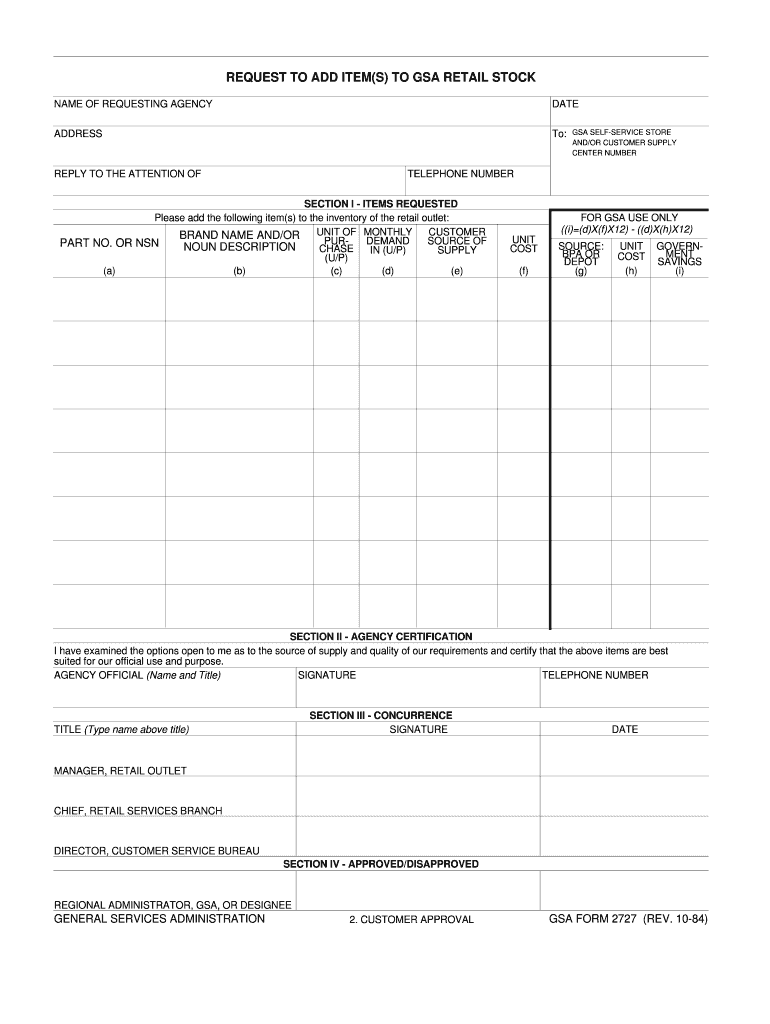
The "REQUEST TO ADD ITEM(S) TO GSA RETAIL STOCK" form, also known as GSA Form 2727, is an official document used by federal agencies to propose the addition of new items to the General Services Administration (GSA) retail inventory. Designed to streamline inventory management, the form ensures that agency requests are efficiently reviewed and authorized, allowing for the quick procurement of necessary items. Proper use of this form is crucial for maintaining a well-rounded and responsive inventory that supports government operations effectively.
How to Use the REQUEST TO ADD ITEM(S) TO GSA RETAIL STOCK
To use the GSA Form 2727 effectively, follow these steps:
-
Obtain the Form: Ensure you have the latest version of the form. It can be downloaded from the GSA website or obtained through your agency's supply chain management team.
-
Fill Out the Item Request Section: Clearly detail the items you wish to add, including descriptions, quantities, and any relevant specifications or codes. This information helps in evaluating the request accurately.
-
Complete Agency Certification: This section requires confirmation from agency officials that the items requested meet necessary criteria and have been approved internally.
-
Seek Concurrence and Approval: The form must be submitted to the appropriate GSA officials for concurrence and final approval. This step is essential for authorization to proceed with procurement.
-
Submit the Form: Depending on GSA requirements, submission can be done via mail or electronically through an approved GSA portal.
Steps to Complete the REQUEST TO ADD ITEM(S) TO GSA RETAIL STOCK
Completing the GSA Form 2727 involves several critical steps:
-
Initiate the Request: Draft a list of items that are proposed for addition, including detailed specifications and justifications for why they should be included in the GSA retail stock.
-
Gather Required Documentation: Assemble all necessary supporting documents that validate the need for the item addition, such as market analysis or internal demand reviews.
-
Fill Out the Form Accurately: Carefully enter information into each section of the form, ensuring accuracy and clarity. Use straightforward language to avoid misinterpretation.
-
Review and Certify: Before submission, have the form reviewed by a supervisor or department head to certify its accuracy and necessity.
-
Submit for Approval: Forward the completed form with all attachments to the relevant GSA department for official review and approval.
-
Track the Request: After submission, stay informed of the status of your request by maintaining communication with GSA officials, ensuring all necessary follow-ups are conducted.
Key Elements of the REQUEST TO ADD ITEM(S) TO GSA RETAIL STOCK
The GSA Form 2727 contains several key sections:
-
Item Description: Provide comprehensive details of the items, including specifications, quantity, and any special requirements.
-
Agency Certification: A formal statement confirming the request has been internally vetted and sanctioned by relevant agency officials.
-
Concurrence and Approval: Sections for GSA officials to document their agreement with the proposed additions and provide final approval.
-
Submission Instructions: Detailed guidelines on how to submit the form, including any supplementary documentation required to accompany the form.
Who Typically Uses the REQUEST TO ADD ITEM(S) TO GSA RETAIL STOCK
The primary users of GSA Form 2727 include:
-
Federal Agency Procurement Officers: Responsible for managing agency supply needs and ensuring inventories align with operational requirements.
-
Supply Chain Managers: Oversee inventory levels and are tasked with proposing new stock additions to meet future demands.
-
GSA Officials: Review and approve item additions, ensuring that the GSA retail stock supports all government needs effectively.


Important Terms Related to REQUEST TO ADD ITEM(S) TO GSA RETAIL STOCK
Understanding specific terminology is essential for navigating and completing the form:
-
GSA Retail Stock: Inventory items maintained and managed by the General Services Administration for use across federal agencies.
-
Concurrence: A formal agreement that proposed actions align with broader operational and strategic goals.
-
Agency Certification: A declaration confirming that specific requests have been internally evaluated and approved by the initiating agency.
Legal Use of the REQUEST TO ADD ITEM(S) TO GSA RETAIL STOCK
Compliance with regulatory guidelines is crucial:
-
Authorization: Ensure all submissions are authorized by relevant agency personnel before proceeding to GSA for approval.
-
Documentation Requirements: Maintain records of all submissions and approvals to comply with federal audit requirements.
-
Procurement Integrity: Adhere strictly to legal standards of procurement, avoiding conflicts of interest or unethical practices.
Software Compatibility for Filing the REQUEST TO ADD ITEM(S) TO GSA RETAIL STOCK
While the form can be completed manually or digitally, certain software can enhance efficiency:
-
Document Management Software: Tools like DocHub enhance the digital filling, editing, and submission of forms.
-
Compatibility with GSA Systems: Ensure software used is compatible with GSA's electronic submission systems to facilitate seamless processing.
Selecting these sections provides comprehensive information and guidance on effectively using, completing, and submitting the REQUEST TO ADD ITEM(S) TO GSA RETAIL STOCK form.