



Short sale package pdf 2026

Get Form
short sale package pdf Preview on Page 1

Here's how it works

01. Edit your short sale package pdf online
Type text, add images, blackout confidential details, add comments, highlights and more.

02. Sign it in a few clicks
Draw your signature, type it, upload its image, or use your mobile device as a signature pad.

03. Share your form with others
Send it via email, link, or fax. You can also download it, export it or print it out.

How to use or fill out short sale package pdf with our platform

Form edit decoration
9.5
Ease of Setup
DocHub User Ratings on G2
9.0
Ease of Use
DocHub User Ratings on G2
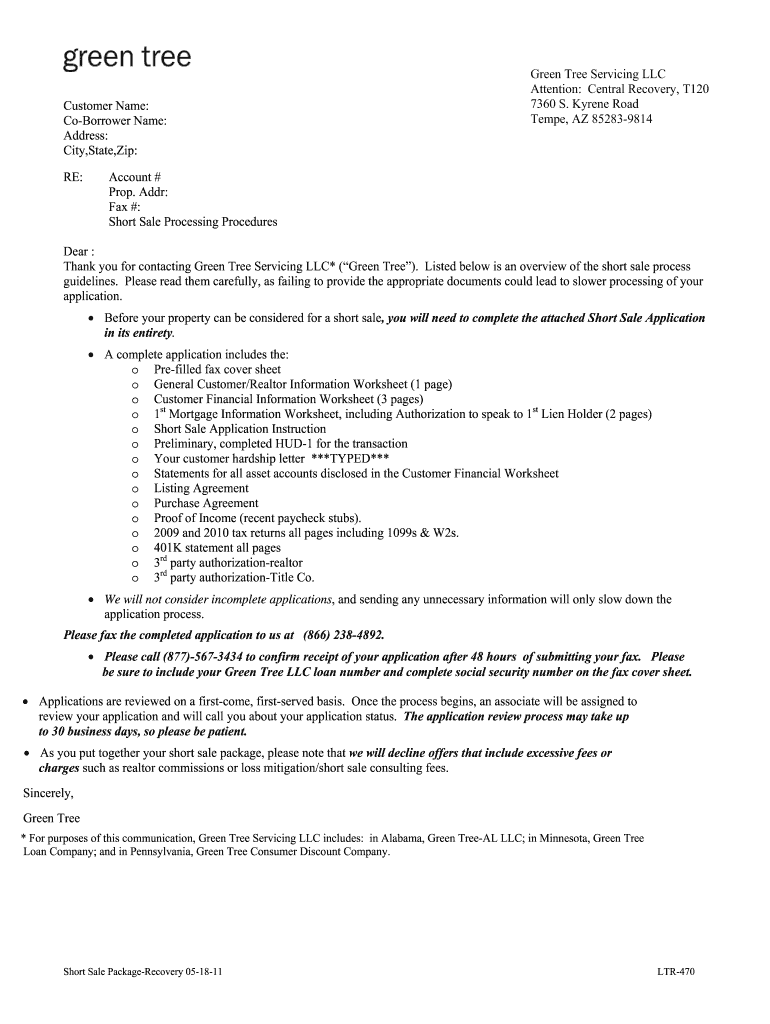
  1. Click ‘Get Form’ to open the short sale package PDF in the editor.
  2. Begin by filling out the 'Customer Name' and 'Co-Borrower Name' fields at the top of the form. Ensure that all names are spelled correctly.
  3. Next, provide your complete address, including city, state, and zip code. This information is crucial for processing your application.
  4. Complete the 'General Customer/Realtor Information Worksheet' by entering details such as phone numbers and employer information. Make sure to indicate if the property is owner-occupied.
  5. Fill out the 'Customer Financial Information Worksheet' thoroughly. Include all sources of income and monthly expenses to give a clear picture of your financial situation.
  6. Attach necessary documents like your hardship letter, tax returns, and proof of income as specified in the instructions section of the form.
  7. Once completed, review all entries for accuracy before submitting via fax to ensure a smooth processing experience.

Start using our platform today to streamline your short sale package completion for free!

See more short sale package pdf versions

We've got more versions of the short sale package pdf form. Select the right short sale package pdf version from the list and start editing it straight away!
Versions Form popularity Fillable & printable
2011 4.9 Satisfied (400 Votes)
be ready to get more

Complete this form in 5 minutes or less

Get form

Got questions?

We have answers to the most popular questions from our customers. If you can't find an answer to your question, please contact us.
Contact us
Short Sale​s Basics A short sale is when a mortgage lender agrees to accept a mortgage payoff amount less than what is owed in order to facilitate a sale of the property by a financially distressed owner. The lender forgives the remaining balance of the loan.
Potentially limitless losses: When you buy shares of stock (take a long position), your downside is limited to 100% of the money you invested. But when you short a stock, its price can keep rising. In theory, that means theres no upper limit to the amount youd have to pay to replace the borrowed shares.
While short sales require a lengthy lender approval process, they may be worth the wait for homebuyers and investors looking for a good deal on a property. With the seller and lender both motivated to mitigate their losses by selling the property, buyers may be able to negotiate a below-market purchase price.
What are the Common Mistakes to Avoid in a Short Sale? Not Consulting Professionals Early On. Ignoring the Lenders Requirements. Setting an Unreasonably High Price. Failing to Disclose Property Issues. Ignoring Taxes Implications. Underestimating the Time Involved in Short Sale. Failing to Communicate with Your Lender.
In a short sale, the homeowner will submit a financial package seeking a lenders approval to sell the property for less than the amount they owe on it. Therefore, the homeowner enters into this process voluntarily, which isnt the case with a foreclosure.

Security and compliance

At DocHub, your data security is our priority. We follow HIPAA, SOC2, GDPR, and other standards, so you can work on your documents with confidence.

Learn more
ccpa2
pci-dss
gdpr-compliance
hipaa
soc-compliance

People also ask

Accepted offers tend to be in the range of 10% or less below asking price with a discount of up to 5% below asking price the most commonly achieved: The most typical negotiated discount is up to 5% below asking price (20% of homeowners say this is what they bid and was accepted).
Its best to strike a balance between whats a good deal for you and whats reasonable for the lender. A price thats 5% to 10% below market value is typically a good number to put on the table. Venturing further down could be dangerous territory.

Related links