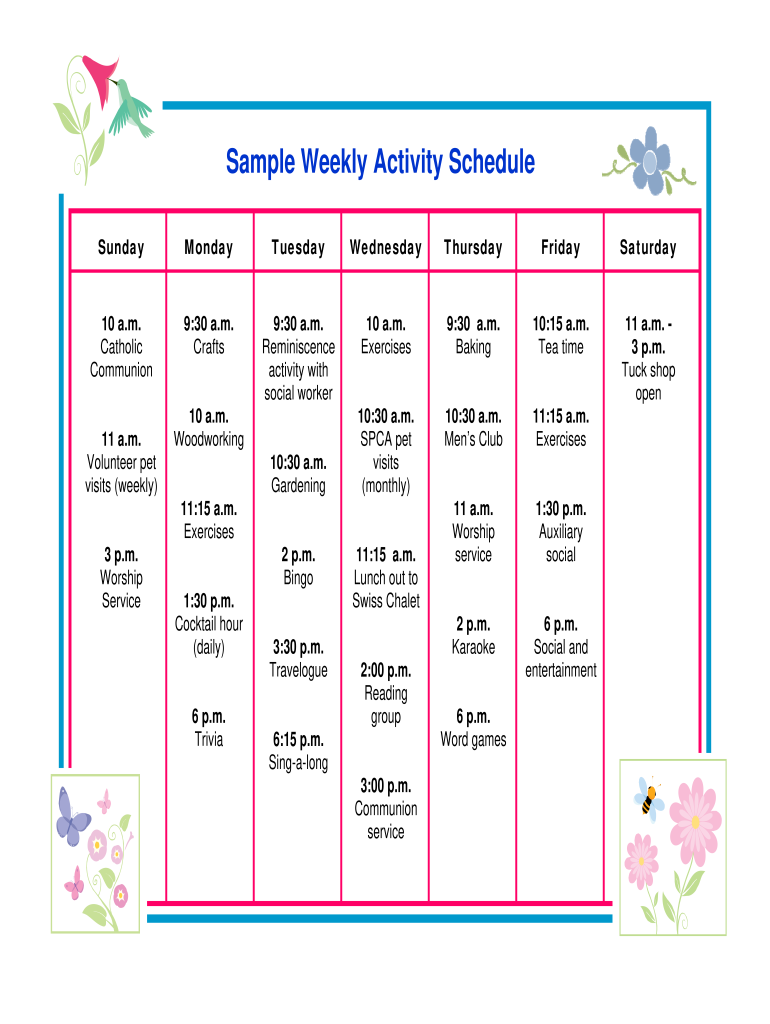
Sample Weekly Activity Schedule 2026

Get Form
sample schedule of activities Preview on Page 1

Here's how it works

01. Edit your sample schedule of activities online
Type text, add images, blackout confidential details, add comments, highlights and more.
02. Sign it in a few clicks
Draw your signature, type it, upload its image, or use your mobile device as a signature pad.
03. Share your form with others
Send weekly activities examples via email, link, or fax. You can also download it, export it or print it out.

How to use or fill out Sample Weekly Activity Schedule with our platform

Form edit decoration
9.5
Ease of Setup
DocHub User Ratings on G2
9.0
Ease of Use
DocHub User Ratings on G2
  1. Click ‘Get Form’ to open the Sample Weekly Activity Schedule in the editor.
  2. Begin by reviewing the schedule layout, which is organized by days of the week. Each day has designated time slots for various activities.
  3. Fill in any missing information for each activity. For example, if you need to add a specific event on Tuesday at 9:30 a.m., simply click on that time slot and type in your details.
  4. Utilize the text fields to provide additional notes or instructions related to each activity, ensuring clarity for all participants.
  5. Once completed, save your changes. You can easily share this updated schedule with others directly from our platform.

Start using our platform today to effortlessly manage your Sample Weekly Activity Schedule online for free!

be ready to get more

Complete this form in 5 minutes or less

Get form

Got questions?

We have answers to the most popular questions from our customers. If you can't find an answer to your question, please contact us.
Contact us
Your weekly schedule should provide a birds-eye view of your week as well as a granular look at your daily objectives. For example, executive coach Rafael Sarandeses recommends setting five weekly goals⁠(opens in a new tab or window) and three daily goals to accomplish throughout the week.
How to build a weekly work plan Set clear weekly goals. Start by identifying what you want to achieve by the end of the week. Prioritise tasks using a system. Once youve set your goals, its time to prioritise. Time block your week. Use a task management tool. Build routines for consistency. Review and reflect weekly.
Laying out a weekly schedule involves choosing themes for different days, listing the specific tasks to be completed for each day, and labelling your blocks of time with those tasks.
Weekly schedules are as much about structure as they can be about visual appeal. Add grids to yours, whether image or type-heavy, and youll have a happy mix of both. Lines and grids are great for layouts that use interesting typography, helping them appear neater, more organized and enhancing their readability.
Fill in all of your fixed time commitments, including classes, jobs, organization or club meetings, church functions, meal times, sleeping, etc. Fixed commitments are inflexible, important, and usually do not change week to week.

Security and compliance

At DocHub, your data security is our priority. We follow HIPAA, SOC2, GDPR, and other standards, so you can work on your documents with confidence.

Learn more
ccpa2
pci-dss
gdpr-compliance
hipaa
soc-compliance

People also ask

A weekly schedule is a way to keep track of your activities and tasks for the week. It includes everything you have to do, and helps you plan out when you can get things done.

example of schedule of activities