Doncaf 2026

Get Form
doncaf Preview on Page 1

Here's how it works

01. Edit your doncaf online
Type text, add images, blackout confidential details, add comments, highlights and more.

02. Sign it in a few clicks
Draw your signature, type it, upload its image, or use your mobile device as a signature pad.

03. Share your form with others
Send it via email, link, or fax. You can also download it, export it or print it out.

How to use or fill out doncaf with our platform

Form edit decoration
9.5
Ease of Setup
DocHub User Ratings on G2
9.0
Ease of Use
DocHub User Ratings on G2
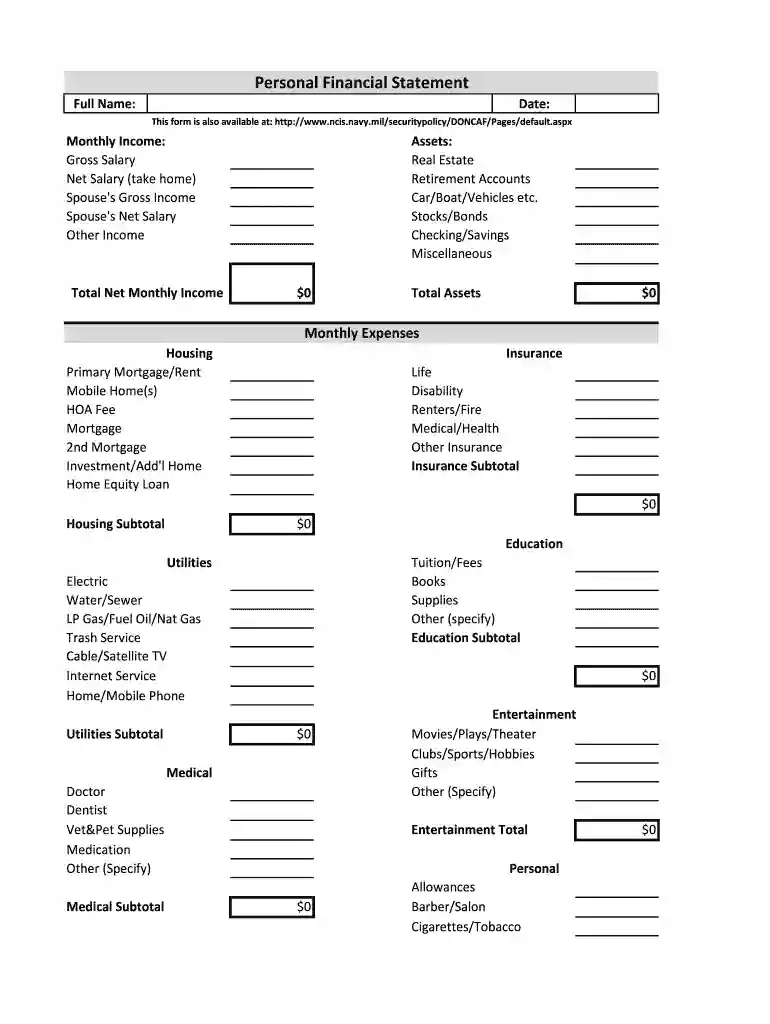
  1. Click ‘Get Form’ to open the Personal Financial Statement in the editor.
  2. Begin by entering your Full Name and Date at the top of the form. This personal information is essential for identification.
  3. In the Monthly Income section, fill in your Gross Salary, Net Salary, Spouse's Gross Income, Spouse's Net Salary, and any Other Income. Calculate your Total Net Monthly Income by summing these amounts.
  4. Next, move to the Assets section. List all relevant assets such as Real Estate, Retirement Accounts, Vehicles, Stocks/Bonds, Checking/Savings accounts, and any Miscellaneous assets. Ensure you calculate and enter your Total Assets.
  5. Proceed to Monthly Expenses. Break down your expenses into categories like Housing, Education, Utilities, Medical, Entertainment, Clothing, Food, Automobile, and Other Expenses. Fill in each field accurately and calculate subtotals where required.
  6. Finally, list all debts under the Debt section. Include details such as Debt Name, Amount Owed, and Monthly Payment for each obligation. Ensure that you total these amounts for clarity.

Start using our platform today to effortlessly complete your doncaf form online for free!

be ready to get more

Complete this form in 5 minutes or less

Get form

Got questions?

We have answers to the most popular questions from our customers. If you can't find an answer to your question, please contact us.
Contact us
The Department of Defense (DoD) Consolidated Adjudications Facility (CAF) is located in Ft. Meade, Maryland.
Most likely the No Determination of Action means they declined to grant you Interim access while your investigation is in progress, meaning there was an issue of concern and they wanted to flush it out before giving you access.
The DoD CAF is the sole authority to determine the security clearance eligibility of non-intelligence Agency DoD personnel occupying sensitive positions and/or requiring access to classified material including Sensitive Compartmented information (SCI).
National Security clearances range from confidential, which is the easiest to attain, to Secret, Top Secret, and SCI, which is the most challenging. Public Trust clearances are either low, moderate, or high risk, and Non-sensitive are the least extensive, requiring only criminal background and credit checks.
Demand Overdraft (DOD): It allows businesses to draw funds as needed, up to a predetermined limit, to cover operational expenses. Interest is charged on the amount utilized, and repayment terms can vary based on the agreement with the bank. DODs are typically unsecured, meaning they may not require specific collateral.
be ready to get more

Complete this form in 5 minutes or less

Get form

People also ask

DCSA Adjudication and Vetting Services (AVS) formerly known as the Department of Defense Consolidated Adjudications Facility (DOD CAF) is the sole authority to determine security clearance eligibility of non-Intelligence agency DOD personnel occupying sensitive positions or requiring access to classified material
What can disqualify you? You are not a U.S. citizen. You were dishonorably discharged from the military. You are currently involved in illegal drug use. You have been judged as mentally incompetent or mentally incapacitated by a mental health professional. You have had a clearance revoked for security reasons.

Related links