Type text, add images, blackout confidential details, add comments, highlights and more.
02. Sign it in a few clicks
Draw your signature, type it, upload its image, or use your mobile device as a signature pad.
03. Share your form with others
Send cp521 irs via email, link, or fax. You can also download it, export it or print it out.
How to use or fill out IRS Notice CP521 with our platform
Ease of Setup
DocHub User Ratings on G2
Ease of Use
DocHub User Ratings on G2
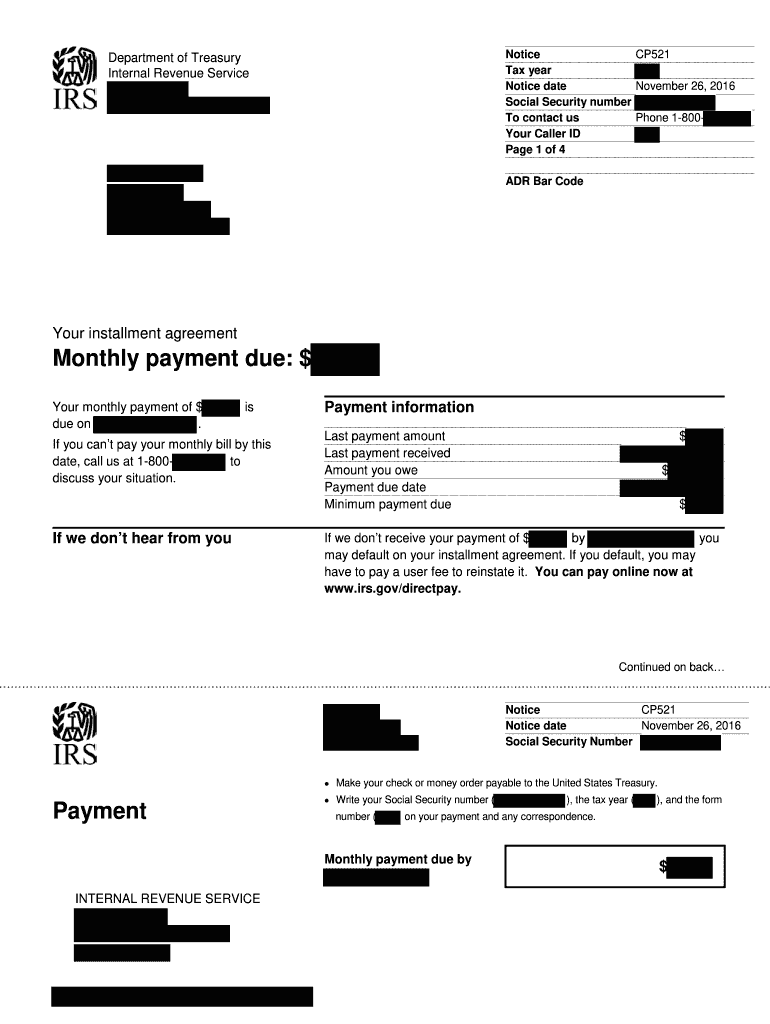
Click ‘Get Form’ to open the IRS Notice CP521 in the editor.
Begin by entering your Social Security number in the designated field. This is crucial for identifying your account.
Review the notice date and ensure it reflects the correct date of November 26, 2008, as this is important for your records.
In the 'Your installment agreement' section, confirm that your monthly payment due is accurately listed as $100.00, and note the due date of December 5, 2008.
Fill out any correspondence fields if you need to contact the IRS regarding your payment situation. Include your Social Security number, tax year, and form number on all correspondence.
If applicable, provide details for penalty removal requests in the specified section. Clearly state which penalties you wish to contest and include a brief explanation.
Start using our platform today to easily fill out and manage your IRS documents for free!
Irs notice cp521 pdfIrs notice cp521 2021IRS letter 2840CIRS Direct Pay 2025IRS Direct Pay loginIRS Direct Pay with credit cardIRS payment type amended returnIRS Direct Pay history
Security and compliance
At DocHub, your data security is our priority. We follow HIPAA, SOC2, GDPR, and other standards, so you can work on your documents with confidence.
Jun 22, 2017 This notice tells you the IRS needs. Identity Theft more information from you to process your tax return accurately. QP01(~. This CP01C noticeRead more
Cookie consent notice
This site uses cookies to enhance site navigation and personalize your experience.
By using this site you agree to our use of cookies as described in our Privacy Notice.
You can modify your selections by visiting our Cookie and Advertising Notice.