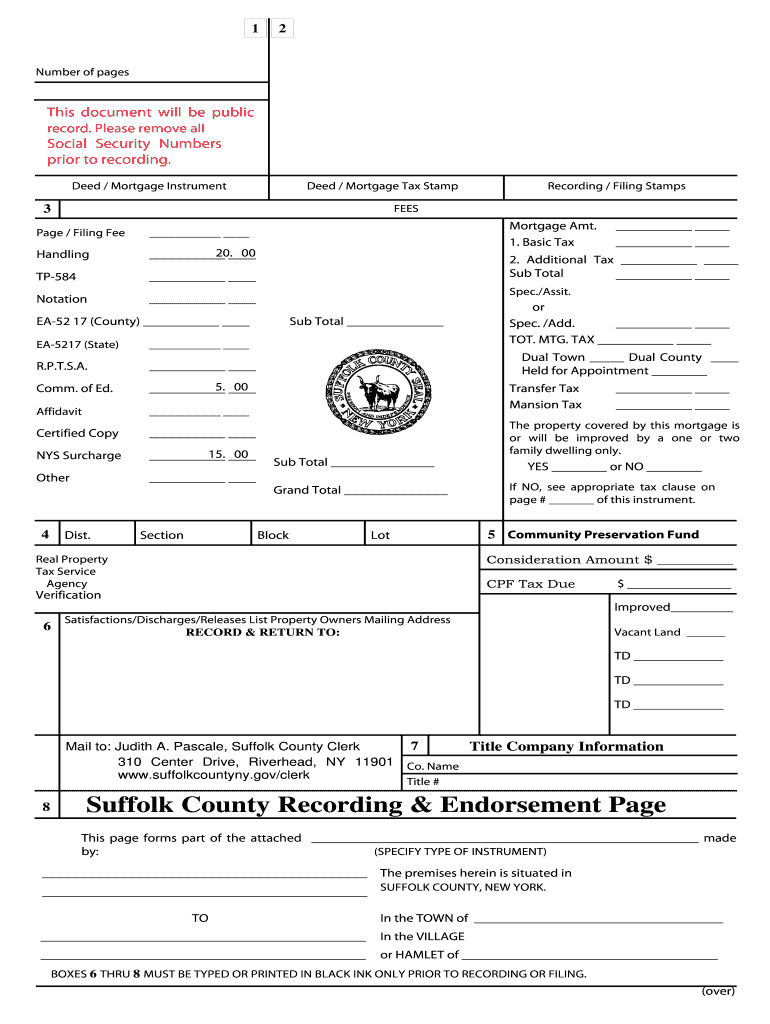
Suffolk county recording and endorsement page 2026

Get Form
suffolk county recording page Preview on Page 1

Here's how it works

01. Edit your suffolk county recording page online
Type text, add images, blackout confidential details, add comments, highlights and more.
02. Sign it in a few clicks
Draw your signature, type it, upload its image, or use your mobile device as a signature pad.
03. Share your form with others
Send suffolk county cover page via email, link, or fax. You can also download it, export it or print it out.

How to use or fill out Suffolk County Recording and Endorsement Page

Form edit decoration
9.5
Ease of Setup
DocHub User Ratings on G2
9.0
Ease of Use
DocHub User Ratings on G2
  1. Click ‘Get Form’ to open the Suffolk County Recording and Endorsement Page in our editor.
  2. Begin by filling in the 'Deed / Mortgage Instrument' section. Specify the type of instrument being recorded.
  3. Complete the 'Property Information' fields, including the Town, Village, or Hamlet where the property is located.
  4. In the 'Fees' section, accurately input all applicable fees such as Basic Tax, Certified Copy, and any additional taxes.
  5. Ensure that boxes 6 through 8 are typed or printed in black ink only. This is crucial for proper recording.
  6. Review all entries for accuracy before finalizing your document. Make sure no Social Security Numbers are included.
  7. Once completed, save your document and proceed to submit it as instructed on the form.

Start using our platform today to streamline your document editing and ensure a hassle-free experience!

See more suffolk county recording and endorsement page versions

We've got more versions of the suffolk county recording and endorsement page form. Select the right suffolk county recording and endorsement page version from the list and start editing it straight away!
Versions Form popularity Fillable & printable
1999 4.8 Satisfied (106 Votes)
be ready to get more

Complete this form in 5 minutes or less

Get form

Got questions?

We have answers to the most popular questions from our customers. If you can't find an answer to your question, please contact us.
Contact us
The Mortgage tax is due and payable at the time of recording as described below: Mortgage Tax is equal to 1.05% of the total mortgage amount (minus a $30.00 deduction if applicable) which consists of the following: Basic Mortgage Tax is . 50% of mortgage amount.
How do I obtain a copy of my property deed? Property deeds are recorded in the Suffolk County Clerks Office in Riverhead, NY. The direct phone number is (631) 852-2000.
Recording fee for a mortgage: a mortgage costs $45.00 ($25 recording fee plus $20 cover page) with an additional $3.00 for each page. Example for a five page mortgage: $45.00 for mortgage plus $15.00 for five pages. Total cost for recording $60.00. The NYS Mortgage Tax is due at the time of recording.
The Record Return To box (number 6) on the Suffolk County Recording and Endorsement Form must be properly completed for the timely return of your recorded mortgage. NOTE: Must be printed on legal size (8 1/2 x 14) paper. Mortgage Tax is computed by a formula based on 1.05% of the amount of the mortgage.
Recording Fees Document TypeFee Deed, Unit Deed, or Easement $155 Mortgage $205 Mortgage Foreclosure Deed Affidavit $155 Mortgage Discharge, Release, or Partial Release $1059 more rows
be ready to get more

Complete this form in 5 minutes or less

Get form

People also ask

The mortgage recording tax requires purchasers to pay 1.8% on mortgage amounts under $500,000 and 1.925% on mortgage amounts above $500,000 in NYC (this includes the recording tax for both New York City and New York State). The mortgage lender typically pays 0.25% of the overall mortgage recording tax.
Whatever the reason, you will need to retain an attorney, experienced in real estate, to draft a new deed conveying your home to yourself and the person you wish to add to your title. In addition to the deed, your attorney will also need to prepare transfer tax returns.

new york suffolk form