Type text, add images, blackout confidential details, add comments, highlights and more.
02. Sign it in a few clicks
Draw your signature, type it, upload its image, or use your mobile device as a signature pad.
03. Share your form with others
Send dd 2351 via email, link, or fax. You can also download it, export it or print it out.
How to use or fill out dd form 2351 with our platform
Ease of Setup
DocHub User Ratings on G2
Ease of Use
DocHub User Ratings on G2
Click ‘Get Form’ to open the DD Form 2351 in the editor.
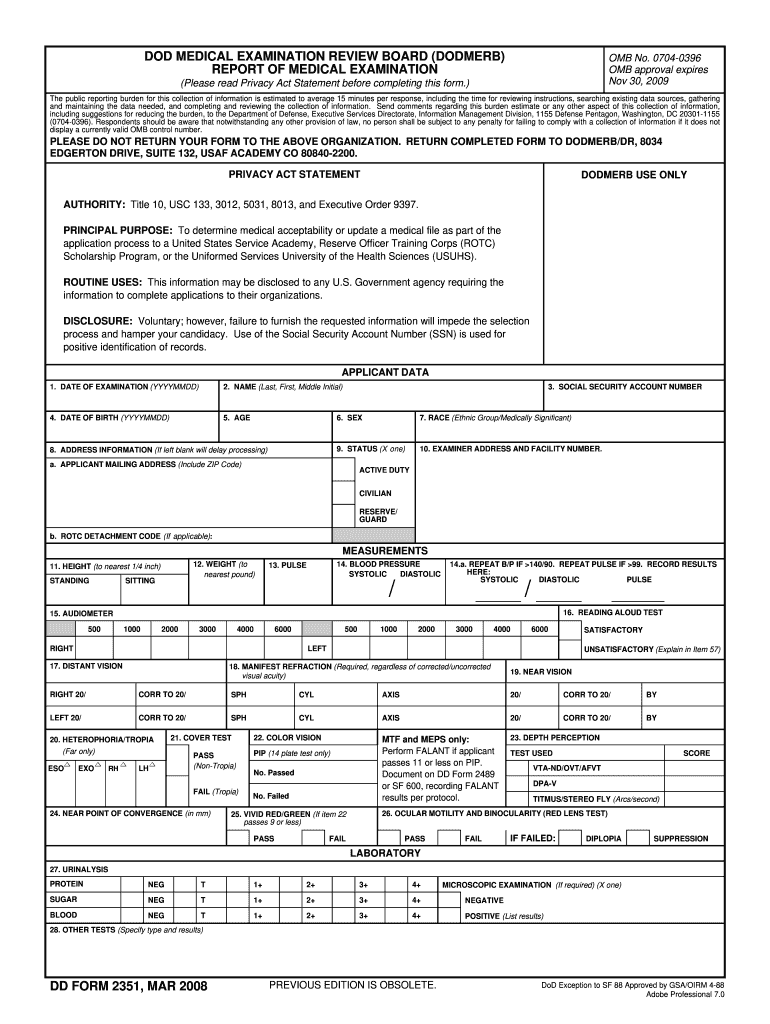
Begin by entering your personal information in the 'Applicant Data' section. Fill in the date of examination, your full name, date of birth, age, and social security number. Ensure all fields are completed accurately to avoid processing delays.
Next, provide your address information. This is crucial for communication regarding your application status. If applicable, include your ROTC detachment code.
Proceed to the 'Measurements' section. Enter your height and weight as required. For blood pressure and pulse readings, ensure you follow the guidelines provided on the form.
Complete the clinical evaluation section by marking each item as normal or abnormal based on your medical examination results. Be thorough; incomplete evaluations may hinder processing.
Finally, have your examiner sign and date the form at the bottom. Make sure all necessary details are filled out before submitting.
Start using our platform today to fill out DD Form 2351 easily and for free!
With this form the Department of Defense asks you to document your decisions about the remains of your Service Member. This process includes providing your name and contact information as well as your relationship to the service member. This collection is authorized by 10 U.S.C.
What is form 3151?
Regular Army Soldiers have 90 calendar days from their BASD (the date they entered Active Duty) to Opt Out Of the Title 38, Chapter 30 Montgomery GI Bill-Active Duty via DD Form 2366 or, by law, the WILL BE automatically enrolled into the education incentive.
How to order dd form 2501?
TO OBTAIN A COPY OF THIS FORM, PLEASE CONTACT THE UNDER SECRETARY OF DEFENSE FOR INTELLIGENCE AND SECURITY (IS).
What is the DD form 3151?
DD3151, ENTITLEMENT EXTENSION REQUEST
What is a DA form 3151 used for?
The DA Form 3151 is officially known as the Ammunition Stores Slip, a document used for tracking the issuance, receipt, and turn-in of ammunition within military operations.
dd form 3166
Dd form 2351 pdfDd form 2351 instructionsDD Form 2492DD Form 2808DoDMERBDD Form 2807-2DoDMERB eye exam form
Security and compliance
At DocHub, your data security is our priority. We follow HIPAA, SOC2, GDPR, and other standards, so you can work on your documents with confidence.
DD Form 2351, DoDMERB Report of Medical Examination,
PRINCIPAL PURPOSE: To determine medical acceptability or update a medical file as part of the application process to a United States Service Academy,Read more
Dec 5, 2019 Candidates for commission in the Corps will submit DD Form 2351,. DoD Medical Examination Review Board (DoDMERB) Report of Medical.Read more
Cookie consent notice
This site uses cookies to enhance site navigation and personalize your experience.
By using this site you agree to our use of cookies as described in our Privacy Notice.
You can modify your selections by visiting our Cookie and Advertising Notice.