Type text, add images, blackout confidential details, add comments, highlights and more.
02. Sign it in a few clicks
Draw your signature, type it, upload its image, or use your mobile device as a signature pad.
03. Share your form with others
Send new mexico 4a via email, link, or fax. You can also download it, export it or print it out.
How to use or fill out New Mexico 4A with our platform
Ease of Setup
DocHub User Ratings on G2
Ease of Use
DocHub User Ratings on G2
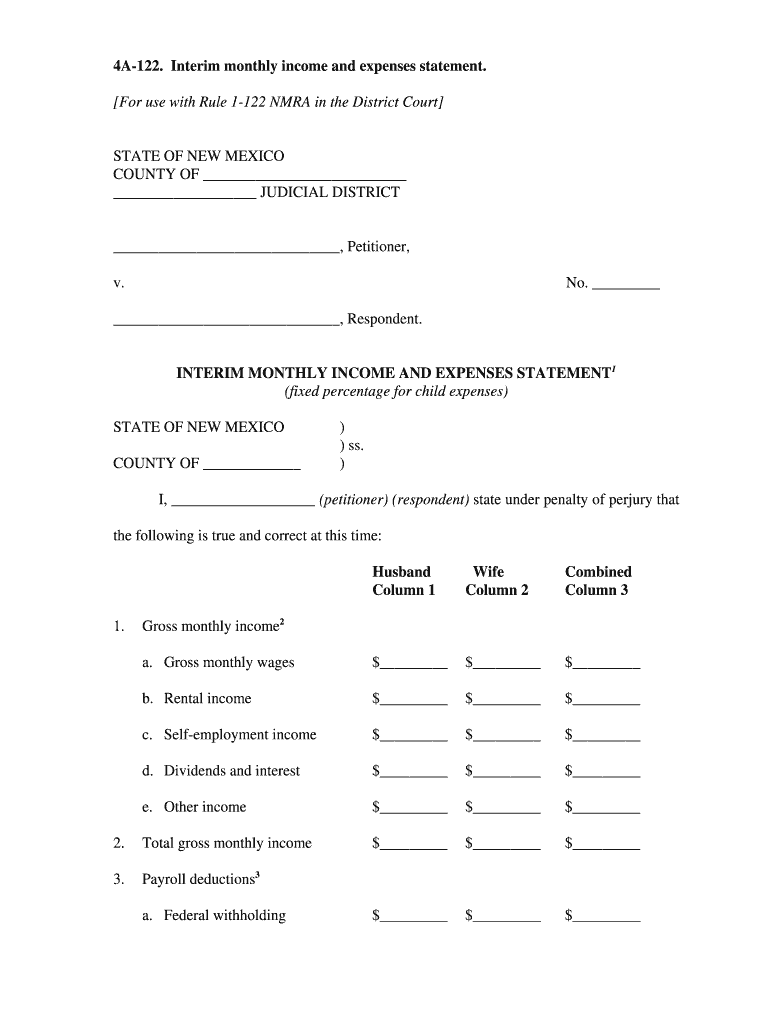
Click ‘Get Form’ to open the New Mexico 4A Interim Monthly Income and Expenses Statement in the editor.
Begin by entering your personal information at the top of the form, including your name and the judicial district.
In Column 1 and Column 2, input the gross monthly wages, rental income, self-employment income, dividends, and any other income for both parties.
Calculate total gross monthly income by summing up all entries in Columns 1 and 2.
Proceed to list payroll deductions such as federal withholding, state withholding, FICA, and health insurance in Section 3.
Next, detail your monthly fixed expenses in Section 6. Include residence costs, utilities, car payments, and any other relevant expenses.
Finally, calculate net spendable income by subtracting total monthly fixed expenses from net monthly income. Ensure all calculations are accurate before submission.
Start using our platform today to fill out your New Mexico 4A form easily and for free!
New mexico 4a footballNew mexico 4a scoreNew mexico 4a football scoreNew mexico 4a playersNew mexico 4a football playersNew mexico 4a tickets4A schools in New MexicoNew mexico state football rankings
Security and compliance
At DocHub, your data security is our priority. We follow HIPAA, SOC2, GDPR, and other standards, so you can work on your documents with confidence.
These forms, approved by the Supreme. Court of New Mexico, are required to initiate domestic relations cases and are used by the courts for case managementRead more
4a. Professional Licensure Notification - By US State Territory(
New Hampshire x**. New Jersey x. New Mexico x. Page 2. New York x. North Carolina x**. North Dakota x. Northern Mariana Islands x. Ohio x. Oklahoma x. Oregon x
NEW MEXICO. Applequerque Computer Club. P.O. Box 35508. Albuguerque. NM 87176 4A. Endicott. NY 13760. Springville-Griffith Institute. 283 North St.Read more
Cookie consent notice
This site uses cookies to enhance site navigation and personalize your experience.
By using this site you agree to our use of cookies as described in our Privacy Notice.
You can modify your selections by visiting our Cookie and Advertising Notice.