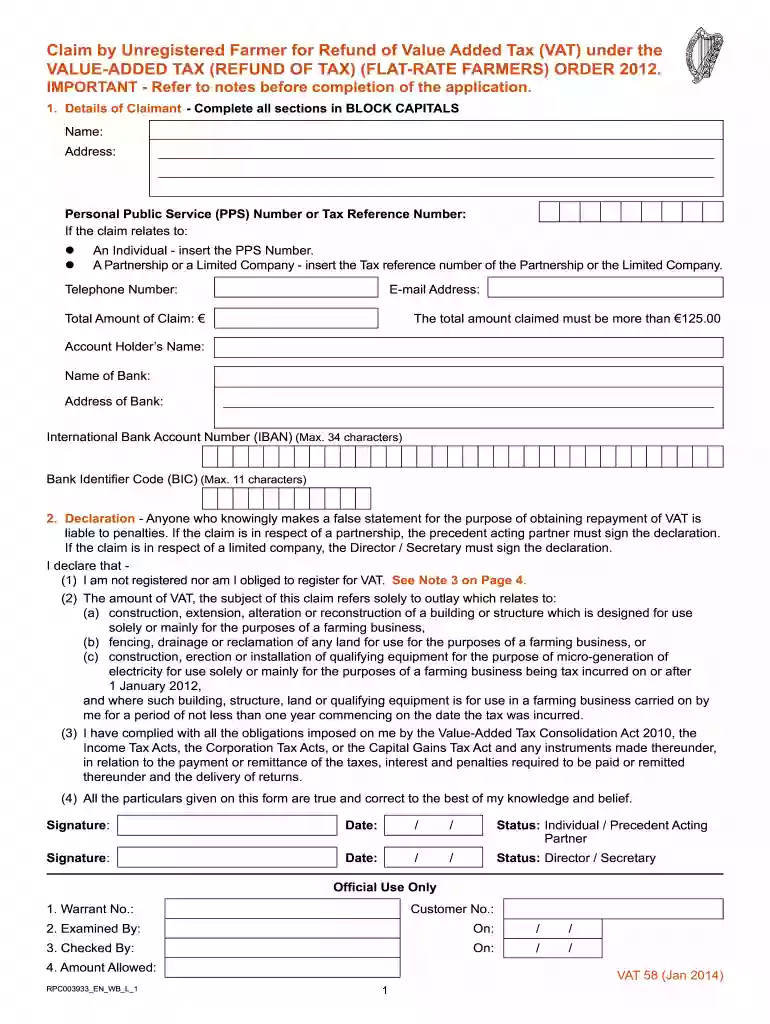
vat 58 form Preview on Page 1

Vat 58 form 2026

Here's how it works

  • 01. Edit your form online

    Type text, add images, blackout confidential details, add comments, highlights and more.

  • 02. Sign it in a few clicks

    Draw your signature, type it, upload its image, or use your mobile device as a signature pad.

  • 03. Share your form with others

    Send it via email, link, or fax. You can also download it, export it or print it out.

How to use or fill out vat 58 form with our platform

Form edit decoration
9.5
Ease of Setup
DocHub User Ratings on G2
9.0
Ease of Use
DocHub User Ratings on G2
  1. Click ‘Get Form’ to open the VAT 58 form in the editor.
  2. Begin by filling in your personal details in BLOCK CAPITALS. Include your name, address, and either your Personal Public Service (PPS) Number or Tax Reference Number based on your status as an individual or a business entity.
  3. Provide your telephone number and the total amount of claim, ensuring it exceeds €125.00. Fill in your bank account details for refund processing.
  4. In the Declaration section, confirm that you are not registered for VAT and sign accordingly. Ensure that the declaration is signed by the appropriate party if claiming as a partnership or limited company.
  5. Complete the Details of Claim section by specifying the period of claim and providing descriptions for any farm buildings, structures, or equipment related to your claim.
  6. Attach original VAT invoices as required and review all entries for accuracy before submitting.

Start using our platform today to easily fill out and submit your VAT 58 form online for free!

See more vat 58 form versions

We've got more versions of the vat 58 form form. Select the right vat 58 form version from the list and start editing it straight away!

VersionsForm popularityFillable & printable
20204.8 Satisfied (196 Votes)
20194.4 Satisfied (228 Votes)
20144 Satisfied (46 Votes)

be ready to get more

Complete this form in 5 minutes or less

Security and compliance

At DocHub, your data security is our priority. We follow HIPAA, SOC2, GDPR, and other standards, so you can work on your documents with confidence.

Related links

Order Form

Company. Company. Name. Name. Street. Street. Zip Code/City. Zip Code/City. Country/State. Country/State. Tel. Tel. Fax. Payment possibilities. Credit Card.

Learn more
Sales and Use Tax Information

Use myconneCT to file taxes, make payments, view filing history, and communicate with the agency simply and more efficiently on virtually any mobile device.Read more

Learn more
Skippys List - An Tir Culture Wiki

Aug 19, 2008 Apprentice Skippy is not allowed to demonstrate vat dyeing or the making of niello upwind of his Laurel at *ANY* time. 8. Sir Skippy may notRead more

Learn more
If you believe that this page should be taken down, please follow our DMCA take down process here