Type text, add images, blackout confidential details, add comments, highlights and more.

02. Sign it in a few clicks
Draw your signature, type it, upload its image, or use your mobile device as a signature pad.

03. Share your form with others
Send spouse survivor via email, link, or fax. You can also download it, export it or print it out.

How to use or fill out spouse consent part with our platform
Ease of Setup
DocHub User Ratings on G2
Ease of Use
DocHub User Ratings on G2
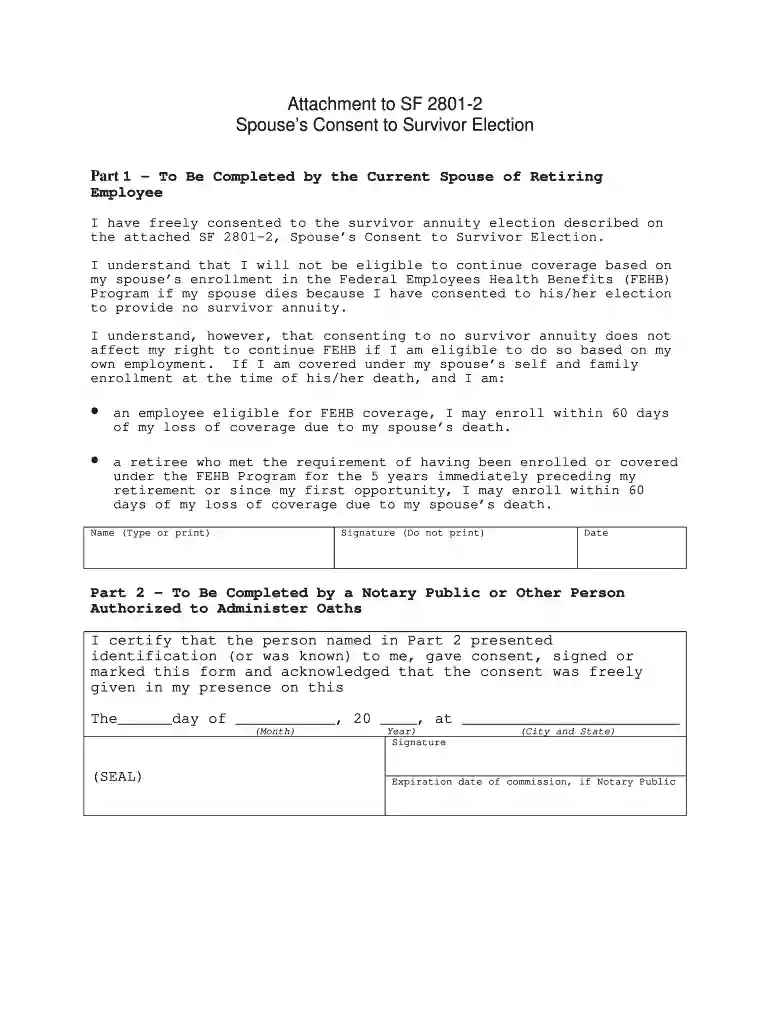
Click ‘Get Form’ to open the Spouse’s Consent to Survivor Election in the editor.
In Part 1, type or print your name in the designated field. This identifies you as the current spouse of the retiring employee.
Next, provide your signature in the specified area. Remember, do not print your name here; a handwritten signature is required.
Enter the date of signing in the format provided. This confirms when you gave your consent.
If applicable, proceed to Part 2 where a Notary Public or authorized person will complete their section. They will need to certify your identification and consent.
Ensure that all fields are filled accurately before saving or exporting your completed form for submission.
Start using our platform today for free and streamline your document completion process!
When is spousal consent required for 401k distributionsSPOUSAL consent Form PDFSpouses Consent to Survivor Election Form 3107-2Spousal consent statesSF 3107-2 Spouses Consent to Survivor Election PDFSF 2801-2 form PDFWhat states require spousal consent for IRA beneficiary designationIs spousal consent required for 401k beneficiary designation
Security and compliance
At DocHub, your data security is our priority. We follow HIPAA, SOC2, GDPR, and other standards, so you can work on your documents with confidence.
Cookie consent notice
This site uses cookies to enhance site navigation and personalize your experience.
By using this site you agree to our use of cookies as described in our Privacy Notice.
You can modify your selections by visiting our Cookie and Advertising Notice.