



Mva certification online 2026

Get Form
mva 140 letter Preview on Page 1

Here's how it works

01. Edit your mva 140 letter online
Type text, add images, blackout confidential details, add comments, highlights and more.

02. Sign it in a few clicks
Draw your signature, type it, upload its image, or use your mobile device as a signature pad.

03. Share your form with others
Send mva 140 via email, link, or fax. You can also download it, export it or print it out.

How to use or fill out mva certification online with our platform

Form edit decoration
9.5
Ease of Setup
DocHub User Ratings on G2
9.0
Ease of Use
DocHub User Ratings on G2
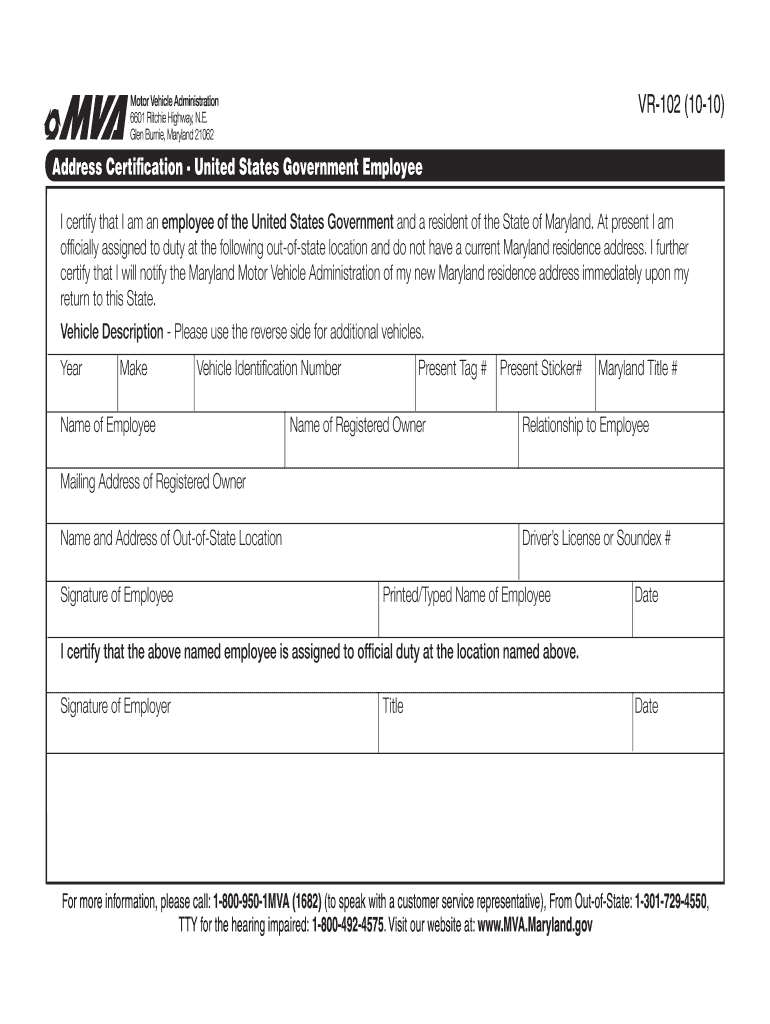
  1. Click ‘Get Form’ to open the mva certification form in the editor.
  2. Begin by filling in your name as the employee and your driver’s license or Soundex number. This information is crucial for identification.
  3. Next, provide the mailing address of the registered owner and their relationship to you. Ensure accuracy to avoid any delays.
  4. In the vehicle description section, enter details such as the year, make, and Vehicle Identification Number (VIN). If you have additional vehicles, use the reverse side of the form.
  5. Complete the out-of-state location details where you are currently assigned. This helps confirm your residency status.
  6. Finally, sign and date the form at both employee and employer signature sections to validate your certification.

Start using our platform today for free to streamline your mva certification process!

See more mva certification online versions

We've got more versions of the mva certification online form. Select the right mva certification online version from the list and start editing it straight away!
Versions Form popularity Fillable & printable
2010 4.8 Satisfied (121 Votes)
be ready to get more

Complete this form in 5 minutes or less

Get form

Got questions?

We have answers to the most popular questions from our customers. If you can't find an answer to your question, please contact us.
Contact us
for the MVAs website or self service kiosk: vision exam results must be submitted electronically by an Authorized Online Vision Certification Provider. for mail-in-renewal: customers are required to have their vision provider complete the vision certification on the back of their renewal form.
Form 511 and its related forms are to be used by partnerships, S corporations, limited liability companies and business trusts that elect to pay tax on members distributive or pro-rata shares of income at the entity level.
To obtain the required documentation, applicants must complete Form 130 and visit one of the Comptrollers branch offices to obtain a letter certifying proof of filing or that they were claimed as a dependent on another taxpayers filing prior to making application to MVA.
The certification letter is FREE to qualified individuals through appointments only, which can be made online, or by calling the taxpayer services hotline, 1-800-MD TAXES or 410-260-7980.
Liabilities due to various state agencies, including the Comptroller, are matched against state and federal tax refunds, federal vendor payments and state vendor payments. When a liability is matched to a payment, a letter is mailed to the taxpayer or vendor listing the billing agency, the invoice date, and amount.

Security and compliance

At DocHub, your data security is our priority. We follow HIPAA, SOC2, GDPR, and other standards, so you can work on your documents with confidence.

Learn more
be ready to get more

Complete this form in 5 minutes or less

Get form

People also ask

Form 6166 is a letter printed on U.S. Department of Treasury stationery certifying that the individuals or entities listed are residents of the United States for purposes of the income tax laws of the United States.
MVA representatives wont be able to serve you in person without an appointment. However, if you need help scheduling your appointment, call the MVA Customer Support Center at 1-800-950-1682.

date maryland

