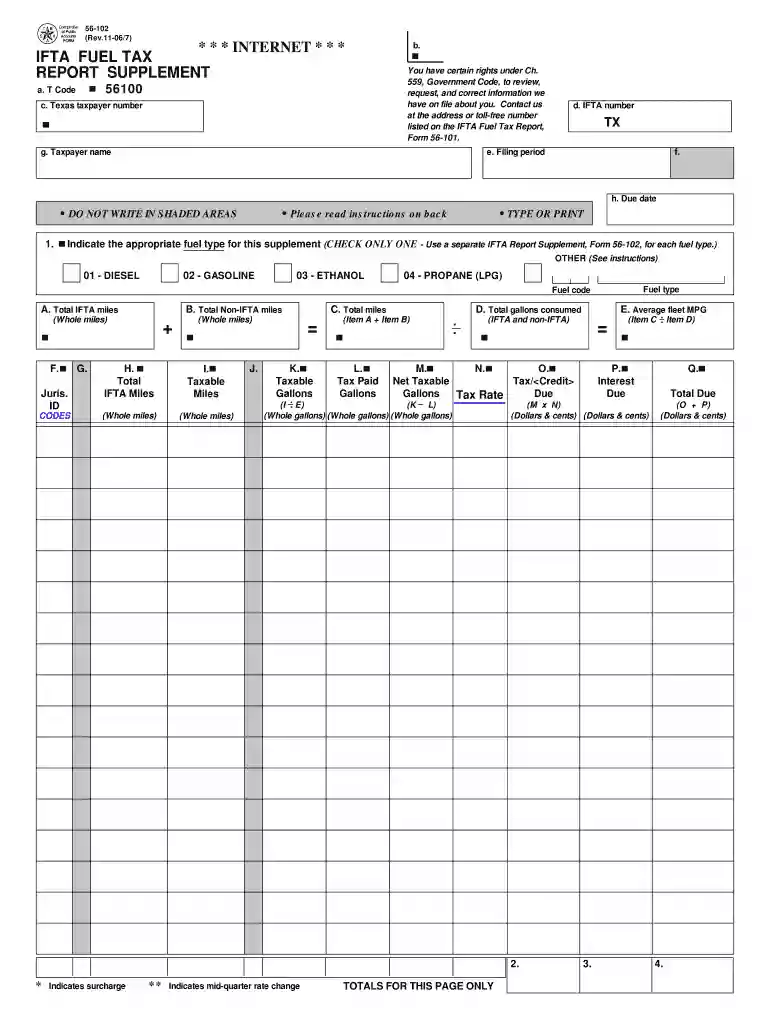
Ifta fuel tax report supplement 2007 form-2026

Get Form
texas ifta forms Preview on Page 1

Here's how it works

01. Edit your texas ifta forms online
Type text, add images, blackout confidential details, add comments, highlights and more.

02. Sign it in a few clicks
Draw your signature, type it, upload its image, or use your mobile device as a signature pad.

03. Share your form with others
Send it via email, link, or fax. You can also download it, export it or print it out.

How to use or fill out ifta fuel tax report supplement 2007 form with our platform

Form edit decoration
9.5
Ease of Setup
DocHub User Ratings on G2
9.0
Ease of Use
DocHub User Ratings on G2
  1. Click ‘Get Form’ to open the IFTA Fuel Tax Report Supplement 2007 in the editor.
  2. Begin by indicating the appropriate fuel type in Item 1. Check only one box for DIESEL, GASOLINE, ETHANOL, or PROPANE. If using another fuel type, check 'OTHER' and enter the corresponding fuel code.
  3. In Item A, enter the total IFTA miles traveled by your fleet using the indicated fuel type. Ensure to round to the nearest whole mile.
  4. For Item B, input the total non-IFTA miles traveled in non-IFTA jurisdictions. Again, round to the nearest whole mile.
  5. Calculate total miles in Item C by adding Items A and B together.
  6. In Item D, record the total gallons of fuel consumed across both IFTA and non-IFTA jurisdictions. Round this figure to the nearest whole gallon.
  7. Proceed to calculate average fleet MPG in Item E by dividing total miles (Item C) by total gallons (Item D), rounding to two decimal places.
  8. Complete Columns F through Q as instructed on the form, ensuring all calculations are accurate and reflect your operations over the reporting period.

Start filling out your IFTA Fuel Tax Report Supplement today for free with our platform!

See more ifta fuel tax report supplement 2007 form versions

We've got more versions of the ifta fuel tax report supplement 2007 form form. Select the right ifta fuel tax report supplement 2007 form version from the list and start editing it straight away!
Versions Form popularity Fillable & printable
2019 4.8 Satisfied (172 Votes)
2018 4.4 Satisfied (216 Votes)
2016 4.3 Satisfied (72 Votes)
2015 4.4 Satisfied (62 Votes)
2014 4 Satisfied (63 Votes)
2007 4.2 Satisfied (54 Votes)
2001 4.2 Satisfied (41 Votes)
be ready to get more

Complete this form in 5 minutes or less

Get form

Got questions?

We have answers to the most popular questions from our customers. If you can't find an answer to your question, please contact us.
Contact us
The person that produced and sold or used a qualified mixture (a mixture of SAF and kerosene) is the only person eligible to make this claim. The credit is based on the gallons of SAF in the qualified mixture.
If you file late, there are penalties and interest charges added to the tax bill. Especially important, if you miss a quarter your license can be suspended and revoked. Then, you will pay more fees to reinstate your IFTA license.
International Fuel Tax Agreement (IFTA)
From the main menu, select Apps IFTA Trip Reports. If necessary, select a truck. If necessary, select a quarter. Select a report.
Download IFTA Reports Click on Reports from the left-hand side menu of the Dashboard. Click on the IFTA button under the Browse section. Click on the Distance Summary report. Click on the Date field to select the start and end dates for a report.
be ready to get more

Complete this form in 5 minutes or less

Get form

People also ask

Information Required for IFTA Reporting IFTA details - Country, base jurisdiction, and the IFTA Account Number need to be submitted. Vehicle Data - Details about the vehicle, such as the truck/unit number, gross vehicle type, fleet name, fleet number, make, and model may need to be provided.
The best way to track IFTA miles is by using a GPS tracking system. GPS-enabled devices automatically record the distance your vehicles travel in each state or province. These systems are highly accurate, saving time and reducing errors compared to manual methods.

Related links