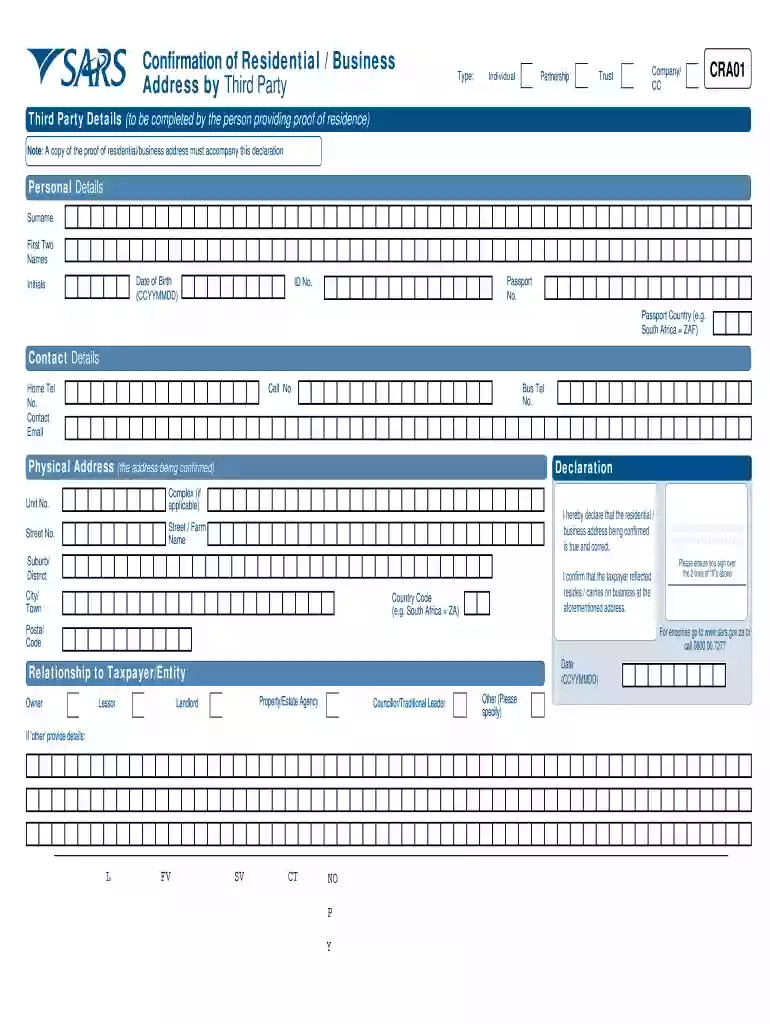
Cra01 form sars 2026

Get Form
sars cra01 Preview on Page 1

Here's how it works

01. Edit your sars cra01 online
Type text, add images, blackout confidential details, add comments, highlights and more.

02. Sign it in a few clicks
Draw your signature, type it, upload its image, or use your mobile device as a signature pad.

03. Share your form with others
Send cra01 via email, link, or fax. You can also download it, export it or print it out.

Definition & Meaning

The CRA01 form, issued by SARS (South African Revenue Service), serves as a formal method for confirming a residential or business address via a third party. It is essential for verifying the accuracy of addresses before finalizing and submitting various tax documents. This form is often necessary when a taxpayer needs to validate their residence or business location, ensuring compliance with regulatory requirements. It includes sections for personal details and declarations for both the confirmer and the taxpayer, making the process of address verification transparent and credible.

How to Use the CRA01 Form SARS

Using the CRA01 form SARS involves several straightforward steps for effective address verification. First, gather all necessary information such as personal details of the confirmer and taxpayer. Fill out sections that require address validation, ensuring accuracy to avoid processing delays. Indicate the type of entity involved, whether it's an individual, partnership, or corporation. Finally, make sure all parties involved sign the declaration before submission. This step-by-step approach streamlines the process, making address confirmation efficient and reliable.

Steps to Complete the CRA01 Form SARS

  1. Collect Necessary Information: Gather personal details about the third party and the taxpayer.
  2. Fill Out the Relevant Sections: Enter the address to be confirmed and select the type of entity.
  3. Declare Accuracy: Both parties must declare the accuracy of the information provided.
  4. Sign the Form: Ensure all required signatures are collected from involved parties.
  5. Verification: Double-check the form for completeness and correctness.
  6. Submit the Form: Follow submission guidelines—whether by mail or online.

These steps ensure that all necessary details are verified and compliant with SARS regulations.

Key Elements of the CRA01 Form SARS

The CRA01 form includes several crucial components to ensure thorough address verification:

  • Personal Information Fields: Details for both the confirmer and the taxpayer.
  • Entity Type Specification: Categories for individuals, partnerships, companies, etc.
  • Address Declaration: Areas for confirming the address accuracy.
  • Contact Details: Information for communicating with the parties involved.
  • Submission Instructions: Guidelines for completing and sending the form.

Each element plays a vital role in the form's function, providing a comprehensive framework for address confirmation.

Legal Use of the CRA01 Form SARS

Legally, the CRA01 form serves as an official document to substantiate address details within South African jurisdiction. It is crucial for compliance with SARS regulations, reducing risks related to inaccurate address reporting in tax documents. By utilizing the CRA01 form, taxpayers and businesses affirm the authenticity of their stated information, thus ensuring adherence to legal standards. Failure to provide accurate details might lead to non-compliance issues, highlighting the form's significance in legal documentation.

Required Documents

To effectively complete the CRA01 form SARS, several ancillary documents may be necessary:

  • Proof of Address: Utility bills, bank statements, or official government correspondence.
  • Identity Documents: Copies of identification for both the taxpayer and the third party.
  • Entity Verification: Registration documents for companies or partnerships if applicable.

These documents support the information on the form, making the verification process straightforward and legally sound.

Form Submission Methods (Online / Mail / In-Person)

There are multiple ways to submit the CRA01 form SARS. Understanding these options can help facilitate the process:

  • Online Submission: Utilize SARS eFiling for a convenient digital submission process.
  • Mail Submission: Send the completed form and related documents to the designated SARS postal address.
  • In-Person Submission: Deliver the form and additional documentation directly at a SARS branch office.

Choosing the submission method that best fits your circumstances can streamline the process and ensure timely processing.

Examples of Using the CRA01 Form SARS

The CRA01 form can be utilized in various situations where address verification is critical:

  • Home Relocation: Confirming a new residential address for tax purposes.
  • Business Registration: Establishing the location of a new business entity.
  • Third-Party Verification: Providing verified address proofs when required in agreements or legal transactions.

These examples underscore the form's versatility in confirming addresses for different scenarios, enhancing its practical utility.

be ready to get more

Complete this form in 5 minutes or less

Get form

Got questions?

We have answers to the most popular questions from our customers. If you can't find an answer to your question, please contact us.
Contact us
If your banking details have been identified for verification, the process can take up to 21 business days from the date when all required supporting documents are received. South African Revenue Service (SARS) Has anyone whos bank details needed to be verified received whats due to them?
The information at SARS disposal indicate that 30 thousand taxpayers have witnessed reversal of their refunds. Due to the risk associated with validity of refunds payments, all refunds go through the validation process with all stakeholders in the tax ecosystem.
How to claim a refund? To ask for the processing of an overpayment the withholding agent must complete the Claim for Refund out of Revenue (REV16) form. If you need any help with filling in the form you may call the SARS Contact Centre on 0800 00 7277 or go to your nearest SARS branch.
The SARS Non-Resident Tax Status Confirmation Letter is a letter confirming that one has ceased to be a tax resident of South Africa with an indication of the effective date tax residency was ceased.
The letter is a directive issued by SARS to your employer or pension fund and it indicates the tax rate percentage which should be used in the calculation of PAYE which should be deducted from your income.

Security and compliance

At DocHub, your data security is our priority. We follow HIPAA, SOC2, GDPR, and other standards, so you can work on your documents with confidence.

Learn more
ccpa2
pci-dss
gdpr-compliance
hipaa
soc-compliance
be ready to get more

Complete this form in 5 minutes or less

Get form

People also ask

How Do You Get a Tax Rebate? (Step by Step) Step 1: Register and Log into SARS eFiling. Before you start, make sure youre registered on the SARS eFiling platform. Step 2: Complete Your Tax Return (ITR12) Step 3: Claim the Solar Panel Tax Rebate (If Eligible) Step 4: Submit and Track Your Refund.
SARS WhatsApp on 0800 11 7277 just say Hi or Hello and select Refund Status, enter ID/passport/Asylum Seeker number provide your Tax Ref number, and hit Send SARS MobiApp on the Home Screen, tap Refund Status, and follow the prompts.
Do you want to register as a taxpayer or change your registered particulars? Copy of a valid identity document, driving license, passport, temporary identity document, asylum seekers certificate or permit together with the original identification. The original ID is also required when visiting a branch.

sars forms cra01