




01. Edit your form online
Type text, add images, blackout confidential details, add comments, highlights and more.

Type text, add images, blackout confidential details, add comments, highlights and more.

Draw your signature, type it, upload its image, or use your mobile device as a signature pad.

Send it via email, link, or fax. You can also download it, export it or print it out.
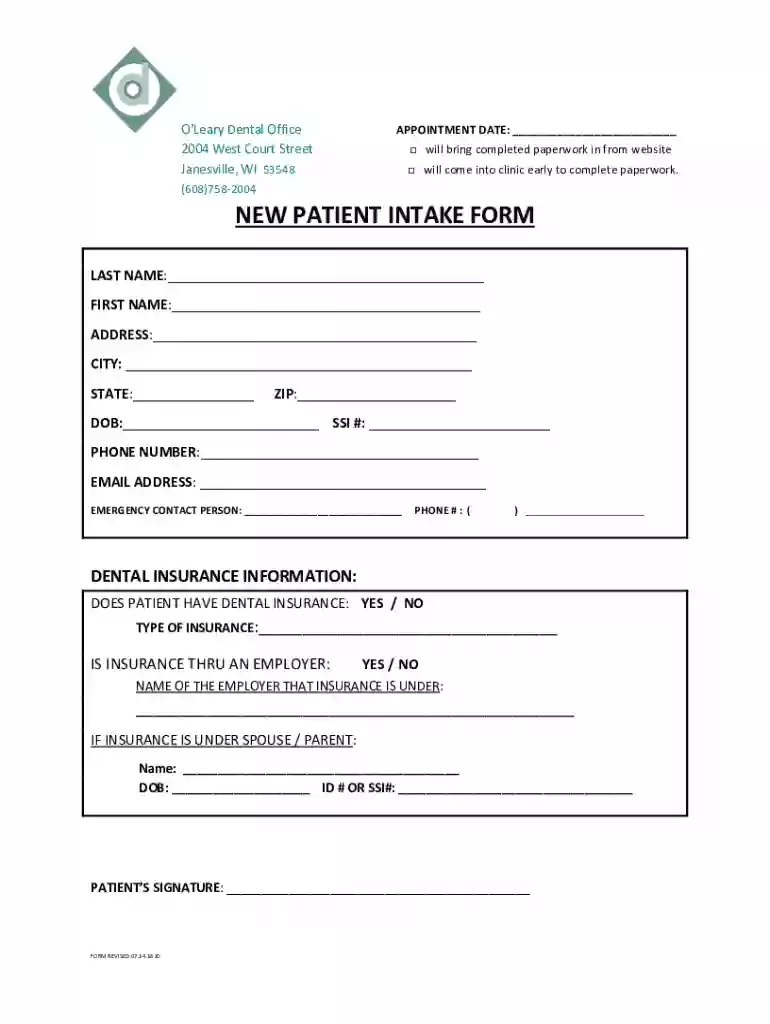
The "New Patient Intake Form - Oleary Dental" is a structured document used to gather essential information from new patients at the O’Leary Dental Office in Janesville, WI. This form serves as an integral part of the patient onboarding process, helping the dental practice establish a comprehensive record that includes personal details, emergency contacts, and insurance information. By facilitating the collection of these details upfront, the form aims to streamline the patient's initial visit and ensure that all necessary information is readily available for the dental staff to provide optimal care.
To effectively use the "New Patient Intake Form - Oleary Dental," patients are encouraged to fill out the form prior to their appointment to ensure a smooth and efficient check-in process. This involves entering detailed personal information, as well as any pertinent medical history that may impact dental care. Patients should also provide details about their dental insurance plan, which aids the office in verifying coverage and processing claims promptly. The completed form helps create a smooth transition into the dental office, minimizing any last-minute delays and ensuring that the dental team is equipped with all necessary patient information.
The form contains several key sections designed to capture comprehensive patient data:
Following are the steps patients should follow to complete the form:
Primarily, the form is used by new patients of O’Leary Dental who are attending their first appointment. It is an essential tool for the dental office to understand each patient's unique health needs and administrative details. This form is also crucial for administrative staff in managing patient information and ensuring efficient communication between patients and the dental care team.


The form complies with legal requirements to ensure patient privacy and consent. It incorporates components that require signatures to authorize the release of medical information, adherence to the Health Insurance Portability and Accountability Act (HIPAA), and confirmation of informed consent for dental treatments. These elements uphold both the patient's and practice's legal responsibilities, providing a framework that prioritizes data security and transparent communication.
While the "New Patient Intake Form - Oleary Dental" is crafted with general compliance in mind, it is tailored to meet Wisconsin state regulations that relate to medical and dental practice operations. This includes alignment with state-specific insurance verification processes, consent laws, and health privacy standards. Patients relocating from other states or with inquiries about specific state regulations should address questions during their initial consultation to ensure full clarity and compliance.
The form is available in both digital and paper formats to accommodate patient preferences and technological accessibility. The digital version facilitates online submission via platforms like DocHub, enhancing convenience for tech-savvy patients and allowing integration with electronic medical record systems. The paper version remains available for patients who prefer or require traditional documentation methods. Both forms ensure accurate and secure information collection, with the digital version providing additional accessibility benefits through cloud-based storage and tractability.
We've got more versions of the NEW PATIENT INTAKE FORM - Oleary Dental form. Select the right NEW PATIENT INTAKE FORM - Oleary Dental version from the list and start editing it straight away!
| Versions | Form popularity | Fillable & printable |
|---|---|---|
| 2016 | 4.6 Satisfied (24 Votes) |
At DocHub, your data security is our priority. We follow HIPAA, SOC2, GDPR, and other standards, so you can work on your documents with confidence.



by F OLeary 2023 The online questionnaire was designed following extensive Public and Patient Involvement engagement with representatives from the dental
The findings of the current study indicate that CS causes discoloration of dental hard tissues and color mismatch of esthetic composite resin restorations.


