




Here's how it works



How to use or fill out quitclaim deed new mexico with DocHub

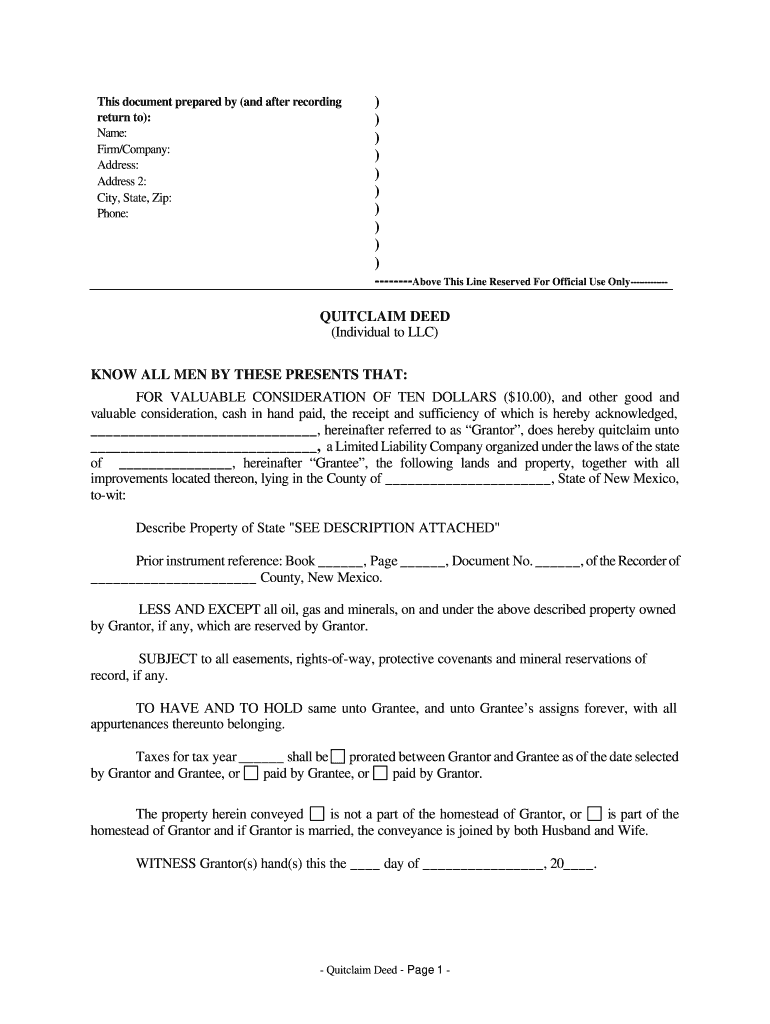
- Click ‘Get Form’ to open the quitclaim deed in our editor.
- Begin by filling in the 'Prepared by' section at the top. Enter your name, firm/company, address, city, state, zip code, and phone number.
- In the main body of the form, identify yourself as the 'Grantor' and provide your name. Then specify the 'Grantee', which is the LLC receiving the property.
- Describe the property being transferred. If there is a detailed description attached, indicate that by writing 'SEE DESCRIPTION ATTACHED'.
- Fill in any prior instrument references if applicable, including book and page numbers from county records.
- Indicate any reservations or exceptions regarding oil, gas, and minerals under the property.
- Decide how taxes will be handled for the year indicated and select one of the options provided.
- Sign and date the document as Grantor. If married, ensure both spouses sign if required.
- Complete the notary section to finalize your quitclaim deed.
Start using our platform today to easily fill out your quitclaim deed for free!
It's free
Got questions?
How do I sign my quit claim deed new mexico for free?
Most eSignature services require users to have a paid subscription. With DocHub, there are two ways for you to create an electronic signature to your quit claim deed new mexico without being charged:
- You can do it during a 7-day trial period;
- You can sign up for a free plan.
The second option, however, has limitations on the number of signatures, sign requests, emails, and documents for adjusting available per month. You can check for full details here.
How do you complete new mexico quit claim deed online?
You may complete and eSign your new mexico quit claim deed online, even on a tight deadline. All you need to access top-notch editing instruments on any device is a DocHub profile, that you can sign up within a couple of moments. After you register, add your file or find what you are looking for in our catalog, complete it using the editing instruments you need, and place your electronic signature on it at the end.
Security and compliance
At DocHub, your data security is our priority. We follow HIPAA, SOC2, GDPR, and other standards, so you can work on your documents with confidence.
Learn more


