




01. Edit your 1994 form 1040 online
Type text, add images, blackout confidential details, add comments, highlights and more.

Type text, add images, blackout confidential details, add comments, highlights and more.

Draw your signature, type it, upload its image, or use your mobile device as a signature pad.

Send how can i get a copy of my 1994 tax return via email, link, or fax. You can also download it, export it or print it out.
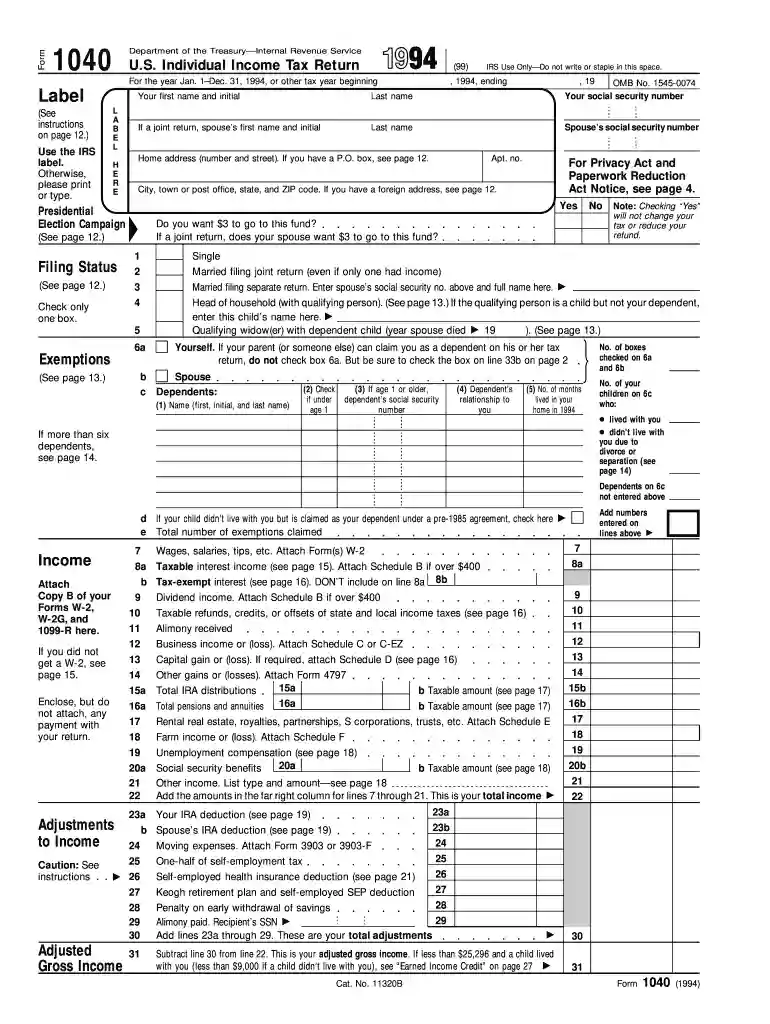
The 1994 Form 1040 serves as the U.S. Individual Income Tax Return form. It is a document used by individuals in the United States to report their annual income accurately to the Internal Revenue Service (IRS). This form calculates the taxpayer's total taxable income, which determines the amount of tax liability or refund. The form captures essential information, including personal identification details, filing status, and income sources, to facilitate the accurate computation of taxes.
Personal Details: The form requires the taxpayer's name, Social Security Number (SSN), and address. Accurate completion of these fields is crucial for identification purposes.
Filing Status: Taxpayers must indicate their filing status, which impacts the tax brackets and potential deductions. Options include single, married filing jointly, married filing separately, head of household, and qualifying widow(er) with a dependent child.
Individuals can claim exemptions for themselves and their dependents. Each exemption reduces the taxpayer's income subject to tax. The 1994 Form 1040 includes sections to list dependents, often children or other family members, that the taxpayer supports financially.
Filling out the 1994 Form 1040 requires careful attention to detail. Follow these steps to complete it accurately:
Gather Necessary Documentation: Collect all relevant documents, including W-2 forms, 1099 reports, and records of other income sources.
Select Filing Status: Choose the appropriate filing status at the top of the form.
Report Income: Enter all forms of income such as wages, salaries, dividends, and business income. Use the attached schedules if needed for additional income sources.
Calculate Adjustments: Subtract any deductions or exclusions to arrive at the adjusted gross income (AGI).
Apply Deductions and Credits: Choose between standard and itemized deductions. Input eligible tax credits to reduce total tax liability.
Determine Tax Liability: Use the IRS tax tables to calculate the exact tax amount due based on taxable income.
Complete Payment Information: Indicate any prepaid tax via withholdings or estimated payments. Complete payment instructions if a tax balance is due.
Once the form is completed, taxpayers can submit it to the IRS via mail or electronically, ensuring all signatures and payments are included. Deadlines must be observed to avoid penalties.
To acquire the 1994 Form 1040, individuals can visit the IRS website to access archived forms. Libraries, post offices, and tax preparation services might also provide physical copies. Digital versions can be printed or filled out using document management platforms like DocHub, which offers tools for editing and electronic submission.
Understanding key tax-related terms is crucial when working with the 1040 form:
Taxpayers must adhere to IRS guidelines to ensure compliance. Non-compliance, such as underreporting income or late submission, can result in significant penalties or interest charges. Accurately completing and timely filing the form mitigates these risks.


Various taxpayers employ the 1994 Form 1040 to report income and compute taxes:
Understanding how the form applies to different scenarios helps ensure it is filled out accurately, reflecting each taxpayer's unique financial situation.
We've got more versions of the 1994 form 1040 form. Select the right 1994 form 1040 version from the list and start editing it straight away!
| Versions | Form popularity | Fillable & printable |
|---|---|---|
| 2025 | 4.9 Satisfied (56 Votes) | |
| 2024 | 4.5 Satisfied (50 Votes) | |
| 2023 | 4.9 Satisfied (56 Votes) | |
| 2022 | 4.3 Satisfied (60 Votes) | |
| 2021 | 4.8 Satisfied (50 Votes) | |
| 2020 | 4.4 Satisfied (257 Votes) | |
| 2019 | 4.2 Satisfied (85 Votes) | |
| 2018 | 4.4 Satisfied (346 Votes) | |
| 2017 | 4 Satisfied (21 Votes) | |
| 2017 | 4.4 Satisfied (458 Votes) | |
| 2016 | 4.4 Satisfied (657 Votes) | |
| 2015 | 4.3 Satisfied (174 Votes) | |
| 2014 | 4 Satisfied (48 Votes) | |
| 2013 | 4 Satisfied (70 Votes) | |
| 2012 | 4 Satisfied (28 Votes) |
At DocHub, your data security is our priority. We follow HIPAA, SOC2, GDPR, and other standards, so you can work on your documents with confidence.
If you did not get a W-2, see page 15. Form. Married filing separate return. Enter spouses social security no. above and full name here. .Read more
Enter the total amount your employer paid for your move (including the value of services furnished in kind) that is not included in the wages box (box 1) ofRead more
Jan 30, 2018 Using the information on Form 8949, report on Schedule D (Form 1040) the gain or loss on your home as a capital gain or loss. Follow theRead more


