Type text, add images, blackout confidential details, add comments, highlights and more.

02. Sign it in a few clicks
Draw your signature, type it, upload its image, or use your mobile device as a signature pad.

03. Share your form with others
Send eoc action plan via email, link, or fax. You can also download it, export it or print it out.

How to use or fill out the EOC form with our platform
Ease of Setup
DocHub User Ratings on G2
Ease of Use
DocHub User Ratings on G2
Click ‘Get Form’ to open the EOC Action Plan in the editor.
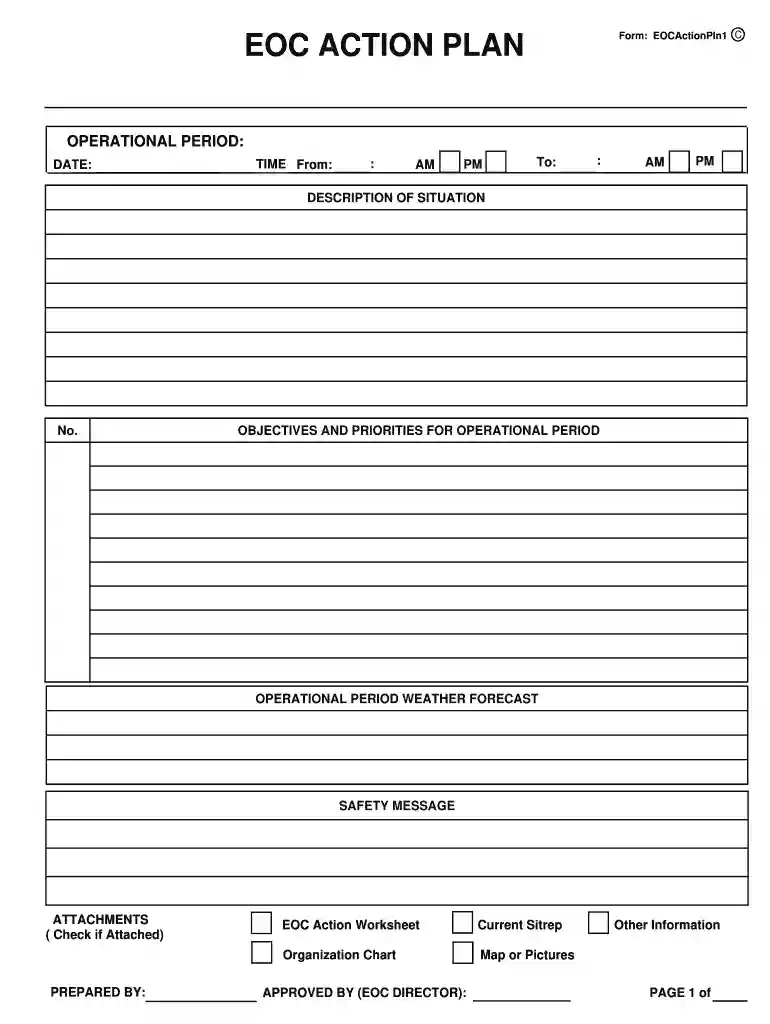
Begin by entering the operational period details, including the date and time range for your operations. Ensure accuracy as this sets the context for your action plan.
In the 'Description of Situation' section, provide a concise overview of the current circumstances. This helps inform all stakeholders about the situation at hand.
List objectives and priorities for the operational period in the designated fields. Number them from 1 to 10, focusing on clarity and relevance to ensure effective communication.
Fill in the operational period weather forecast and safety message to keep all personnel informed about environmental conditions and safety protocols.
Complete sections for staffing organization by filling in names of EOC staff and other key response personnel. This ensures everyone knows their roles during operations.
Review all entries for accuracy before saving or sharing your completed form. Utilize our platform’s features to easily export or distribute your finalized document.
Start using our platform today to streamline your EOC form completion process for free!
Selected EEOC Forms ; PDF Form 5, Charge of Discrimination ; Form 131, Notice of Charge of Discrimination ; Form 131-A, Notice of Charge of Discrimination inRead more
Cookie consent notice
This site uses cookies to enhance site navigation and personalize your experience.
By using this site you agree to our use of cookies as described in our Privacy Notice.
You can modify your selections by visiting our Cookie and Advertising Notice.