




Here's how it works



How to use or fill out GUARANTOR'S APPLICATION - Property Book UK with our platform

- Click ‘Get Form’ to open it in the editor.
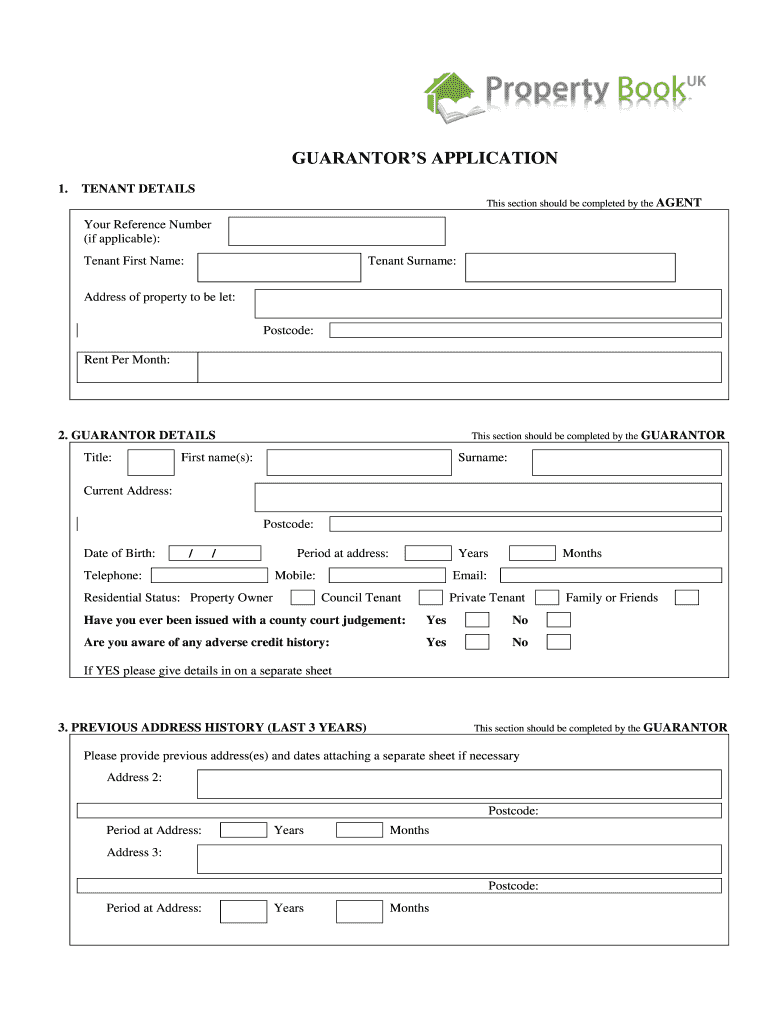
- Begin with the TENANT DETAILS section, which should be completed by the AGENT. Fill in the Tenant's First Name, Surname, Address of property to be let, Postcode, and Rent Per Month.
- Next, move to the GUARANTOR DETAILS section. Here, as the GUARANTOR, provide your Title, First Name(s), Surname, Current Address, Postcode, Date of Birth, Telephone number, Mobile number, Email address and Residential Status. Indicate if you have any adverse credit history or county court judgments.
- In the PREVIOUS ADDRESS HISTORY section for the last 3 years, list your previous addresses along with the duration of stay at each location.
- Proceed to GUARANTOR’S EMPLOYMENT. Indicate your employment status and provide details about your current employer including Company Name, Contact Name, Address, Telephone number and Gross Salary.
- If applicable, complete the GUARANTOR’S PREVIOUS EMPLOYMENT DETAILS section with information about past employment if you have not been in your current position for at least 12 months.
- Finally, review and sign the DECLARATION section confirming that all information is accurate before submitting your application.
Start filling out your GUARANTOR'S APPLICATION today using our platform for a seamless experience!
It's free
See more GUARANTOR'S APPLICATION - Property Book UK versions
| Versions | Form popularity | Fillable & printable |
|---|---|---|
| 2011 | 4 Satisfied (32 Votes) |
Got questions?
Can I type my eSignature on my whats guarantor?
Yes, a typed name is recognized as a valid electronic signature when you add it to your form utilizing a compliant solution like DocHub. Simply upload your whats guarantor to our editor, click Sign in the top tool pane → Create your signature → Type your name in the proper tab, and choose how it will look on your document.
How to complete and sign GUARANTOR'S APPLICATION - Property Book UK online?
You may easily fill out, modify, and even eSign your GUARANTOR'S APPLICATION - Property Book UK using DocHub. Create a new profile and start your free trial. After that, you can add the file with the form and simply make all the needed edits. No need to print on paper or use a third-party application to sign it, as you can put your electronic signature on your document faster through DocHub.
Security and compliance
At DocHub, your data security is our priority. We follow HIPAA, SOC2, GDPR, and other standards, so you can work on your documents with confidence.
Learn more


