




01. Edit your check to remove hardlock online
Type text, add images, blackout confidential details, add comments, highlights and more.

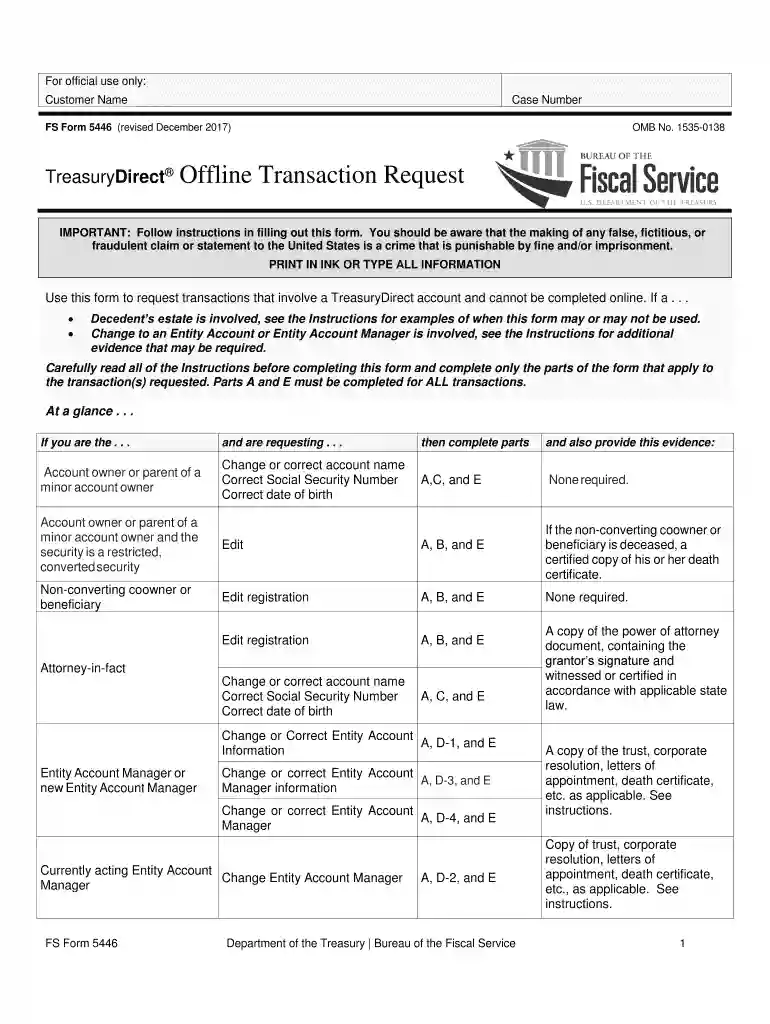
Type text, add images, blackout confidential details, add comments, highlights and more.

Draw your signature, type it, upload its image, or use your mobile device as a signature pad.

Send fs form 5446 via email, link, or fax. You can also download it, export it or print it out.

Start using our platform today to fill out form pdf 5446 easily and efficiently!
We've got more versions of the check to remove hardlock form. Select the right check to remove hardlock version from the list and start editing it straight away!
A lot of software applications are available on the market for document editing and signing. DocHub is one of the most in-demand online solutions that comply with all data protection and compliance standards and guarantees your electronically signed paperwork is legally enforceable. All you need to try it out is to register an account, upload your form pdf 5446, provide the required information, and click Sign. Create your electronic signature by typing, drawing it, uploading its picture to your document, or scanning a unique QR code.
If you are searching for a state-specific form pdf 5446 sample, you can find it in our DocHub Forms & Templates catalog. Use the search field, key in your form’s name, and search through the results for your state. You may also filter out irrelevant results while browsing our catalog by groups.
At DocHub, your data security is our priority. We follow HIPAA, SOC2, GDPR, and other standards, so you can work on your documents with confidence.
Your students 2025-2026 Free Application for Federal Student Aid (FAFSA) was selected for review in a process called Verification.
by TH Wiedemeier Cited by 362 This report is a work prepared for the United States Air Force Center for Environmental Excellence. (AFCEE) - Technology Transfer DivisionRead more
Use of Form Use this form to request TreasuryDirect account maintenance transactions that cannot be completed online. Complete a separate FS Form 5446 forRead more


