




01. Edit your kentucky llet account number lookup online
Type text, add images, blackout confidential details, add comments, highlights and more.

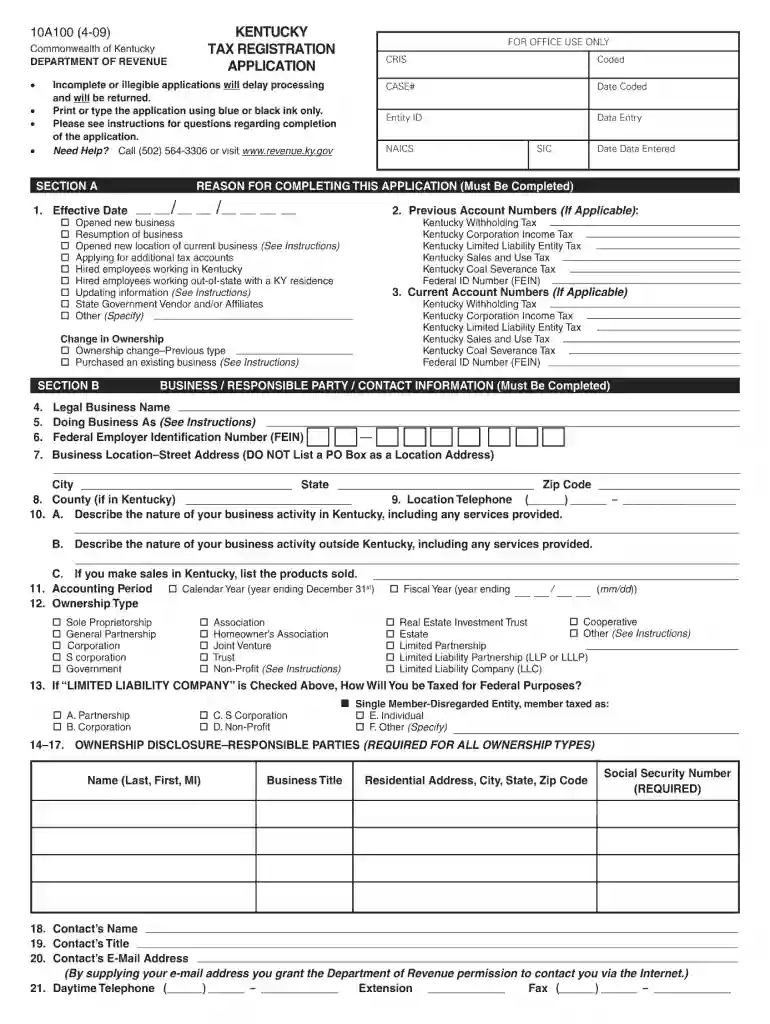
Type text, add images, blackout confidential details, add comments, highlights and more.

Draw your signature, type it, upload its image, or use your mobile device as a signature pad.

Send kentucky tax registration application online via email, link, or fax. You can also download it, export it or print it out.

Start using our platform today to fill out your Kentucky Tax Registration Application Online 2009 form for free!
We've got more versions of the kentucky llet account number lookup form. Select the right kentucky llet account number lookup version from the list and start editing it straight away!
| Versions | Form popularity | Fillable & printable |
|---|---|---|
| 2025 | 4.6 Satisfied (51 Votes) | |
| 2023 | 4.4 Satisfied (31 Votes) | |
| 2022 | 4.3 Satisfied (55 Votes) | |
| 2021 | 4.8 Satisfied (64 Votes) | |
| 2020 | 4.4 Satisfied (266 Votes) | |
| 2019 | 4.4 Satisfied (129 Votes) | |
| 2018 | 4.3 Satisfied (103 Votes) | |
| 2017 | 4.4 Satisfied (64 Votes) | |
| 2016 | 4.3 Satisfied (116 Votes) | |
| 2015 | 4 Satisfied (53 Votes) | |
| 2015 | 4 Satisfied (55 Votes) | |
| 2013 | 4.4 Satisfied (51 Votes) | |
| 2012 | 4 Satisfied (40 Votes) | |
| 2011 | 4.3 Satisfied (36 Votes) | |
| 2009 | 4.3 Satisfied (52 Votes) |
At DocHub, your data security is our priority. We follow HIPAA, SOC2, GDPR, and other standards, so you can work on your documents with confidence.
by A Martin Cited by 2 This study analyzed the tax and fee structure for Kentucky motor carriers and details a possible policy scenario for eliminating the weight-distance tax.Read more
Find a Form Free Electronic Filing Free Tax Return Preparation Identity Confirmation Quiz Protest Procedures Records Requests Report Tax FraudRead more
Feb 2, 2021 Income before income taxes increased 10% primarily as the result of higher revenues and improved gross margins across the majority of markets.Read more


