




01. Edit your form online
Type text, add images, blackout confidential details, add comments, highlights and more.

Type text, add images, blackout confidential details, add comments, highlights and more.

Draw your signature, type it, upload its image, or use your mobile device as a signature pad.

Send it via email, link, or fax. You can also download it, export it or print it out.
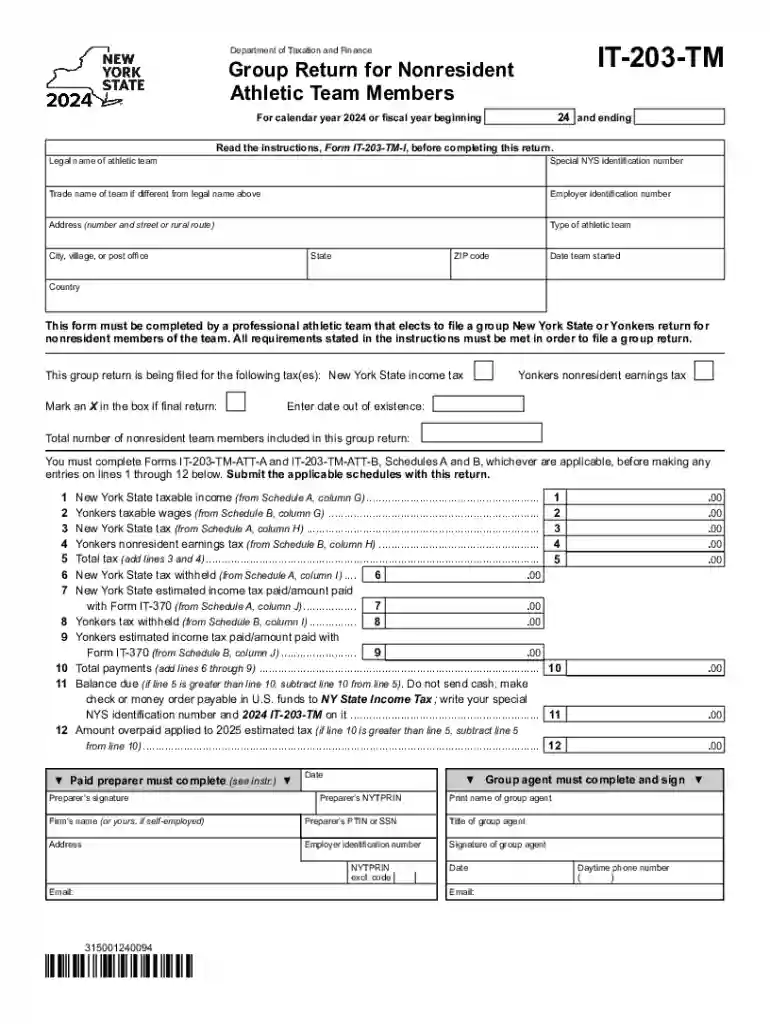
Form IT-203-TM, titled "Group Return for Nonresident Athletic Team Members Tax Year 2024," is a tax document used by professional athletic teams operating in New York State. The primary function of this form is to allow these teams to file a collective income tax return on behalf of their nonresident team members. This facilitates simpler tax administration by summarizing the taxable earnings of members who do not reside in New York but earn income through athletic activities performed within the state.
Completing the Form IT-203-TM requires careful attention to detail and adherence to the steps outlined by the New York State Department of Taxation and Finance.
Gather Team and Member Information: Collect detailed information about the team and each nonresident member, including names, addresses, and Social Security Numbers.
Calculate Earnings: Determine the portion of each member’s income attributable to activities performed in New York. This requires collaboration with the team's finance department to accurately track game appearances, training sessions, and other taxable activities.
Complete Tax Computations: Use the appropriate tax rates and calculations to determine the total tax liability for the team’s nonresident members.
Attach Supporting Documents: Provide necessary documentation supporting income claims, such as contracts or pay stubs detailing earnings that occurred in New York.
Review and Submit: Conduct a thorough review to ensure accuracy before submitting the form electronically or via mail to the designated New York State tax office.
Understanding the essential elements of this form is critical for accurate filing.
Team Identification: Includes details such as the team’s official name, contact information, and federal identification number.
Member Listings: Comprehensive list of nonresident team members participating in the group filing. Each entry must include the individual’s personal and income details.
Income Breakdown: Breakdown of New York-sourced income versus income from other states or sources, ensuring compliant reporting of earnings subject to state taxes.
Timely submission of Form IT-203-TM is essential to avoid penalties.
Due Date: Typically aligns with the federal tax filing deadline, April 15, unless extended. Check with the New York State Department for specific annual deadlines.
Extensions: Teams can apply for an extension if more time is needed to gather required information, though interest on unpaid taxes may still accrue.
Not every athletic team or member is eligible to use Form IT-203-TM.
Team Requirement: Only professional sports teams with nonresident athletes earning income in New York are eligible to use this form.
Nonresident Status: Each team member included in the filing must meet the criteria for nonresidency in New York but have taxable income from activities performed within the state.


Ensuring that Form IT-203-TM is used within its legal confines is crucial.
State Compliance: The form must be filed according to New York State tax laws, which govern nonresident income taxation for athletic team members.
Record Keeping: Maintain records of income determinations and filings for audit purposes, including all supporting documents used in the computation of tax obligations.
Teams can choose from multiple ways to file the Form IT-203-TM, leveraging technology for efficiency.
Digital Tools: Compatible with various tax software such as TurboTax and QuickBooks, allowing for straightforward data importation and form creation.
Online Submission: New York State supports electronic submission of forms, offering a quick and secure method that reduces paper use and likelihood of errors.
Failure to properly file Form IT-203-TM can result in significant repercussions.
Late Payment Penalties: Interest and fines can accrue on unpaid taxes if the form is not filed by the deadline.
Audit Risks: Incomplete or inaccurate filings could trigger audits by the state, leading to additional scrutiny and potential financial penalties.
Filing Form IT-203-TM includes consideration of specific New York tax rules unique to nonresident athlete earnings.
Unique Tax Rates: New York may apply distinct tax rates on earnings of nonresident athletes based on the income source and nature of activities performed in the state.
Local Tax Obligations: Must also consider any county or city taxes applicable to earned income, such as additional levies by Yonkers for nonresident workers.
We've got more versions of the Form IT-203-TM Group Return for Nonresident Athletic Team Members Tax Year 2024 form. Select the right Form IT-203-TM Group Return for Nonresident Athletic Team Members Tax Year 2024 version from the list and start editing it straight away!
At DocHub, your data security is our priority. We follow HIPAA, SOC2, GDPR, and other standards, so you can work on your documents with confidence.




Dec 12, 2025 Be sure to include any overpayment from the 2024 team group return that was applied to the members estimated income tax. Column N: If theRead more
by K Kisska-Schulze 2021 Cited by 23 December 30, 2024. In this scenario, Player X must still report that amount as taxable income on her 2024 Form 1040 even if her agent does not.Read more


