




Here's how it works

01. Edit your how to fill out online il 4506 online online
Type text, add images, blackout confidential details, add comments, highlights and more.

02. Sign it in a few clicks
Draw your signature, type it, upload its image, or use your mobile device as a signature pad.

03. Share your form with others
Send il 4506 via email, link, or fax. You can also download it, export it or print it out.
How to use or fill out il 4506 with our platform

- Click ‘Get Form’ to open the IL-4506 in the editor.
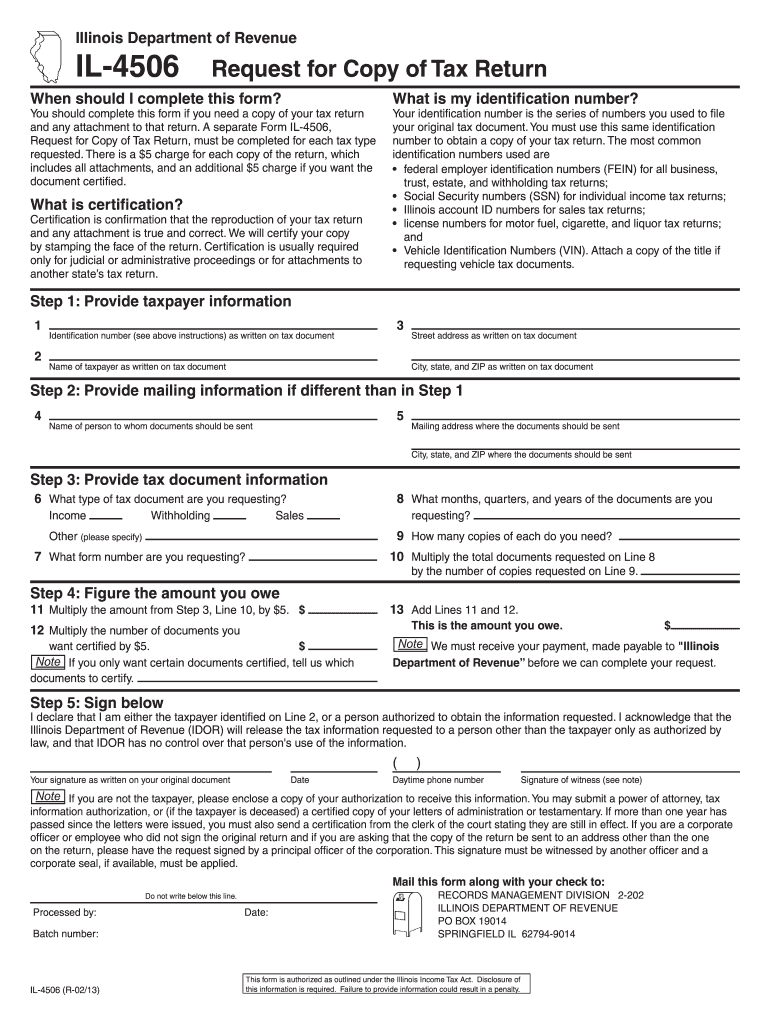
- Begin by providing your taxpayer information. Fill in your identification number, name, street address, city, state, and ZIP code as they appear on your original tax document.
- If your mailing address differs from the one provided, enter the name of the person to whom documents should be sent along with their mailing address and city/state/ZIP.
- Specify the type of tax document you are requesting (e.g., income, sales) and indicate the months or years for which you need copies. Also, mention how many copies you require.
- Calculate the total amount owed by multiplying the number of documents requested by $5. If certification is needed for any documents, include that cost as well.
- Sign and date the form where indicated. Ensure that if you're not the taxpayer, you attach appropriate authorization documentation.
Start using our platform today to easily fill out your IL-4506 form online for free!
Fill out il 4506 online
It's free
It's free
Got questions?
We have answers to the most popular questions from our customers. If you can't find an answer to your question, please contact us.
Contact us
What happens after I submit form 4506-T?
Please submit the form directly to the IRS at the address or fax number listed for your state of residence at the time your return was filed. The IRS will mail you a copy of the document you have requested. You will then submit all pages of that document to the Financial Aid Scholarship Office for review.
What is the purpose of a 4506 C form?
Purpose of form. Use Form 4506-C to request tax return information through an authorized IVES participant.
What is the 4506 form used for?
Use Form 4506, Request for Copy of Tax Return, to request copies of tax returns. Automated transcript request. You can quickly request transcripts by using our automated self-help service tools.
Who needs to file IL-1040?
an Illinois resident who worked in Iowa, Kentucky, Michigan, or Wisconsin, you must file Form IL-1040 and include as Illinois income any compensation you received from an employer in these states. Compensation paid to Illinois residents working in these states is taxed by Illinois.
What is the purpose of the IRS form 4506-T?
Use Form 4506-T to request tax return information. Taxpayers using a tax year beginning in one calendar year and ending in the following year (fiscal tax year) must file Form 4506-T to request a return transcript.
Security and compliance
At DocHub, your data security is our priority. We follow HIPAA, SOC2, GDPR, and other standards, so you can work on your documents with confidence.
Learn more


People also ask
What is a 4506 used for?
Use Form 4506-T to request any of the transcripts: tax return, tax account, wage and income, record of account and verification of non-filling. The transcript format better protects taxpayer data by partially masking personally identifiable information.
How much does a 4506 cost?
Form 4506 is useful if you need a copy of your tax return from more than three years ago. But be prepared to wait. After mailing the form, it can take up to 75 days to get a copy of your return and it costs you $50 per return.


