
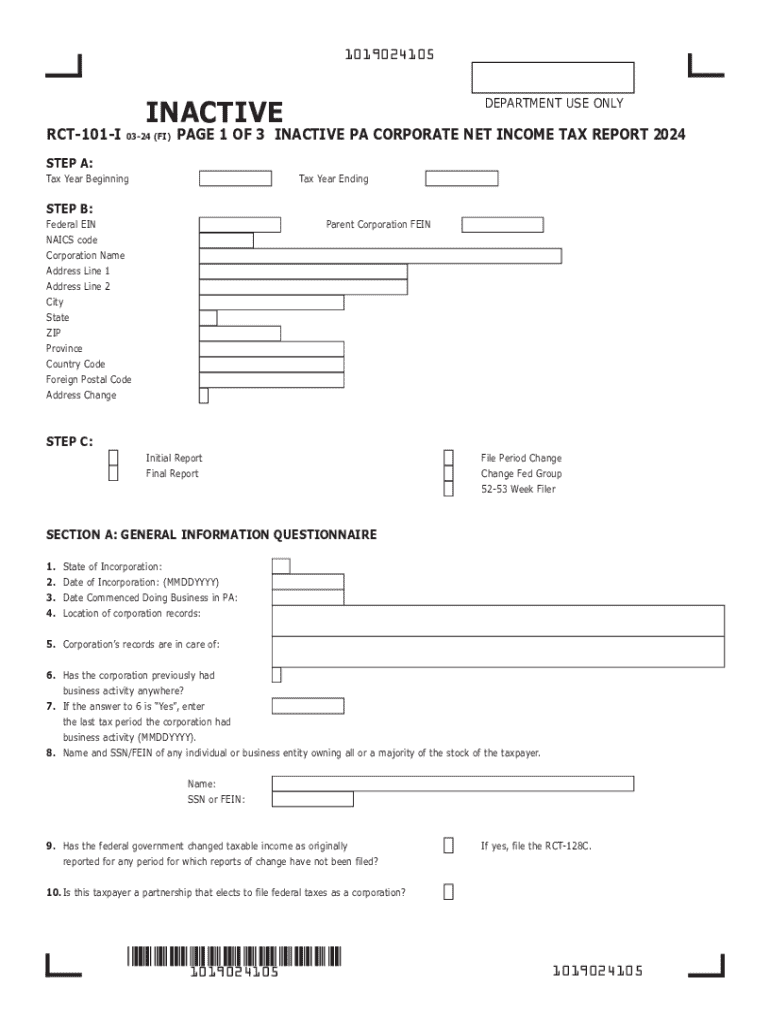







Understanding the 2024 PA Inactive PA Corporate Net Income Tax Report (RCT-101-I)
The 2024 PA Inactive PA Corporate Net Income Tax Report, also known as RCT-101-I, is a specialized tax form used by corporations in Pennsylvania that have no business activities during the tax year. This form is critical for maintaining accurate tax records and ensuring compliance with state regulations for corporations that are inactive but still registered within Pennsylvania.
Steps to Complete the RCT-101-I
-
Gather Relevant Information: Before you begin, collect all necessary details about your corporation, such as the corporate identification number, contact information for corporate officers, and details about the inactivity status.
-
Enter General Corporate Information: Start by filling in the basic corporate information section. Ensure that details like the corporation's name, address, and contact details are clearly stated in all capital letters, as required.
-
Declare Inactive Status: Clearly indicate that your corporation has not engaged in any business activities during the tax year. This declaration should align with your records and other documentation.
-
Complete Corporate Officer Details: Provide information about all corporate officers, including titles, names, and contact information. Ensure accuracy, as these details are crucial for compliance.
-
Review and Sign: Thoroughly check the completed form for accuracy. Once satisfied, the form should be signed by an authorized corporate officer.
-
Submission: Submit the completed RCT-101-I form to the Pennsylvania Department of Revenue by the specified deadline.
How to Obtain the RCT-101-I Form
The RCT-101-I form can be accessed through the Pennsylvania Department of Revenue's official website. Corporations may download the form directly for printing or use the department's online services for electronic filing. In addition, the form can be requested via mail by contacting the department's customer service.
Filing Deadlines and Important Dates
For the RCT-101-I, staying aware of filing deadlines is crucial to avoid penalties. Typically, the report must be submitted annually, with specific dates aligning with corporate fiscal schedules. Late submissions can incur fines, so it's essential to consult the Pennsylvania Department of Revenue for precise deadlines each year.
Who Typically Uses the RCT-101-I
The RCT-101-I is used by Pennsylvania-based corporations that have been inactive throughout the tax year. This form is suitable for entities that are still registered but have not conducted any business, do not have income to report, and have no tax liabilities. Understanding eligibility ensures correct filing.


Key Elements of the RCT-101-I
- Inactive Declaration: A statement confirming no business activities.
- Corporate Information: Detailed contact and identification details of the corporation.
- Officer Details: Information about the officers in charge, affirming compliance.
- Signature: Authorization by a corporate official validating the document's accuracy.
State-Specific Rules for the RCT-101-I
Pennsylvania has specific requirements regarding the RCT-101-I to ensure only qualifying corporations use this report. Corporations must verify their status aligns with being inactive, meaning absolutely no business transactions occurred during the filing period. Additionally, Pennsylvania mandates precise data presentation formats.
Penalties for Non-Compliance
Failure to submit the RCT-101-I form, or submitting it incorrectly, can result in monetary penalties. Corporations that mistakenly file this form or fail to declare a change in status to active may face fines. It's imperative to follow Pennsylvania's guidelines to maintain good corporate standing.
Alternatives and Variants to the RCT-101-I
Corporations that incorrectly file as inactive but engage in business activities should instead utilize the RCT-101 form, designed for active entities. Understanding these distinctions prevents misfiling and potential legal or financial repercussions.
Technology and Software Compatibility
While traditional paper submissions are accepted, corporations benefit from preparing and submitting the RCT-101-I using compatible accounting or tax software such as TurboTax or QuickBooks. These programs often include features to streamline the submission process, ensuring accuracy and compliance with Pennsylvania tax laws.




