
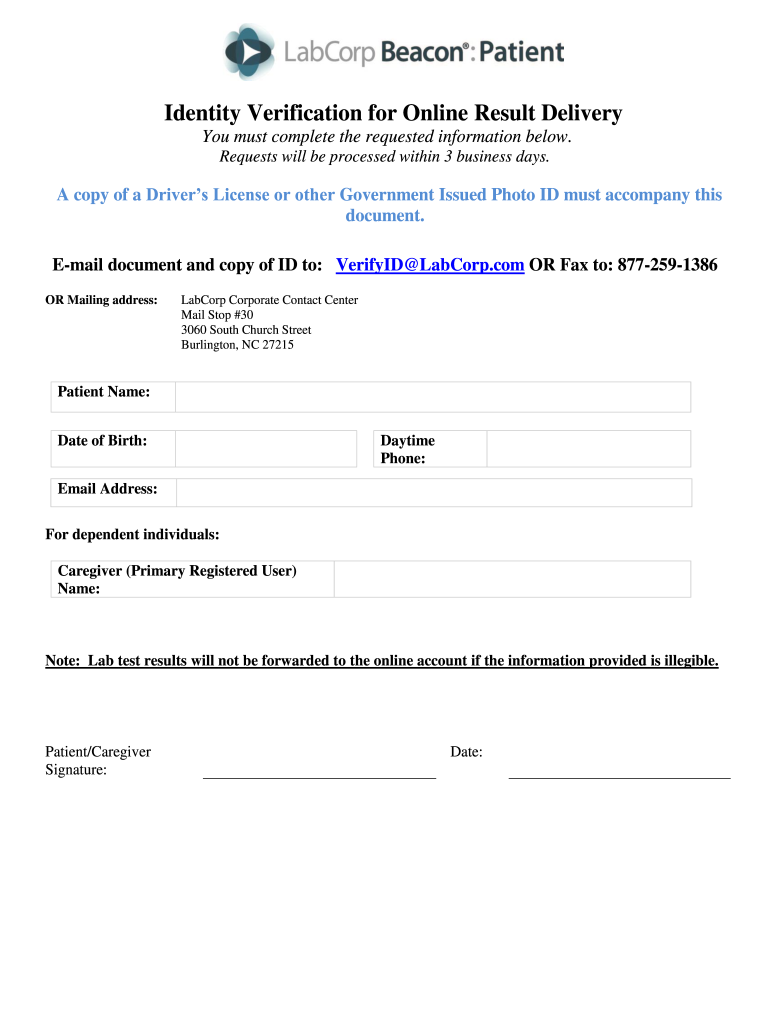




Here's how it works

01. Edit your labcorp std test results online
Type text, add images, blackout confidential details, add comments, highlights and more.

02. Sign it in a few clicks
Draw your signature, type it, upload its image, or use your mobile device as a signature pad.

03. Share your form with others
Send labcorp std test results pdf via email, link, or fax. You can also download it, export it or print it out.
How to use or fill out labcorp std test results pdf with our platform

- Click ‘Get Form’ to open the labcorp std test results PDF in the editor.
- Begin by entering your Patient Name and Date of Birth in the designated fields. Ensure that this information is accurate, as it is crucial for identity verification.
- Next, provide your Daytime Phone number and Email Address. This contact information will be used for any follow-up regarding your test results.
- If you are filling this out for a dependent, enter the Caregiver's Name in the appropriate section. This identifies who is responsible for receiving the results.
- Make sure to sign and date the form at the bottom. Your signature confirms that all provided information is correct and complete.
- Finally, attach a copy of your Driver’s License or another Government Issued Photo ID as required, ensuring all documents are legible before submission.
Start using our platform today to easily fill out and submit your labcorp std test results PDF for free!
Fill out labcorp std test results pdf online
It's free
Security and compliance
At DocHub, your data security is our priority. We follow HIPAA, SOC2, GDPR, and other standards, so you can work on your documents with confidence.
Learn more


Related forms
Purchase requisition form
The document is a purchase requisition form for the SUNY Health Science Center at Brooklyn, intended for both external v ...
Alcohol & Drug Rehabilitation Attendance Log - Ohio State Medical - med ohio
The document is an attendance log for alcohol and drug rehabilitation meetings, requiring details such as the participan ...
Notice of liability form
The document is a user guide for the InPower Liability Action Process, specifically focusing on Round 1, which involves ...

Dangerous goods security card
The document provides guidelines for applying for a Dangerous Goods Security Card (DGSC) in Western Australia, detailing ...
Medical certificate template nsw
The document is a medical certificate for the Assisted School Travel Program, which provides transport assistance to eli ...
Specification Sheet Form Rev 12-09-2013 - Heil Trailer
The document is a specification sheet for the ST 4600 20 S1 Standard Duty Petroleum Truck Tank, detailing its design, ma ...
Dance team contract template
The KMS Dance Team Contract outlines the purpose, eligibility requirements, tryout schedule, financial responsibilities, ...