2016 form 5695-2026

Get Form
2013 credits Preview on Page 1

Here's how it works

01. Edit your 2013 credits online
Type text, add images, blackout confidential details, add comments, highlights and more.

02. Sign it in a few clicks
Draw your signature, type it, upload its image, or use your mobile device as a signature pad.

03. Share your form with others
Send form 5695 via email, link, or fax. You can also download it, export it or print it out.

How to use or fill out 2016 form 5695 with our platform

Form edit decoration
9.5
Ease of Setup
DocHub User Ratings on G2
9.0
Ease of Use
DocHub User Ratings on G2
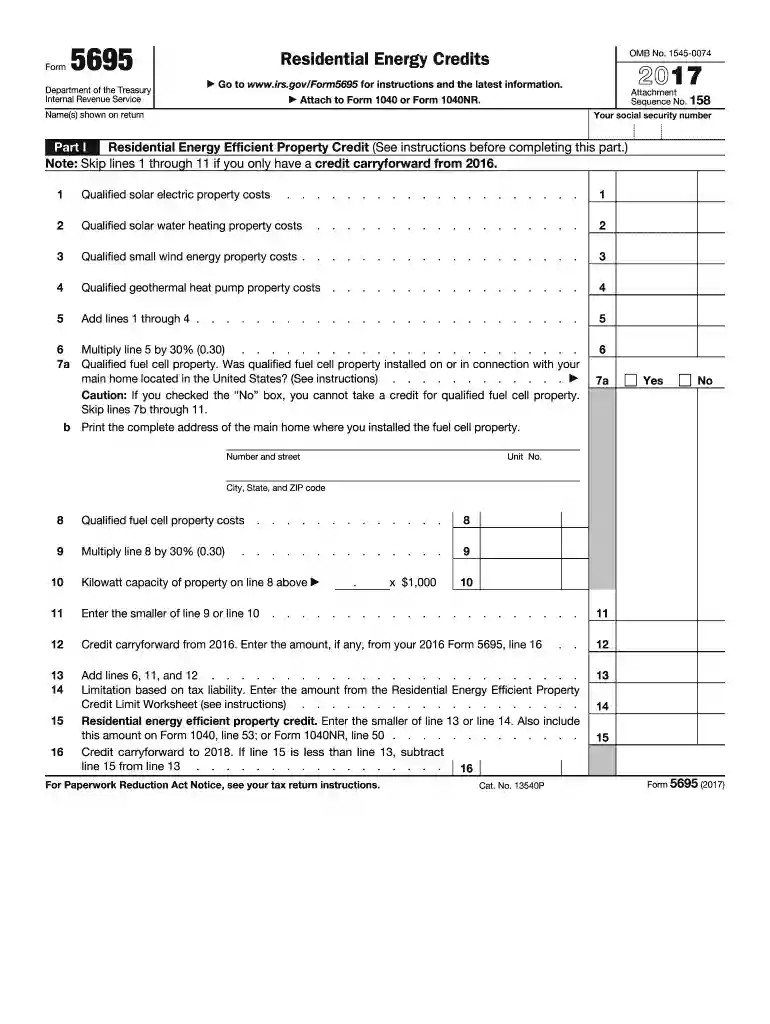
  1. Click ‘Get Form’ to open the 2016 Form 5695 in the editor.
  2. Begin with Part I, where you will enter your name and social security number at the top of the form. This information is essential for identification purposes.
  3. Proceed to line 1 through line 4, where you will input costs related to qualified solar electric property, solar water heating property, small wind energy property, and geothermal heat pump property. Ensure accuracy as these figures determine your credit.
  4. On line 5, sum up the amounts from lines 1 through 4. Then multiply this total by 30% on line 6 to calculate your potential credit.
  5. If applicable, complete lines regarding qualified fuel cell property in section 7. Indicate whether it was installed in your main home and provide its address if necessary.
  6. Continue filling out Part II for nonbusiness energy property credits by answering questions about improvements made to your main home and entering relevant costs on lines provided.

Start using our platform today for free to simplify filling out your tax forms!

See more 2016 form 5695 versions

We've got more versions of the 2016 form 5695 form. Select the right 2016 form 5695 version from the list and start editing it straight away!
Versions Form popularity Fillable & printable
2023 4.9 Satisfied (32 Votes)
2022 4.6 Satisfied (55 Votes)
2021 4.8 Satisfied (212 Votes)
2020 4.4 Satisfied (191 Votes)
2019 3.8 Satisfied (29 Votes)
2016 4.3 Satisfied (24 Votes)
2013 4 Satisfied (47 Votes)
be ready to get more

Complete this form in 5 minutes or less

Get form

Got questions?

We have answers to the most popular questions from our customers. If you can't find an answer to your question, please contact us.
Contact us
The maximum credit you can claim each year is: $1,200 for energy efficient property costs and certain energy efficient home improvements, with limits on exterior doors ($250 per door and $500 total), exterior windows and skylights ($600) and home energy audits ($150)
Residential Clean Energy Credit:Limits and carry forward rules: as a nonrefundable credit with no annual or lifetime limit, this credit can be carried forward. If you do not owe enough taxes in the year you claim it, carry it forward to a year in which you owe taxes.
You must claim the credit for the tax year when the property is installed, not merely purchased. For additional instructions on how to claim the credit for residential clean energy follow our step-by-step guide.
Another common mistake on the Residential Energy Credits Form is entering incorrect costs for qualified energy improvements or labor. It is crucial to ensure that the costs you claim are accurate and directly related to the energy improvements you have made.
If you invest in renewable energy for your home (solar, wind, geothermal, fuel cells or battery storage technology), you may qualify for an annual residential clean energy tax credit of 30% of the costs for qualified, newly installed property from 2022 through 2025.

Security and compliance

At DocHub, your data security is our priority. We follow HIPAA, SOC2, GDPR, and other standards, so you can work on your documents with confidence.

Learn more
ccpa2
pci-dss
gdpr-compliance
hipaa
soc-compliance
be ready to get more

Complete this form in 5 minutes or less

Get form

People also ask

Go to .irs.gov/Form5695 for instructions and the latest information. Part I Residential Clean Energy Credit (See instructions before completing this part.)

Related links