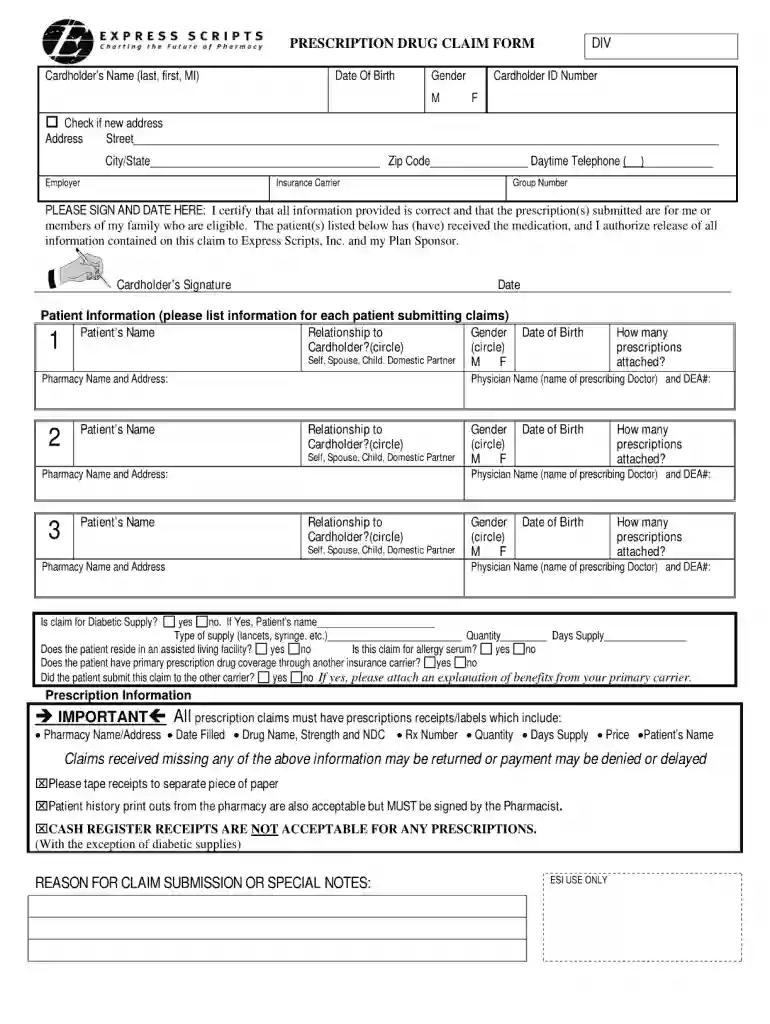
Type text, add images, blackout confidential details, add comments, highlights and more.

02. Sign it in a few clicks
Draw your signature, type it, upload its image, or use your mobile device as a signature pad.

03. Share your form with others
Send express scripts fax form pdf via email, link, or fax. You can also download it, export it or print it out.

How to use or fill out express scripts fax form with our platform
Ease of Setup
DocHub User Ratings on G2
Ease of Use
DocHub User Ratings on G2
Click ‘Get Form’ to open the express scripts fax form in the editor.
Begin by entering the patient’s information in the designated fields, including their name, date of birth, and insurance details. Ensure accuracy for seamless processing.
Next, provide the prescriber’s information. Fill in their name, contact number, and NPI (National Provider Identifier) number. This is crucial for verification purposes.
In the medication section, list all prescribed medications along with dosages and frequencies. Double-check this information to avoid any discrepancies.
Finally, review all entered data for completeness and accuracy before submitting. Use our platform's tools to make any necessary edits easily.
Start using our platform today to fill out your express scripts fax form online for free!
Fill out express scripts fax form online It's free
Express Scripts prescription form PDFExpress Scripts forms for providersExpress Scripts fax number for Prior AuthorizationExpress Scripts fax order formExpress Scripts Zepbound prior authorization form PDFNew Prescription Fax FormExpress Scripts general request formExpress Scripts address
Security and compliance
At DocHub, your data security is our priority. We follow HIPAA, SOC2, GDPR, and other standards, so you can work on your documents with confidence.
Fax: Have your doctor call 888.327.9791 for faxing instructions. (Faxes can Complete the order form and send to Express Scripts along with prescriptions andRead more
We cannot accept CII prescriptions via fax. Fax forms wil only be accepted when sent from a prescribers office. The printed fax confirmation is proof ofRead more
Setting Up Fax Features Using the Fax Utility - Windows. You can set up your fax header and select your fax settings using the FAX Utility for Windows. 1. DoRead more
Cookie consent notice
This site uses cookies to enhance site navigation and personalize your experience.
By using this site you agree to our use of cookies as described in our Privacy Notice.
You can modify your selections by visiting our Cookie and Advertising Notice.