Response notice 2026

Get Form
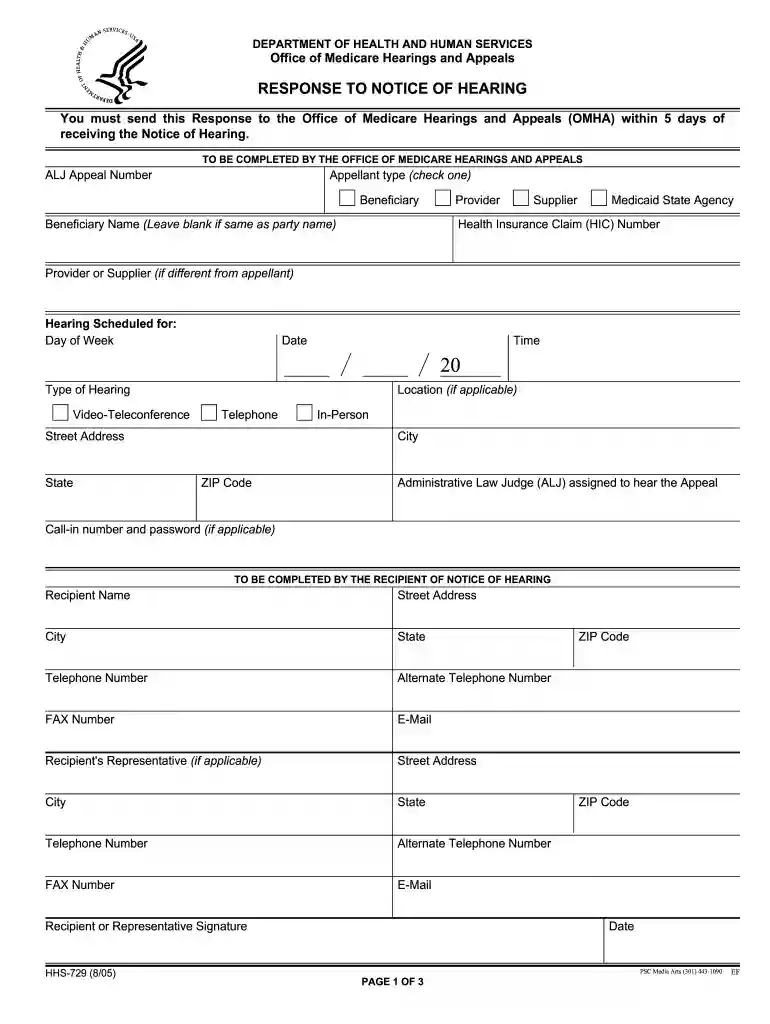
form response notice Preview on Page 1

Here's how it works

01. Edit your form response notice online
Type text, add images, blackout confidential details, add comments, highlights and more.

02. Sign it in a few clicks
Draw your signature, type it, upload its image, or use your mobile device as a signature pad.

03. Share your form with others
Send how to response notice via email, link, or fax. You can also download it, export it or print it out.

How to use or fill out response notice with our platform

Form edit decoration
9.5
Ease of Setup
DocHub User Ratings on G2
9.0
Ease of Use
DocHub User Ratings on G2
  1. Click ‘Get Form’ to open the response notice in the editor.
  2. Begin by entering the ALJ Appeal Number at the top of the form. This is essential for tracking your appeal.
  3. Select your appellant type by checking one of the options: Beneficiary, Supplier, Provider, or Medicaid State Agency.
  4. Fill in your Health Insurance Claim (HIC) Number and Beneficiary Name if applicable. If it’s the same as the party name, you can leave it blank.
  5. Indicate the scheduled hearing details including date, time, and type of hearing (Video-Teleconference or In-Person).
  6. Complete your contact information in the recipient section, ensuring all fields are filled accurately for effective communication.
  7. Choose one of the options under Item 1 regarding your presence at the hearing and provide any necessary explanations.
  8. If applicable, check any objections under Items 2 to 4 and provide detailed reasons as required.
  9. Finally, sign and date the form before submitting it through our platform to ensure timely processing.

Start using our platform today to fill out your response notice easily and for free!

See more response notice versions

We've got more versions of the response notice form. Select the right response notice version from the list and start editing it straight away!
Versions Form popularity Fillable & printable
2005 4.9 Satisfied (479 Votes)
be ready to get more

Complete this form in 5 minutes or less

Get form

Got questions?

We have answers to the most popular questions from our customers. If you can't find an answer to your question, please contact us.
Contact us
Log in to e-Filing portal and click Pending Actions Response to Outstanding Demand and you will be taken to Response to outstanding demand page. If there are demands outstanding against your PAN, the current status against each of the past / existing outstanding demands will be updated as Pending payment / Response.
Time Limit to Respond to the Demand The assessee shall pay the amount of demand within 30 days from the date of service of notice.
Here is a step-by-step guide to log in and respond to a notice. Step 1: Visit the home page of Income Tax Department, Government of India. Step 2: Log in using your credentials. Step 3: Check for Any Notices. Step 4: View Detailed Notices and File Response by Clicking on Submit.
How to Answer an NTE Step 1: Stay Calm and Understand the Issue. Step 2: Acknowledge the Notice and Own the Situation. Step 3: Explain the Facts Clearly. Step 4: Provide Supporting Evidence. Step 5: Offer Solutions or Next Steps. Step 6: End on a Positive, Professional Note.
How to respond to a notice or letter Read your notice or letter carefully as it contains valuable information. Respond as outlined on your notice or letter by mail, fax, or online. Pay as much as you can, even if you cant pay the full amount. Keep a copy of all notices or letters with your tax records for later use.

Security and compliance

At DocHub, your data security is our priority. We follow HIPAA, SOC2, GDPR, and other standards, so you can work on your documents with confidence.

Learn more
ccpa2
pci-dss
gdpr-compliance
hipaa
soc-compliance
be ready to get more

Complete this form in 5 minutes or less

Get form

People also ask

0:56 2:47 Code called the 846 refund issued code on on your transcript. This code will show the exact dateMoreCode called the 846 refund issued code on on your transcript. This code will show the exact date when the IRS will send your refund to your bank or mail you a check.
How to Check and Reply to Notices on the Income Tax Portal Visit the e-filing portal, i.e., incometaxfiling.gov.in, and log in using your User Id and Password. Click on e-proceedings under pending options menu. Click on the links sent in the email. Click Submit response after opening the notice.
The Internal Revenue Service (IRS) will send a notice or a letter for any number of reasons. It may be about a specific issue on your federal tax return or account, or may tell you about changes to your account, ask you for more information, or request a payment.

Related links