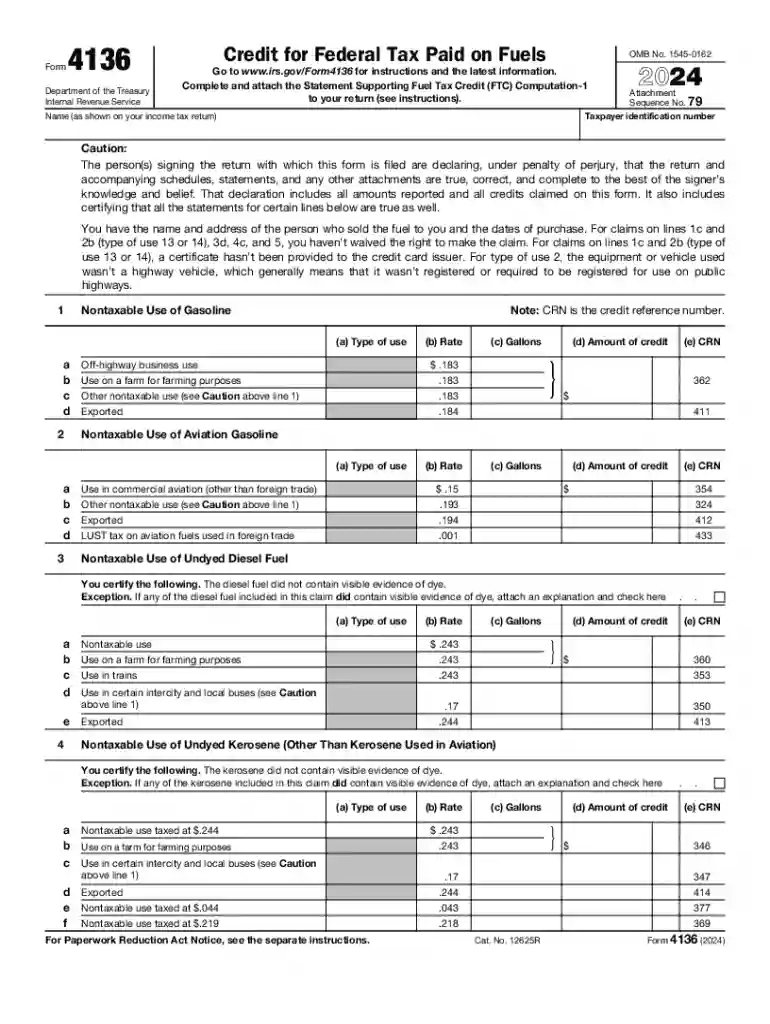
Complete and attach the Statement Supporting Fuel Tax Credit (FTC) Computation-1 2026

Get Form
form 4136 Preview on Page 1

Here's how it works

01. Edit your form 4136 online
Type text, add images, blackout confidential details, add comments, highlights and more.

02. Sign it in a few clicks
Draw your signature, type it, upload its image, or use your mobile device as a signature pad.

03. Share your form with others
Send irs form 4136 via email, link, or fax. You can also download it, export it or print it out.

Definition and Purpose of the Statement Supporting Fuel Tax Credit Computation

The "Complete and Attach the Statement Supporting Fuel Tax Credit (FTC) Computation-1" is an essential document for claiming a credit for federal taxes paid on various fuels. This form is primarily used for tax reporting purposes and is required by the Internal Revenue Service (IRS) to validate the fuel tax credits claimed by taxpayers. By providing detailed information about fuel purchases and uses, this document helps ensure compliance with the legal requirements set forth by the IRS.

Components of the Statement

  • Fuel Types: Includes details about the types of fuels for which credits are being claimed, such as gasoline and aviation fuel.
  • Usage Specifications: Documents how the purchased fuels are used in non-taxable situations.
  • Volume and Cost: Requires accurate reporting of the volume of fuel purchased and the associated costs.
  • Certification: Mandates that taxpayers certify the accuracy of their claims under penalty of perjury.

Steps to Complete the Fuel Tax Credit Computation

Completing the FTC Computation-1 form involves several key steps:

  1. Gather Necessary Documentation: Collect all relevant receipts and records detailing fuel purchases and uses.
  2. Fill Out Personal and Business Information: Include your business name or personal information, as necessary.
  3. Detail Fuel Purchases: Enter specific data about each type of fuel, its volume, and how it was used.
  4. Calculate Credit Amount: Use the IRS guidelines to compute the total tax credit based on non-taxable fuel uses.
  5. Certify the Form: Sign and date the form to confirm the accuracy of the information provided, acknowledging that it is subject to IRS verification.

Common Mistakes to Avoid

  • Inaccurate Calculations: Double-check all calculations to prevent errors that could delay your credit.
  • Incomplete Information: Ensure all fields are filled out and documents are attached.

Eligibility Criteria for Claiming the Credit

To qualify for the fuel tax credit, businesses and individuals must meet certain criteria:

  • Non-taxable Use of Fuel: The fuel must be used in a manner that qualifies for a tax exemption.
  • Proper Documentation: Maintain detailed records of fuel usage and purchases.
  • Compliant Business Activity: The business activities must align with IRS regulations concerning fuel tax credits.
decoration image ratings of Dochub

Examples of Eligible Uses

  • Farming Activities: Fuel used in certain farming operations.
  • Off-Highway Business Uses: Fuel used for commercial fishing or construction equipment.

Legal Requirements and Compliance

Understanding the legal landscape regarding the FTC Computation-1 form is crucial:

  • IRS Regulations: Must comply with all IRS guidelines and instructions for claiming fuel tax credits.
  • Documentation Retention: Keep all supporting documentation for at least three years in case of an audit.

Penalties for Non-Compliance

  • Fines: Financial penalties may apply for incorrect or fraudulent claims.
  • Legal Action: Potential for legal consequences if false statements are submitted.

Important Terms Related to the FTC Computation

Familiarity with key terminology is essential for completing the form accurately:

  • Nontaxable Use: Situations where fuel is not subject to taxation.
  • Certification Under Penalty of Perjury: Legally binding declaration of the accuracy of the form's contents.
  • Fuel Tax Credit: The refundable credit for taxes paid on eligible fuel purchases.

Submission Methods and Deadlines

The form can be submitted in several ways:

  • Online Submission: Using IRS-approved software.
  • Mailing: Sending a physical copy to the IRS.
  • In-Person: Can be submitted directly at designated IRS locations.

Critical Dates to Remember

  • Filing Deadline: Aligns with the federal tax filing deadline each year.
  • Extension Requests: Available if more time is needed, but must be formally requested.

Examples and Use Cases

Exploring real-world scenarios can enhance understanding:

  • Agricultural Business Example: A farming corporation using undyed diesel fuel for tractors.
  • Commercial Fishing: A fishing company utilizing gasoline for its fleet.

IRS Guidelines and Supporting Documents

The IRS provides specific guidelines to help you correctly fill out the form and calculate your credit. It's crucial to refer to the most recent IRS instructions available on their website to ensure compliance. Supporting documents typically required include detailed purchase records, usage logs, and any previous correspondence with the IRS if applicable.

Required Documents Checklist

  • Purchase Receipts
  • Usage Logs
  • Previous IRS Correspondence

See more Complete and attach the Statement Supporting Fuel Tax Credit (FTC) Computation-1 versions

We've got more versions of the Complete and attach the Statement Supporting Fuel Tax Credit (FTC) Computation-1 form. Select the right Complete and attach the Statement Supporting Fuel Tax Credit (FTC) Computation-1 version from the list and start editing it straight away!
Versions Form popularity Fillable & printable
2025 4.5 Satisfied (46 Votes)
2024 4.6 Satisfied (23 Votes)
2023 4.6 Satisfied (46 Votes)
2022 4.1 Satisfied (47 Votes)
2021 4.8 Satisfied (102 Votes)
2020 4.3 Satisfied (111 Votes)
2019 4.3 Satisfied (134 Votes)
2018 4.4 Satisfied (235 Votes)
2017 4.3 Satisfied (154 Votes)
2016 4.4 Satisfied (468 Votes)
2016 4.7 Satisfied (54 Votes)
2015 4.2 Satisfied (63 Votes)
2014 4 Satisfied (37 Votes)
2013 4 Satisfied (55 Votes)
2012 4.4 Satisfied (52 Votes)
be ready to get more

Complete this form in 5 minutes or less

Get form

Security and compliance

At DocHub, your data security is our priority. We follow HIPAA, SOC2, GDPR, and other standards, so you can work on your documents with confidence.

Learn more
ccpa2
pci-dss
gdpr-compliance
hipaa
soc-compliance