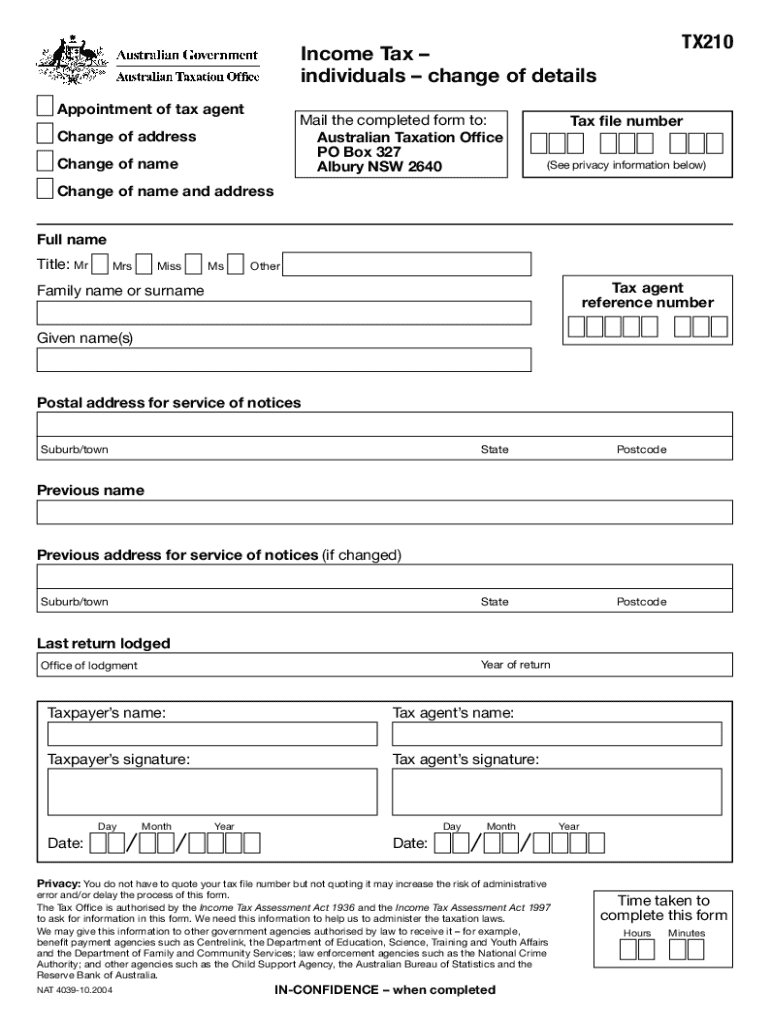







Meaning of the Income Tax Individuals Change of Details TX210
The Income Tax individuals change of details TX210 form is designed for individuals to update their personal information as it pertains to income tax records. This can include changes to your name, address, or other contact details. Keeping this information current is crucial for maintaining accurate tax records and ensuring that all correspondences from tax authorities reach you without delay.
- Purpose: Primarily used to inform tax authorities of any changes in personal details.
- Relevance: Ensures that individuals' income tax records are up to date, preventing possible miscommunications or errors.
Using the TX210 Form
Navigating the TX210 form can be straightforward when approached methodically. Here's how to use it effectively:
- Identify Information to Update: Make a checklist of all details that need updating, such as your address or agent appointments.
- Complete the Appropriate Sections: Fill out the form sections related to the changes you're making.
- Review and Verify: Double-check for accuracy to avoid processing delays.
Examples:
- Updating your residential address and ensuring your tax file number (TFN) is correctly reflected.
Obtaining the TX210 Form
To obtain the TX210 form, you can explore several avenues to ensure ease of access:
- Online Access: Visit the official document repository or relevant tax authority websites. Many resources provide downloadable and printable versions of such forms.
- Physical Copies: Request a physical form from local tax offices or authorized financial institutions.
Completing the TX210 Form
Completing the TX210 involves several straightforward steps:
- Gather Required Information: Have all necessary documents and personal identification ready.
- Fill Out Your Details: Enter your updated information into the relevant sections of the document.
- Appoint a Tax Agent: If a tax agent will assist with your affairs, complete the representative section.
- Privacy and Security Instructions: Familiarize yourself with privacy information regarding your data and implications concerning the Tax File Number (TFN).
Reasons for Updating Personal Details Using TX210
Keeping your personal details updated with tax authorities is not just a legal requirement but also essential for several practical reasons:
- Accuracy of Tax Records: Ensures your tax records reflect your current situation, preventing unwanted complications.
- Prompt Delivery of Correspondence: Critical tax documents and notices reach you in a timely manner.
- Legal Compliance: Contributes to overall compliance with tax regulations and enhances your relationship with authorities.
Typical Users of the TX210 Form
The TX210 is typically utilized by individuals who:
- Undergo Life Changes: Such as marriage, relocation, or legal name change.
- Engage in Tax Representations: Appoint or change a tax agent handling their affairs.
- Seek Accurate Tax Record Maintenance: For individuals prioritizing accurate tax records to avoid disputes.
Key Elements of the TX210 Form
This form comprises several key components that facilitate its primary function:
- Personal Information Section: Basic details like your name, TFN, and contact information.
- Address Update Section: Specific fields to enter new residential or mailing addresses.
- Tax Agent Details: Sections for assigning or updating information related to your tax representative.
- Certification and Signature: Areas for you or your representative to sign, affirming the accuracy of provided details.
Submission Methods for the TX210 Form
There are several ways to submit the completed TX210 form directly to the tax authorities:
- Online Submission: Upload the completed form on relevant tax portals, ensuring any electronic submissions adhere to official guidelines.
- Mail: Send the filled form through traditional postal services to the designated address outlined by the tax office.
- In-Person: Hand deliver the form to a local office, often ensuring immediate acknowledgment of receipt.