



It nrc 2026

Get Form
ohio it nrc Preview on Page 1

Here's how it works

01. Edit your ohio it nrc online
Type text, add images, blackout confidential details, add comments, highlights and more.

02. Sign it in a few clicks
Draw your signature, type it, upload its image, or use your mobile device as a signature pad.

03. Share your form with others
Send ohio it nrc form via email, link, or fax. You can also download it, export it or print it out.

How to use or fill out IT NRC with our platform

Form edit decoration
9.5
Ease of Setup
DocHub User Ratings on G2
9.0
Ease of Use
DocHub User Ratings on G2
  1. Click ‘Get Form’ to open it in the editor.
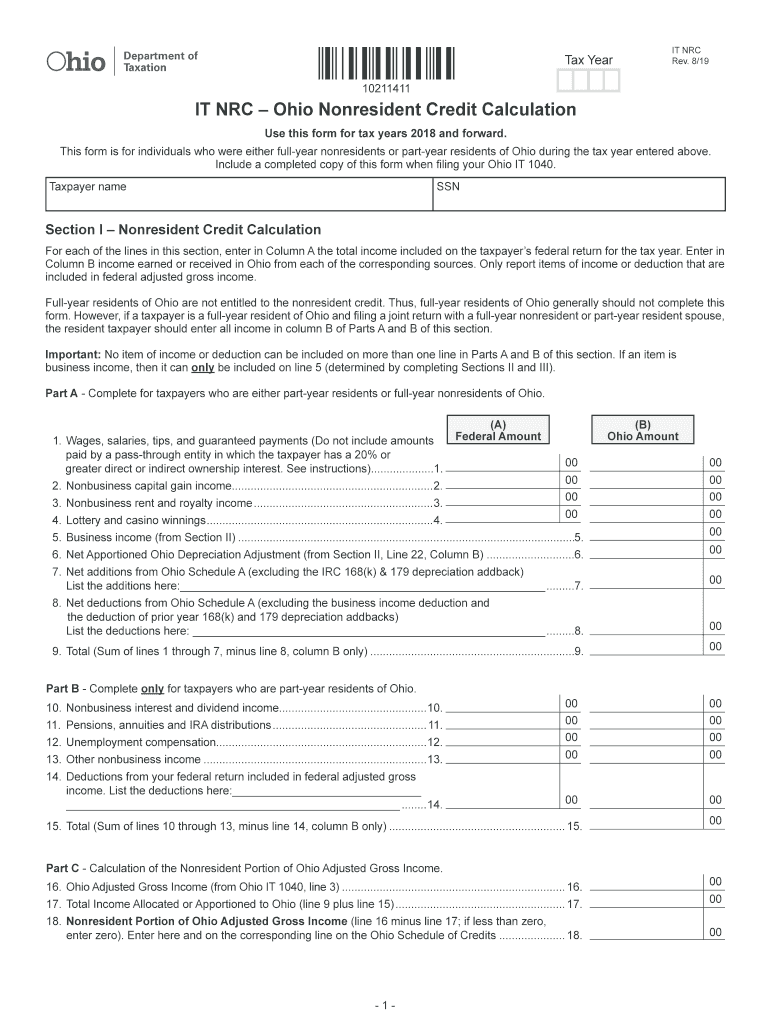
  2. Begin by entering your taxpayer name and SSN at the top of the form. This information is essential for identification.
  3. In Section I, Nonresident Credit Calculation, fill in Column A with total income from your federal return. In Column B, report income earned in Ohio corresponding to each line.
  4. Complete Part A for wages, nonbusiness capital gains, and other specified incomes. Ensure no item is reported more than once across Parts A and B.
  5. If you are a part-year resident, complete Part B by reporting additional nonbusiness income such as pensions and unemployment compensation.
  6. Proceed to Section II for business income. List each business's federal income and Ohio apportioned amounts as instructed.
  7. Finally, review all entries for accuracy before submitting your completed form through our platform.

Start using our editor today to simplify your IT NRC form completion!

See more it nrc versions

We've got more versions of the it nrc form. Select the right it nrc version from the list and start editing it straight away!
Versions Form popularity Fillable & printable
2022 4.4 Satisfied (34 Votes)
2021 4.8 Satisfied (214 Votes)
2020 4.4 Satisfied (64 Votes)
2019 4.3 Satisfied (138 Votes)
2017 4.2 Satisfied (143 Votes)
be ready to get more

Complete this form in 5 minutes or less

Get form

Got questions?

We have answers to the most popular questions from our customers. If you can't find an answer to your question, please contact us.
Contact us
Ohio Form IT NRS - Ohio Nonresident Statement is a calculating form in UltraTax CS. Part-year residents and nonresidents of Ohio use the form to establish the amount of Ohio adjusted gross income not earned or received in Ohio. UltraTax CS uses the amount on Ohio Schedule D to determine the nonresident credit.
Scholarship Donation Credit If you file as single or married filing separately, the maximum credit is $750. If you file as married filing jointly, the maximum credit is $1,500. You may qualify if a Pass-Through Entity (PTE) that you have ownership interest in donated money to an approved SGO.
The American Rescue Plan Act (ARPA) increased the Child Tax Credit (CTC) for 2021. Tax filers could claim a CTC of up to $3,600 per child under age 6 and up to $3,000 per child ages 6 to 17. There was no cap on the total credit amount that a filer with multiple children could claim.
Every full-year resident, part year resident and full year nonresident must file an Ohio tax return if they have income from Ohio sources. An exception is for full year nonresidents living in a border state will not have to file an Ohio tax return if wages received are from an unrelated employer.
The full form of IT is Information Technology and Income Tax.
be ready to get more

Complete this form in 5 minutes or less

Get form

People also ask

The IT NRC form is used to calculate the Nonresident Credit on the Ohio return. These forms are specific for each tax year, so make sure you are using the correct form. The IT NRC form will need to be included with your Ohio IT 1040 if you are claiming the Nonresident Credit.

it nrc ohio