




01. Edit your ssa form 703 online
Type text, add images, blackout confidential details, add comments, highlights and more.

Type text, add images, blackout confidential details, add comments, highlights and more.

Draw your signature, type it, upload its image, or use your mobile device as a signature pad.

Send irs pub 915 form via email, link, or fax. You can also download it, export it or print it out.
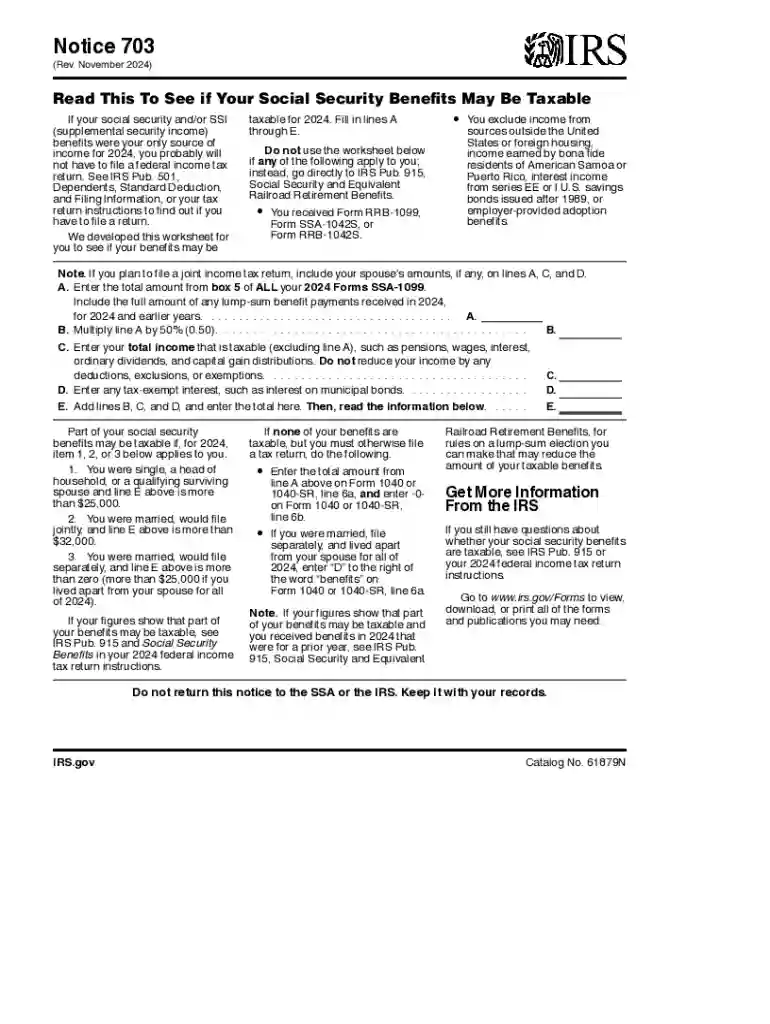
Notice 703 is an essential document for U.S. taxpayers who receive Social Security benefits. It serves as a guide to help individuals determine if their Social Security and SSI benefits are taxable for a particular year, specifically for 2024 in this context. This notice includes instructions, an income worksheet, and specific income thresholds to assist taxpayers in assessing their tax liabilities related to these benefits. Understanding this notice is crucial for accurately filing tax returns and avoiding any potential penalties for misreporting taxable income.
To effectively use the IRS Notice 703, begin by gathering all pertinent financial documents, including your Social Security statement, W-2s, and any other sources of income. The notice provides a worksheet designed to guide you through calculations by considering the sum of your benefits and other income sources. The worksheet employs predefined thresholds to determine if your benefits are taxable. Follow each step thoroughly, ensuring you include all applicable income streams to achieve an accurate evaluation of your tax obligations.
Gather Financial Information: Collect all income documents, such as Social Security statements and additional earnings from employment.
Review the Notice: Understand the instructions and sections included in IRS Notice 703 that are pertinent to your financial situation.
Complete the Worksheet: Utilize the provided worksheet, imputing your income data to evaluate potential taxation of your benefits.
Determine Tax Obligations: Assess the outcome of your completed worksheet to determine if your Social Security benefits are subject to taxation.
File Tax Returns: If benefits are taxable, accurately report this on your federal tax return using the appropriate forms.
Modified Adjusted Gross Income (MAGI): A measure of income used to determine if your benefits are taxable; includes wages, self-employment income, and other non-taxable income.
Taxable Benefits: A portion of your benefits subject to taxation determined by your combined income and filing status.
Threshold Income Levels: Specific income criteria outlined in the notice indicating at which point Social Security benefits become taxable.
Notice 703 provides relevant IRS guidelines to assist in understanding the taxability of Social Security benefits. It outlines detailed instructions for using the worksheet and calculating any potential taxes due. The guidelines further clarify exceptions and special conditions, ensuring taxpayers have a comprehensive understanding of how their benefits interact with their total income.
Adhering to tax filing deadlines is crucial to avoid penalties. For most taxpayers, the deadline to submit their federal tax return, including any taxes due on Social Security benefits as determined by IRS Notice 703, is April 15th of the year following the tax year in question. Extensions may be requested if more time is needed, typically extending the deadline to October 15th, but ensure any payments are made by the original deadline to avoid interest on taxes owed.
To navigate IRS Notice 703 effectively, have the following documents ready:
Consider a retiree who receives $20,000 in Social Security benefits and an additional $10,000 from a part-time job. By using IRS Notice 703, they would calculate their taxable income using the worksheet. If their MAGI surpasses the threshold, then a portion of the benefits may be deemed taxable. Another scenario involves a married couple filing jointly who receive $30,000 in combined Social Security benefits and $25,000 from an investment fund, applying the notice to correctly identify tax liabilities.
Tax preparation software, such as TurboTax or QuickBooks, can typically integrate the IRS Notice 703 calculations to streamline the estimation of taxable Social Security benefits. This compatibility assists taxpayers in ensuring accurate tax filings by automatically inputting financial data and checking calculations against IRS guidelines. Verify that your chosen software is up-to-date with current tax codes to maximize its usefulness.
We've got more versions of the ssa form 703 form. Select the right ssa form 703 version from the list and start editing it straight away!
At DocHub, your data security is our priority. We follow HIPAA, SOC2, GDPR, and other standards, so you can work on your documents with confidence.





This publication explains the federal income tax rules for social security benefits and equivalent tier 1 railroad retire- ment benefits.
Apr 15, 2015 If you are filing a return only because you owe this tax, you can file Schedule H. (Form 1040) by itself. Social security and Medicare tax on.


