




Here's how it works



How to use or fill out light's retention scale pdf with our platform

- Click ‘Get Form’ to open the light's retention scale PDF in the editor.
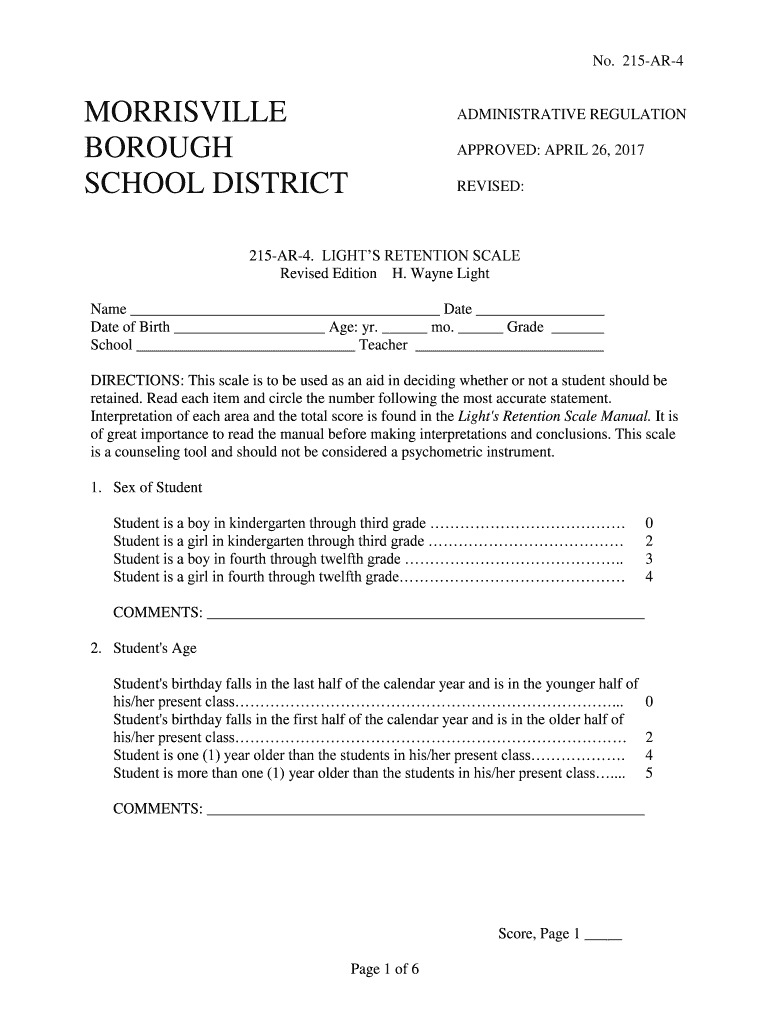
- Begin by entering the student's name, date, date of birth, age, grade, school, and teacher in the designated fields at the top of the form.
- For each section, read the statements carefully. Circle the number that corresponds to the most accurate description of the student’s situation. For example, under 'Sex of Student', select from options based on their grade level.
- Continue through each section such as 'Student's Age' and 'Knowledge of English Language', circling the appropriate scores while adding any relevant comments in the provided space.
- Once all sections are completed, ensure you tally up the total score at the end of the document for a comprehensive assessment.
Start using our platform today to easily fill out and manage your documents for free!
It's free
See more light's retention scale pdf versions
| Versions | Form popularity | Fillable & printable |
|---|---|---|
| 2017 | 4.4 Satisfied (49 Votes) |
Got questions?
Is it secure to sign my lights retention scale electronically?
You need to use only trusted software solutions with strong security compliance to approve your documents electronically. DocHub is just the type of editor you need! It stores data on Amazon Web Servers and complies with all necessary security criteria and eSignature regulations, so it’s a trustworthy way to electronically sign your lights retention scale or other forms using this tool.
Can I edit lights retention scale scoring guide on my phone?
As a comprehensive document editing service, DocHub is accessible on mobile devices. Open DocHub in your choice of mobile browser and employ our intelligent mobile-friendly toolset to complete your lights retention scale scoring guide.
What do scores mean on Light's Retention Scale?
Is retention good for kids?
What do scores mean on Light's Retention Scale?
Security and compliance
At DocHub, your data security is our priority. We follow HIPAA, SOC2, GDPR, and other standards, so you can work on your documents with confidence.
Learn more


