




01. Edit your form online
Type text, add images, blackout confidential details, add comments, highlights and more.

Type text, add images, blackout confidential details, add comments, highlights and more.

Draw your signature, type it, upload its image, or use your mobile device as a signature pad.

Send it via email, link, or fax. You can also download it, export it or print it out.
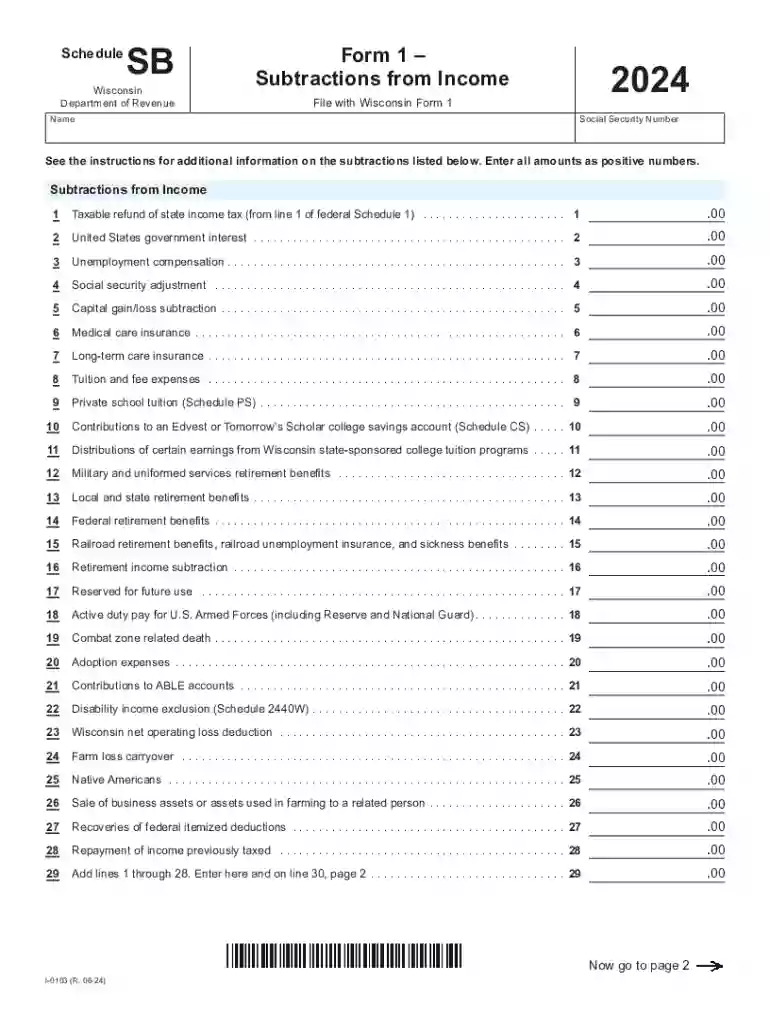
Schedule SB is a form used by taxpayers in Wisconsin to document specific subtractions from income for the tax year. These subtractions can include items such as taxable refunds, government interest, unemployment compensation, and retirement benefits. The goal of Schedule SB is to help taxpayers accurately calculate their total subtractions from income, which are then reported on Wisconsin Form 1. By using Schedule SB, individuals can ensure that they're only taxed on the portion of their income that is above these eligible subtractions, thereby potentially reducing their overall tax liability.
Eligibility to use Schedule SB primarily depends on residency and the types of income subtractions available for the tax year. Generally, it is designed for Wisconsin residents who:
Each type of subtraction has specific criteria, so it's vital that taxpayers check eligibility based on the most recent Wisconsin tax laws.


To obtain Schedule SB, taxpayers can access it directly through the Wisconsin Department of Revenue's website. The form is available for download in a PDF format, allowing taxpayers to print and fill it out by hand or complete it digitally. Additionally, taxpayers can pick up a hard copy from the Department of Revenue office or request a mailed copy by calling the department's customer service line.
Using Schedule SB can offer several benefits:
Wisconsin has particular regulations that influence how Schedule SB is used:
Taxpayers must stay up-to-date with any changes to these rules by reviewing the annual tax instructions provided by the Wisconsin Department of Revenue.
Consider a retired Wisconsin resident who receives social security benefits alongside retirement pension. In a given tax year, they may be eligible to subtract a portion of their pension and possibly their social security benefits from their income if these meet specific state guidelines. By completing Schedule SB correctly, this individual can subtract these amounts, ensuring they're only taxed on what remains, which may lead to significant tax savings.
Failure to accurately complete Schedule SB or inaccurately report subtractions can lead to penalties, including:
Taxpayers should double-check all information and consider consulting with a tax professional to ensure compliance.
We've got more versions of the Schedule Sb form. Select the right Schedule Sb version from the list and start editing it straight away!
At DocHub, your data security is our priority. We follow HIPAA, SOC2, GDPR, and other standards, so you can work on your documents with confidence.



Changes are made to the 2008 Instructions for Schedule SB (Form 5500), Single-Employer Defined Benefit Plan Actuarial Information, filed with the Form 5500,
This document is about the Schedule SB filing requirements and instructions for a single-employer defined benefit pension plan.


