




01. Edit your form 8862 online
Type text, add images, blackout confidential details, add comments, highlights and more.

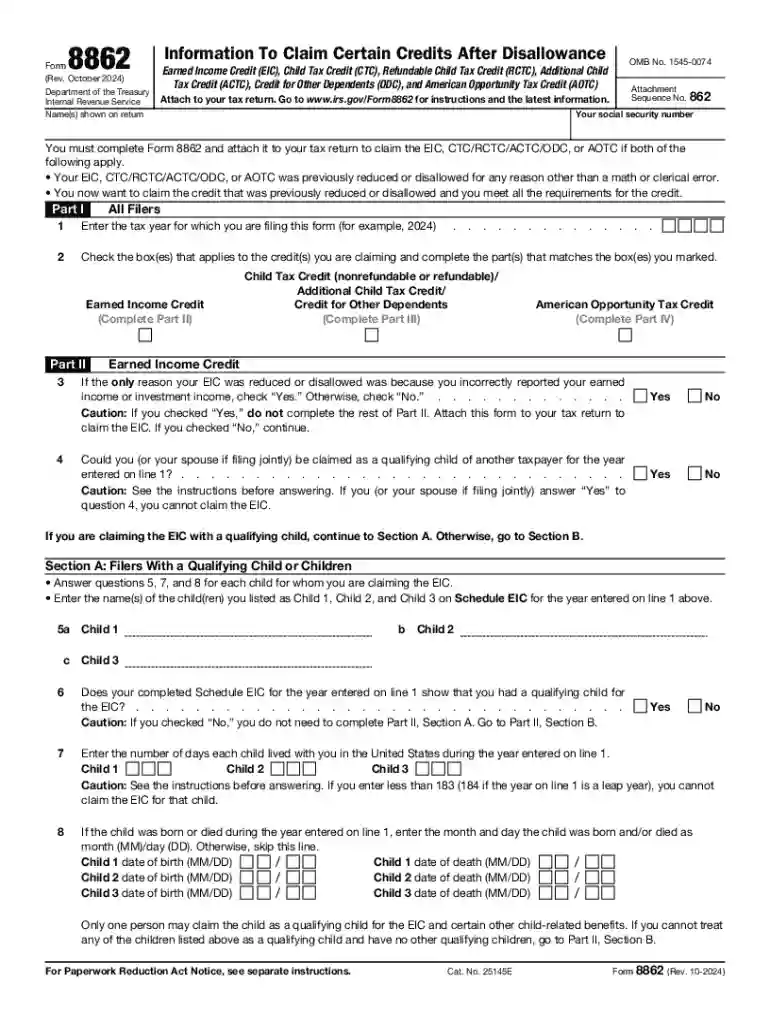
Type text, add images, blackout confidential details, add comments, highlights and more.

Draw your signature, type it, upload its image, or use your mobile device as a signature pad.

Send 8862 form via email, link, or fax. You can also download it, export it or print it out.
Form 8862, titled "Information To Claim Certain Credits," is a document mandated by the Internal Revenue Service (IRS) that taxpayers must complete to reclaim eligibility for certain tax credits, such as the Earned Income Credit (EIC) and Child Tax Credit (CTC), after these credits have previously been disallowed. This form serves to substantiate the taxpayer’s claim that they now meet all eligibility requirements. It includes specific sections addressing taxpayers both with and without qualifying children. By thoroughly reviewing and completing Form 8862, taxpayers provide necessary evidence to support their claims, ensuring that they comply with IRS guidelines.
When using Form 8862, taxpayers should first gather all pertinent information and documentation that supports their eligibility for the credits they wish to claim. This includes proof of income, residency, and relationship to any qualifying children. Once ready, taxpayers must accurately fill out each section of the form according to their individual circumstances. Key entries include personal information, income details, and data regarding qualifying children, if applicable. Ensure that all entries correlate with the information on your tax return to avoid discrepancies and potential delays in processing.
Form 8862 is readily accessible through multiple avenues. It can be downloaded directly from the IRS website as a PDF document, which can be printed and manually filled out. Alternatively, you can request a physical copy by contacting the IRS through their hotline or visiting an IRS office. Many tax preparation software programs also include Form 8862, allowing users to complete and submit it electronically as part of their tax filing package.
Form 8862 is mainly utilized by taxpayers whose claims for certain credits were denied in previous tax years but who now wish to reclaim these credits. This form is particularly common for individuals seeking credits like the Earned Income Credit and Child Tax Credit, who have since rectified the reasons for their initial disallowance. Taxpayers in diverse situations, such as those experiencing changes in income or family dynamics, regularly find Form 8862 pertinent to their financial planning.
The IRS provides specific guidelines for completing and submitting Form 8862. The form must be completed accurately and attached to the taxpayer's federal income tax return for the year in which they wish to reclaim credits. Adhering to IRS guidelines ensures that the form is processed without issue and that no further documentation is needed.
To successfully reclaim credits via Form 8862, taxpayers must adhere to strict filing deadlines set by the IRS. The form must be submitted along with the taxpayer's annual tax return. Missing the deadline can result in delays or the inability to reclaim credits for that tax year.
When completing Form 8862, it is crucial to have all necessary supporting documents on hand. These include previous tax returns where credits were disallowed, current income records, proof of residency, and documentation supporting any qualifying children. Presenting these documents ensures the form is filled accurately and increases the likelihood of reclaiming your credits smoothly.
We've got more versions of the form 8862 form. Select the right form 8862 version from the list and start editing it straight away!
| Versions | Form popularity | Fillable & printable |
|---|---|---|
| 2025 | 4.7 Satisfied (48 Votes) | |
| 2024 | 4.6 Satisfied (24 Votes) | |
| 2023 | 4.3 Satisfied (55 Votes) | |
| 2022 | 4.1 Satisfied (39 Votes) | |
| 2021 | 4.8 Satisfied (71 Votes) | |
| 2018 | 4.2 Satisfied (101 Votes) | |
| 2017 | 4.2 Satisfied (115 Votes) | |
| 2012 | 4.4 Satisfied (422 Votes) | |
| 2009 | 4.3 Satisfied (48 Votes) | |
| 2002 | 4.6 Satisfied (46 Votes) | |
| 2000 | 4.9 Satisfied (53 Votes) |
At DocHub, your data security is our priority. We follow HIPAA, SOC2, GDPR, and other standards, so you can work on your documents with confidence.


Jan 26, 2024 Form 8862 may be required. you must attach a completed Form 8862, Infor- mation To Claim Certain Credits After Disallowance, to your tax return
Form 8862, Information To Claim Certain Credits After Disallowance Revision Date Dec 2025 Posted Date 01/07/2026


