Complete a 2015 utah state tax return-2026

Get Form
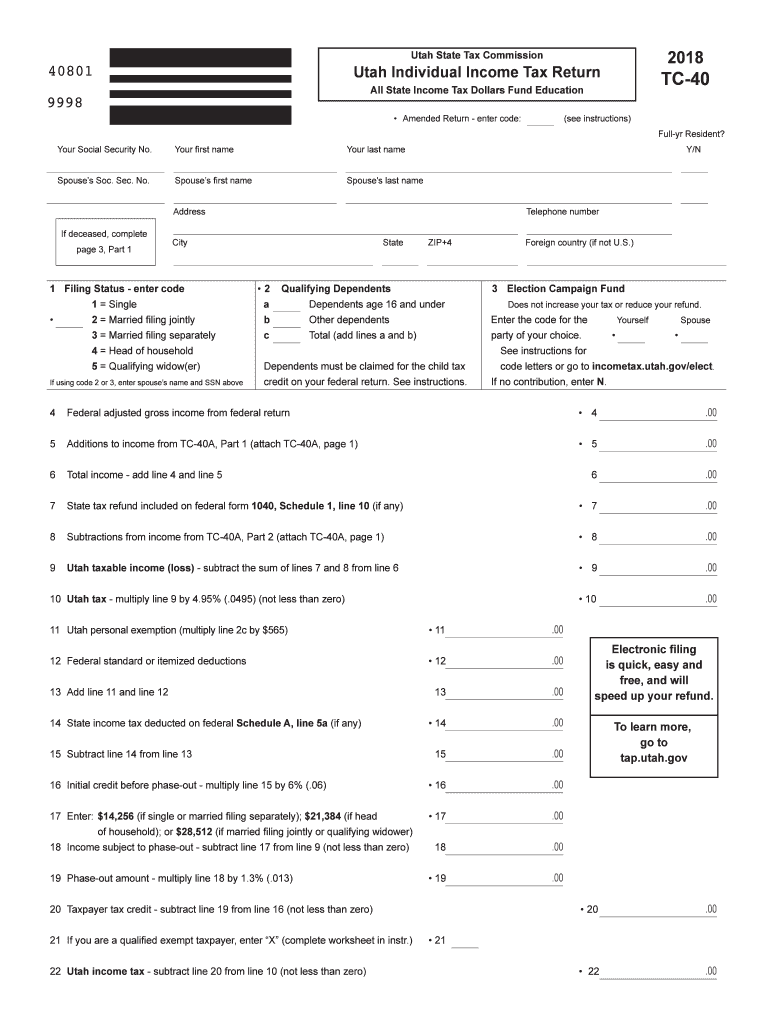
2018 utah tax Preview on Page 1

Here's how it works

01. Edit your 2018 utah tax online
Type text, add images, blackout confidential details, add comments, highlights and more.
02. Sign it in a few clicks
Draw your signature, type it, upload its image, or use your mobile device as a signature pad.
03. Share your form with others
Send utah sales tax via email, link, or fax. You can also download it, export it or print it out.

How to use or fill out complete a 2015 Utah State Tax Return with DocHub

Form edit decoration
9.5
Ease of Setup
DocHub User Ratings on G2
9.0
Ease of Use
DocHub User Ratings on G2
  1. Click ‘Get Form’ to open the 2015 Utah State Tax Return (TC-40) in our editor.
  2. Begin by filling in your personal information, including your Social Security number, name, and address. Ensure accuracy as this information is crucial for processing.
  3. Select your filing status by entering the appropriate code in section 1. This determines your tax obligations and potential deductions.
  4. List any qualifying dependents in section 2. This can impact your tax credits, so be sure to include all eligible individuals.
  5. Proceed to report your federal adjusted gross income on line 4. This figure is essential for calculating your state taxable income.
  6. Complete lines for additions and subtractions from income as indicated on the form. Attach any necessary schedules if required.
  7. Finally, review all entries for accuracy before signing and submitting the form electronically through our platform for a quick and free filing experience.

Start using our editor today to simplify your tax return process!

See more complete a 2015 utah state tax return versions

We've got more versions of the complete a 2015 utah state tax return form. Select the right complete a 2015 utah state tax return version from the list and start editing it straight away!
Versions Form popularity Fillable & printable
2023 4.6 Satisfied (40 Votes)
2022 4.5 Satisfied (45 Votes)
2021 4.8 Satisfied (252 Votes)
2020 4.2 Satisfied (49 Votes)
2019 4.1 Satisfied (50 Votes)
2018 4.4 Satisfied (165 Votes)
2017 4.3 Satisfied (59 Votes)
2015 4.4 Satisfied (462 Votes)
2014 4 Satisfied (57 Votes)
2011 4 Satisfied (53 Votes)
2008 4.1 Satisfied (46 Votes)
be ready to get more

Complete this form in 5 minutes or less

Get form

Got questions?

We have answers to the most popular questions from our customers. If you can't find an answer to your question, please contact us.
Contact us
If you are due a refund for withholding or estimated taxes, you must file your return to claim it within 3 years of the return due date. The same rule applies to a right to claim tax credits such as the Earned Income Credit.
Most individuals who wish to file their own prior-year return will need to print and mail it. If you have been issued an Identity Protection Personal Identification Number (IP PIN) from the IRS, however, you can e-file a prior-return.
However, it is possible to submit returns dating even several years back using third-party commercial software. This is because HMRC-recognised MTD software providers such as AbraTax are able to support Self Assessment docHubing back a number of years.
The Income Tax Work page is displayed when you login to eFiling. It is within this page that you request, complete, save and file your ITR12 return to SARS. A message will appear informing you that your ITR12 return has been generated and contains the latest information SARS has on record for you.
The CRA EFILE service allows you to electronically transmit T1 tax returns of prior years, up to a maximum of three preceding years, using your current-year transmission credentials. However, prior year T1 returns (2015, 2016 and 2017) should be transmitted before the 2018 T1 returns.

Security and compliance

At DocHub, your data security is our priority. We follow HIPAA, SOC2, GDPR, and other standards, so you can work on your documents with confidence.

Learn more
ccpa2
pci-dss
gdpr-compliance
hipaa
soc-compliance

People also ask

According to Utah Instructions for Form TC-40, you must file a Utah state tax return if: You were a resident or part year resident of Utah that must file a federal return. You were a nonresident or part-year resident with Utah source income and are required to file a federal return.
A copy of your return is your return plus all attachments. Most of the time you can meet a need for tax return information with a transcript.
Prior year returns MeF allows filing of prior year 1040 returns. As a new tax form type is added to the MeF platform, tax returns will be accepted for the current tax year only. As subsequent tax years are added to the system, MeF will accept the current tax year and two prior tax years.

Related links