




Here's how it works

01. Edit your form online
Type text, add images, blackout confidential details, add comments, highlights and more.

02. Sign it in a few clicks
Draw your signature, type it, upload its image, or use your mobile device as a signature pad.

03. Share your form with others
Send it via email, link, or fax. You can also download it, export it or print it out.
How to use or fill out Diabetes Zones with our platform

- Click ‘Get Form’ to open the Diabetes Zones document in the editor.
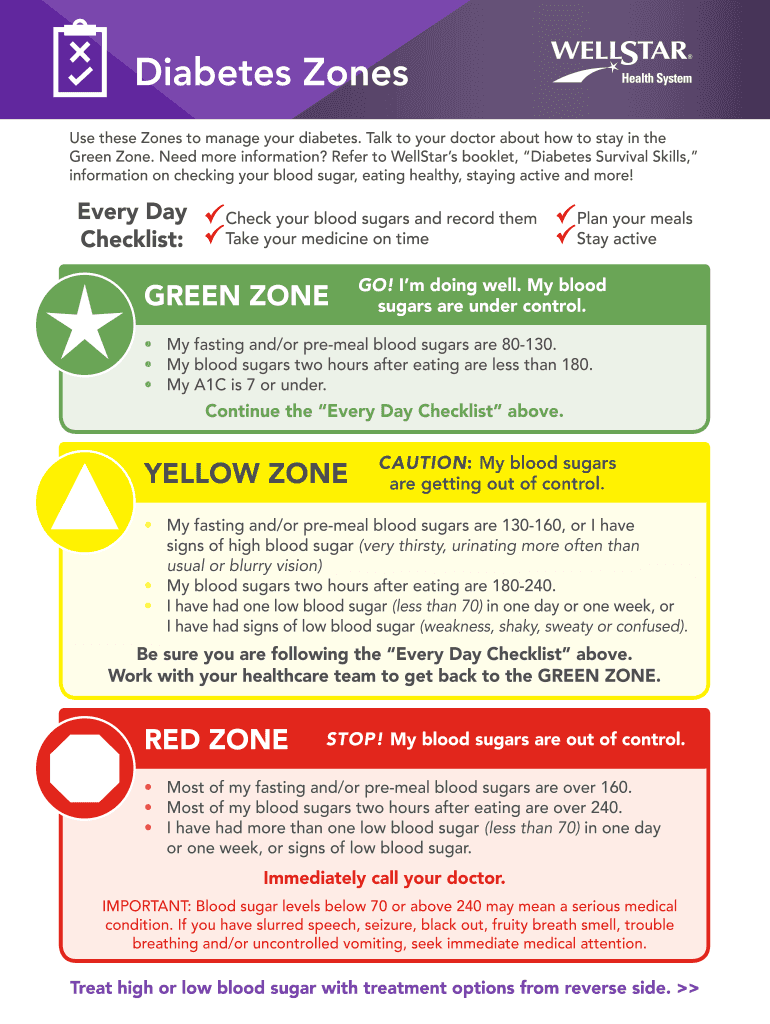
- Begin by reviewing the 'Every Day Checklist' section. Ensure you check your blood sugars and record them, as well as take your medicine on time.
- Identify your current zone: Green, Yellow, or Red. Each zone has specific criteria for blood sugar levels. Fill in your fasting and post-meal blood sugar readings accordingly.
- For the Green Zone, confirm that your blood sugars are under control and continue following the checklist. For the Yellow Zone, note any cautionary signs and ensure you are working with your healthcare team.
- If you find yourself in the Red Zone, immediately call your doctor as instructed. Document any symptoms or actions taken in the provided space.
- Lastly, fill in the contact information for your nurse or doctor at the bottom of the form for easy reference.
Start using our platform today to manage your diabetes effectively and for free!
Fill out Diabetes Zones online
It's free
It's free
Security and compliance
At DocHub, your data security is our priority. We follow HIPAA, SOC2, GDPR, and other standards, so you can work on your documents with confidence.
Learn more


