Form 1040 2023 (Profit Loss Statement)-2026

Get Form
schedule c fillable Preview on Page 1

Here's how it works

01. Edit your schedule c fillable online
Type text, add images, blackout confidential details, add comments, highlights and more.

02. Sign it in a few clicks
Draw your signature, type it, upload its image, or use your mobile device as a signature pad.

03. Share your form with others
Send schedule c tax form via email, link, or fax. You can also download it, export it or print it out.

Definition and Meaning

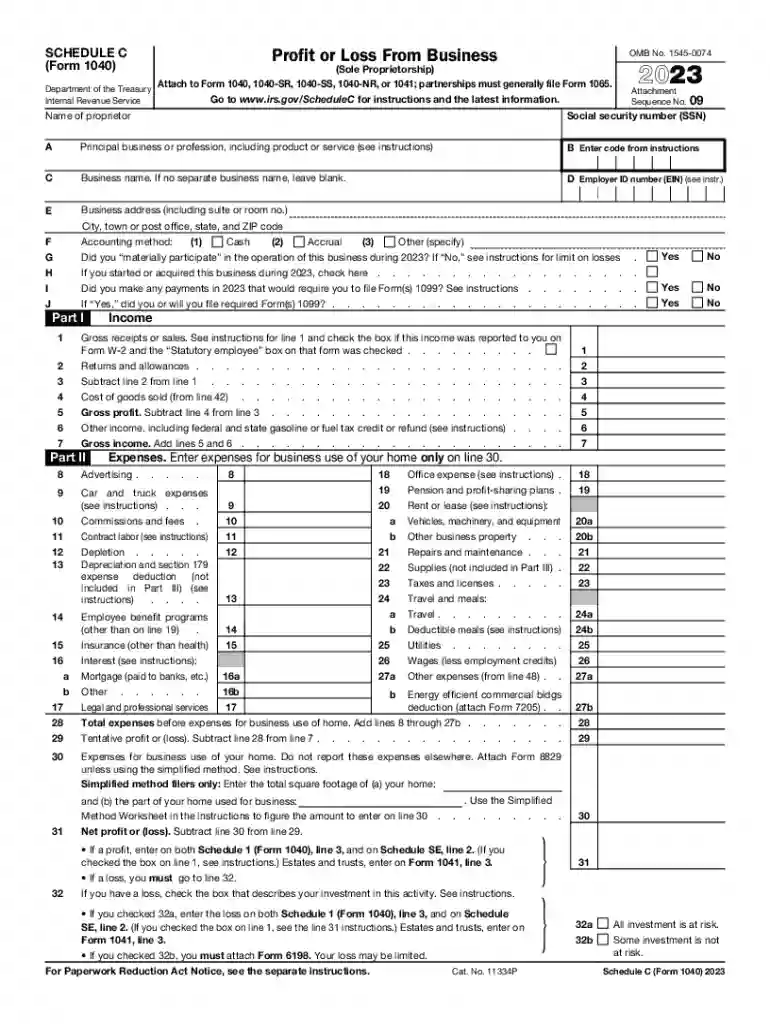
The Form (Profit Loss Statement) is an essential document used by individuals, primarily sole proprietors, to report their business income and expenses to the IRS for the year 2023. This form calculates the net profit or loss from business operations, which directly impacts the individual's taxable income. It includes a detailed breakdown of income earned, deductibles, and operational costs. Understanding this form is crucial for accurate tax reporting and compliance with federal tax regulations.

How to Use the Form (Profit Loss Statement)

The primary function of the Form is to identify the financial results of business activities. Users begin by listing all income sources, such as sales revenues or service fees. Next, they itemize expenses, which can include costs related to supplies, employee wages, and utilities. The net amount, after subtracting expenses from income, indicates the business's profit or loss. This figure is then reported on the individual's tax return to determine tax obligations.

Steps to Complete the Form

  1. Gather Income Records: Collect all income statements, invoices, and sales receipts.
  2. Identify Deductible Expenses: List eligible business expenses, like office rent and travel costs.
  3. Calculate Cost of Goods Sold (COGS): For businesses that produce goods, determine the COGS to deduct from sales revenue.
  4. Sum Total Income and Expenses: Add up all income and expenses separately.
  5. Calculate Net Profit or Loss: Subtract total expenses from total income.
  6. Complete and Attach to Tax Return: Fill out the form with computed details and attach it to Form 1040.

Who Typically Uses the Form (Profit Loss Statement)

Form is most commonly utilized by sole proprietors and self-employed individuals who operate businesses individually, rather than through a corporation or partnership. Freelancers, independent contractors, and gig economy workers also use this form to report business earnings. It supports a wide range of business activities, making it a versatile document for diverse entrepreneurial ventures.


decoration image ratings of Dochub

Key Elements of the Form (Profit Loss Statement)

The form encompasses several crucial components, including:

  • Income Line Items: Sections detailing various income sources.
  • Expense Categories: Classification for deductible expenses, such as advertising, supplies, and repairs.
  • Cost of Goods Sold (COGS): An area dedicated to calculating costs associated with producing goods.
  • Net Income Calculation: Lines where profit or loss is determined by netting expenses against income.

IRS Guidelines

The IRS provides comprehensive guidelines on how to accurately complete the Form . These guidelines outline:

  • Proper documentation required for all reported figures.
  • Specification of what constitutes deductible expenses.
  • Instructions on the treatment of depreciation and amortization.
  • Requirements for maintaining evidence of reported income and expenses.

Adhering to these guidelines helps avoid errors and potential penalties.

Filing Deadlines and Important Dates

The filing deadline for Form aligns with the individual income tax filing deadline, typically April 15th. Extensions may be available, but they usually require filing a request before the original deadline. It's essential for taxpayers to be aware of these timelines to avoid late filing penalties, interest charges, or processing delays.

Penalties for Non-Compliance

Non-compliance with filing requirements, such as failure to file the Form or inaccuracies in reporting, can lead to penalties. These may include:

  • Late Filing Penalties: Financial charges for overdue submissions.
  • Accuracy-Related Penalties: Fines applied for significant discrepancies in reported figures.
  • Interest Charges: Accumulated interest on unpaid tax liabilities.

To mitigate these risks, it is imperative to ensure timely and accurate filing.

Digital vs. Paper Version

Taxpayers have the option to file the Form electronically or through traditional paper submission. Digital filing offers benefits like faster processing times, immediate confirmation of receipt, and reduced risk of errors due to integrated checks. On the other hand, paper submissions may be preferred by those less familiar with digital interfaces. Understanding both methods helps users choose the most appropriate option for their needs.

Software Compatibility

Various tax software programs, including TurboTax and QuickBooks, support the Form , providing tools to streamline the completion process. These software solutions offer:

  • Step-by-step guidance to ensure all required sections are accurately filled.
  • Automatic calculations, reducing the likelihood of mathematical errors.
  • E-filing options for quicker submission and processing.

By leveraging these tools, users can simplify their tax reporting obligations while ensuring precision and compliance.

See more Form 1040 2023 (Profit Loss Statement) versions

We've got more versions of the Form 1040 2023 (Profit Loss Statement) form. Select the right Form 1040 2023 (Profit Loss Statement) version from the list and start editing it straight away!
Versions Form popularity Fillable & printable
2024 4.6 Satisfied (31 Votes)
2023 4.4 Satisfied (54 Votes)
2022 4.3 Satisfied (38 Votes)
2021 4.8 Satisfied (140 Votes)
2020 4.4 Satisfied (93 Votes)
2019 4.1 Satisfied (38 Votes)
2018 4.3 Satisfied (239 Votes)
2017 4.3 Satisfied (233 Votes)
2016 4.1 Satisfied (110 Votes)
2015 3.5 Satisfied (95 Votes)
2014 4.1 Satisfied (54 Votes)
2013 4 Satisfied (44 Votes)
2012 4 Satisfied (27 Votes)
2011 4.2 Satisfied (66 Votes)
2010 4 Satisfied (34 Votes)
be ready to get more

Complete this form in 5 minutes or less

Get form

Got questions?

We have answers to the most popular questions from our customers. If you can't find an answer to your question, please contact us.
Contact us
Get federal tax forms for current and prior years Download them from IRS.gov. Order online and have them delivered by U.S. mail. Order by phone at 1-800-TAX-FORM (1-800-829-3676)
To create a manual profit and loss statement, list all business income sources first. Then, detail all expenses such as rent, supplies, and salaries. Subtract total expenses from total income to find net profit or loss. Use clear categories and keep supporting documents handy.
How To Create a Profit and Loss Statement Choose a reporting period. Gather financial statements and information. Add up revenue. List your COGS. Record your expenses. Figure your EBITDA. Calculate interest, taxes, depreciation, and amortization. Determine net income.
The single-step method is the simplest way to create a PL statement. With this approach, you list all revenue items at the top of the statement and subtract all expenses to arrive at the net income or loss. It requires only a single calculation.
IRS Form 1040 Schedule C (2023) is used to report income or loss from a business the filer operated or a profession the filer practiced as a sole proprietor.

Security and compliance

At DocHub, your data security is our priority. We follow HIPAA, SOC2, GDPR, and other standards, so you can work on your documents with confidence.
Learn more
ccpa2
pci-dss
gdpr-compliance
hipaa
soc-compliance

People also ask

Add all revenue earned over the accounting period. Add all expenditures made throughout the accounting period. Subtract total expenses from total revenue to know the difference. If the value is positive, it represents profit; if it is negative, it represents a loss.
How to create a profit and loss statement: 9 steps Step 1: Choose a reporting period. Step 2: Track the business revenue. Step 3: Calculate the cost of goods sold. Step 4: Subtract cost of goods sold from revenue to determine gross profit. Step 5: Record and calculate operating expenses.
For sole proprietors, net income from your pass-through business appears on Line 31 of the Schedule C that accompanies Form 1040. Personal net income is not explicitly identified on Form 1040, but you can calculate it by subtracting Line 24, Total Tax, from Line 15, Taxable Income.

schedule c