




Here's how it works

01. Edit your pa estate information form online
Type text, add images, blackout confidential details, add comments, highlights and more.

02. Sign it in a few clicks
Draw your signature, type it, upload its image, or use your mobile device as a signature pad.

03. Share your form with others
Send estate information sheet pa via email, link, or fax. You can also download it, export it or print it out.
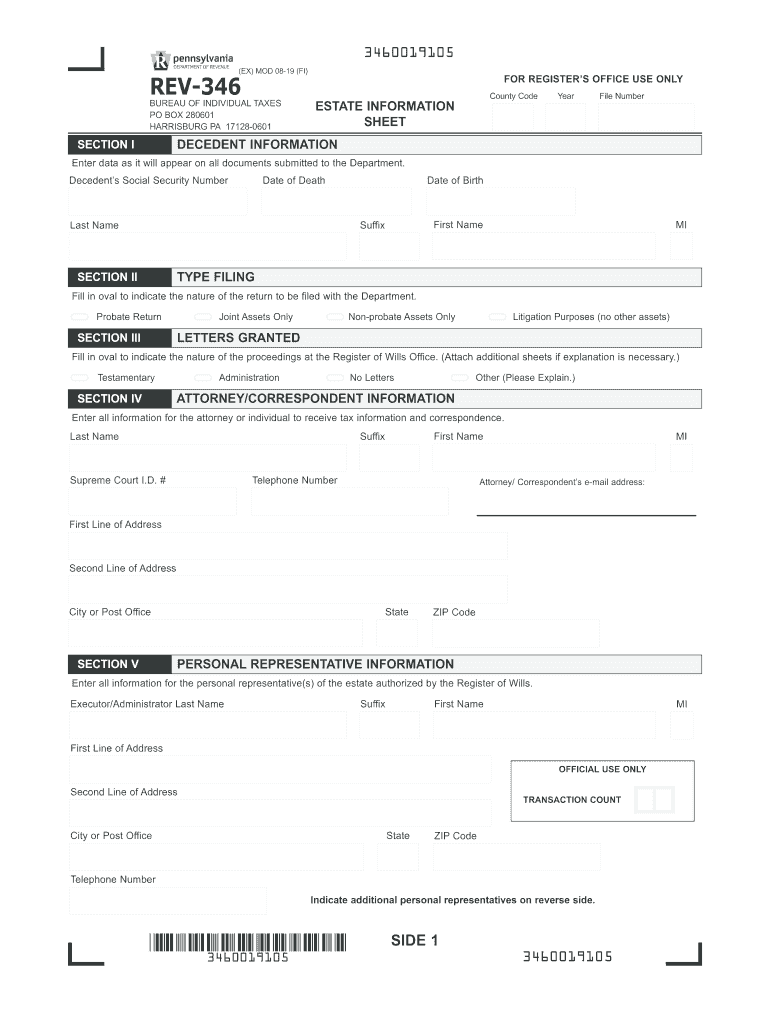
How to use or fill out Pennsylvania Estate Information with our platform

- Click ‘Get Form’ to open the Pennsylvania Estate Information Sheet in the editor.
- In Section I, enter the decedent's information including their Social Security Number, Date of Death, Date of Birth, Last Name, First Name, Suffix, and Middle Initial. Ensure accuracy as this data will appear on all submitted documents.
- Move to Section II and select the appropriate filing type by filling in the oval next to either Probate Return, Joint Assets Only, Non-probate Assets Only, or Litigation Purposes.
- In Section III, indicate the nature of proceedings at the Register of Wills Office by selecting from options like Testamentary or Administration. If necessary, attach additional sheets for explanations.
- Section IV requires you to input details for the attorney or correspondent receiving tax information. Fill in their Last Name, First Name, Suffix, Telephone Number, Supreme Court I.D. #, email address and address details.
- Finally, in Section V provide information for personal representatives authorized by the Register of Wills. Include names and addresses for Executors/Administrators and any Co-Executors if applicable.
Start using our platform today to fill out your Pennsylvania Estate Information form online for free!
Fill out pennsylvania estate information online
It's free
It's free
See more pennsylvania estate information versions
We've got more versions of the pennsylvania estate information form. Select the right pennsylvania estate information version from the list and start editing it straight away!
Security and compliance
At DocHub, your data security is our priority. We follow HIPAA, SOC2, GDPR, and other standards, so you can work on your documents with confidence.
Learn more




