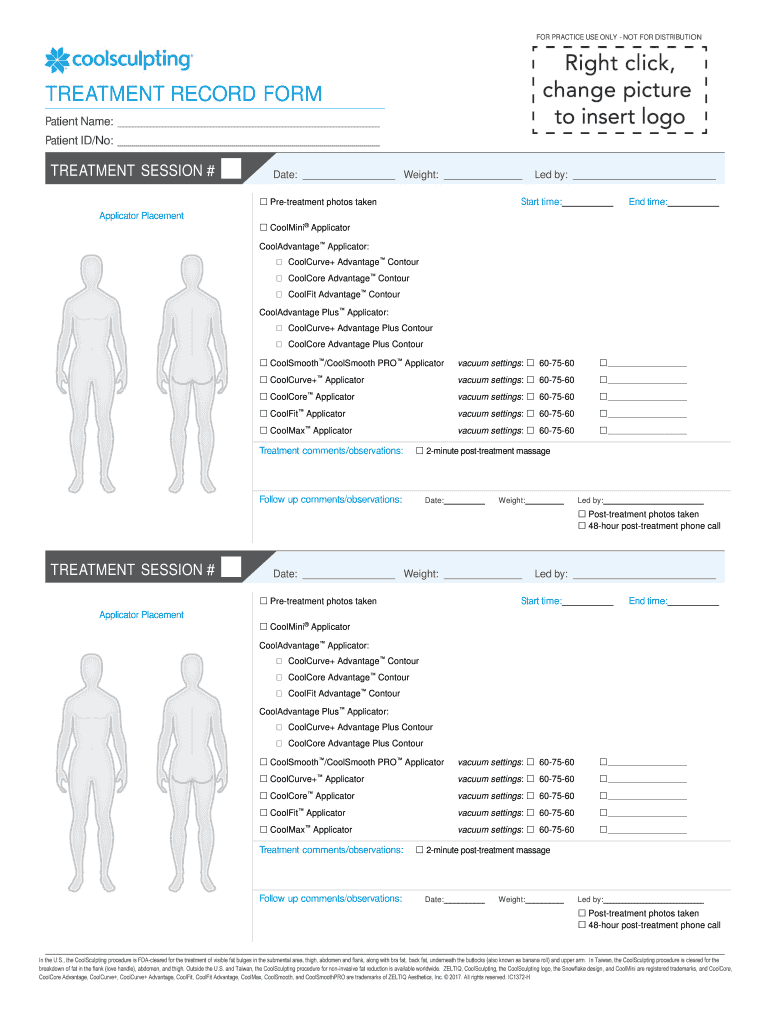
TREATMENT RECORD FORM 2026

Get Form
individual treatment record example Preview on Page 1

Here's how it works

01. Edit your individual treatment record example online
Type text, add images, blackout confidential details, add comments, highlights and more.
02. Sign it in a few clicks
Draw your signature, type it, upload its image, or use your mobile device as a signature pad.
03. Share your form with others
Send individual treatment record via email, link, or fax. You can also download it, export it or print it out.

How to use or fill out TREATMENT RECORD FORM with our platform

Form edit decoration
9.5
Ease of Setup
DocHub User Ratings on G2
9.0
Ease of Use
DocHub User Ratings on G2
  1. Click ‘Get Form’ to open the TREATMENT RECORD FORM in the editor.
  2. Begin by entering the Patient Name and Patient ID/No. at the top of the form. This information is crucial for identifying the patient.
  3. Fill in the TREATMENT SESSION # and Date fields to document when the treatment occurred.
  4. Record the patient's Weight and check if pre-treatment photos were taken by marking the appropriate box.
  5. Indicate who led the session, along with Start time and End time for accurate record-keeping.
  6. In the Applicator Placement section, select from various applicators used during treatment. Ensure to note vacuum settings as required.
  7. Add any Treatment comments/observations and Follow up comments/observations in their respective sections for comprehensive documentation.
  8. Finally, confirm if post-treatment photos were taken and if a follow-up phone call was made after 48 hours.

Start using our platform today to streamline your TREATMENT RECORD FORM completion for free!

be ready to get more

Complete this form in 5 minutes or less

Get form

Got questions?

We have answers to the most popular questions from our customers. If you can't find an answer to your question, please contact us.
Contact us
It includes medications, treatments, tests, immunizations, and notes from visits to a health care provider. Most hospitals and other large health care providers keep patient data in computerized systems called electronic health records (EHRs), which make it easy to find information to treat you, or to share with you.
​ physical examination reports, including reports from entrance and discharge physical examinations, if performed. ​ the service members medical history. ​ all dental examination reports and records. ​ clinical record cover sheets and summaries. ​ outpatient medical and dental treatment records. ​ physical profiles.
The files include a variety of documents dealing with enlistment, medical and dental history, hospitalization, discipline, pay, discharge and subsequent correspondence relating to the individuals eligibility for war service gratuities and other service-related issues.
Health records cover the outpatient, dental and mental health treatment that former members received while in military service. Health records include induction and separation physical examinations, as well as routine medical care (doctor/dental visits, lab tests, etc.) when the patient was not admitted to a hospital.
Personnel Record Portion: The Official Military Personnel File (OMPF) is primarily an administrative record, containing information about the subjects service history such as: date and type of enlistment/appointment; duty stations and assignments; training, qualifications, performance; awards and decorations received;

Security and compliance

At DocHub, your data security is our priority. We follow HIPAA, SOC2, GDPR, and other standards, so you can work on your documents with confidence.

Learn more
ccpa2
pci-dss
gdpr-compliance
hipaa
soc-compliance
be ready to get more

Complete this form in 5 minutes or less

Get form

People also ask

CDCR 7385, Authorization for Release of Protected Health Information.

individual treatment record form doh