Type text, add images, blackout confidential details, add comments, highlights and more.
02. Sign it in a few clicks
Draw your signature, type it, upload its image, or use your mobile device as a signature pad.
03. Share your form with others
Send patagonia repairs via email, link, or fax. You can also download it, export it or print it out.
How to use or fill out patagonia repair with our platform
Ease of Setup
DocHub User Ratings on G2
Ease of Use
DocHub User Ratings on G2
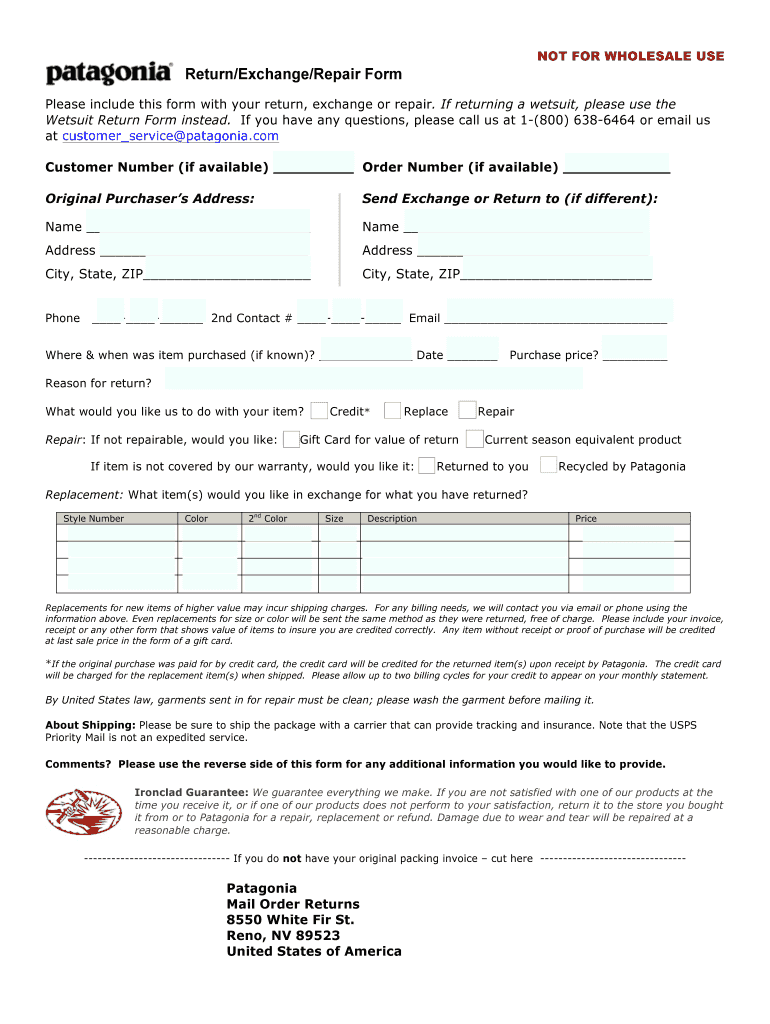
Click ‘Get Form’ to open the Patagonia Repair Form in the editor.
Begin by entering your Customer Number and Order Number if available. This helps streamline your request.
Fill in the Original Purchaser’s Address and, if different, the Send Exchange or Return address. Ensure all fields are complete for accurate processing.
Provide your contact information, including phone numbers and email. This is crucial for any follow-up regarding your return or repair.
Indicate where and when the item was purchased, along with the reason for return. This information assists Patagonia in understanding your needs.
Select what you would like Patagonia to do with your item: Repair, Credit, Replace, Gift Card, etc. Be clear about your preferences.
If requesting a replacement, list the desired items including Style Number, Color, Size, and Price to ensure correct processing.
Finally, review all entries for accuracy before submitting the form through our platform for free.
Start using our platform today to easily fill out your Patagonia Repair Form!
Consumer protection - The Sustainability Management Wiki
Jan 18, 2026 If a repair is possible the items are repaired free of charge, except for demanding repairs or damage due to wear and tear for which a small feeRead more
Patagonia clothing recycling program where customers can send in their worn out clothes that will be repurposed or recycled for new Patagonia products.Read more
Cookie consent notice
This site uses cookies to enhance site navigation and personalize your experience.
By using this site you agree to our use of cookies as described in our Privacy Notice.
You can modify your selections by visiting our Cookie and Advertising Notice.