




Here's how it works

01. Edit your form online
Type text, add images, blackout confidential details, add comments, highlights and more.

02. Sign it in a few clicks
Draw your signature, type it, upload its image, or use your mobile device as a signature pad.

03. Share your form with others
Send it via email, link, or fax. You can also download it, export it or print it out.
How to use or fill out article of association of company with DocHub

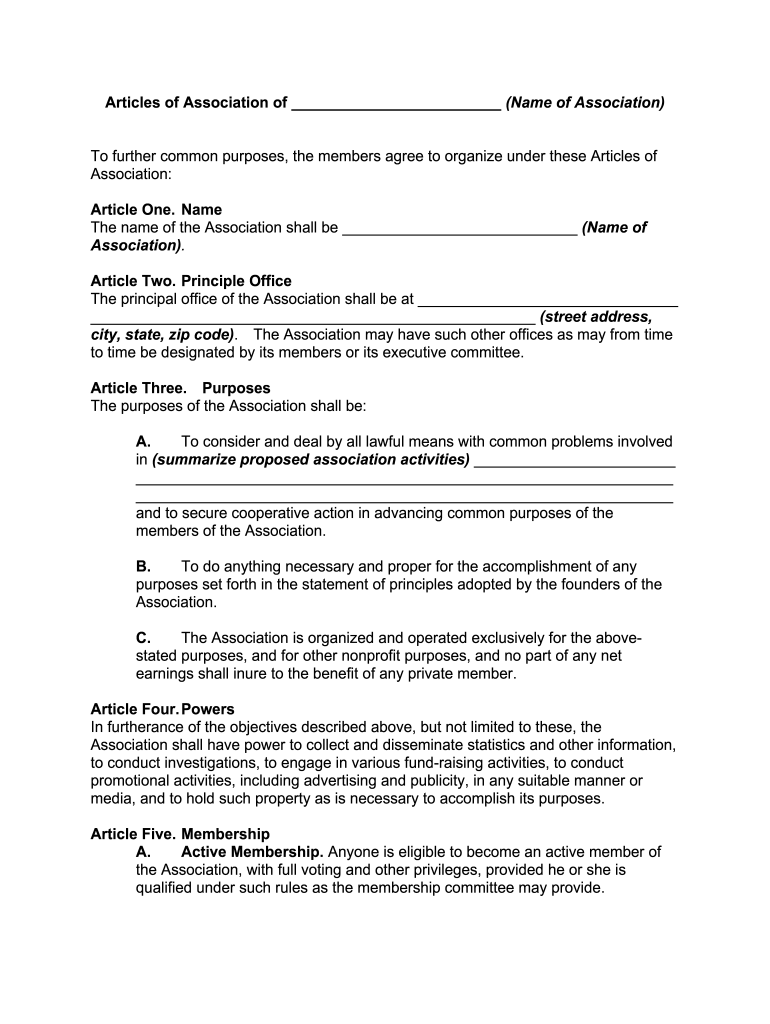
- Click ‘Get Form’ to open the article of association in our editor.
- Begin with Article One: Name. Enter the official name of your Association in the designated field.
- Proceed to Article Two: Principal Office. Fill in the complete street address, city, state, and zip code for your Association's main office.
- In Article Three: Purposes, summarize the activities and objectives of your Association clearly and concisely.
- For Article Four: Powers, outline any additional powers your Association may require to fulfill its objectives.
- Move on to Article Five: Membership. Specify eligibility criteria for active and associate members, including voting rights.
- In Article Six: Dues, indicate how annual dues will be determined by active members.
- Complete Article Seven: Meetings by stating the month for the annual meeting and the required notice period for members.
- Fill out Articles Eight through Eleven regarding officers, amendments, bylaws, and property distribution upon dissolution as needed.
- Finally, sign and date the document at the end to finalize your article of association.
Start using our platform today to easily create and manage your articles of association for free!
Fill out article of association of company online
It's free
It's free
Security and compliance
At DocHub, your data security is our priority. We follow HIPAA, SOC2, GDPR, and other standards, so you can work on your documents with confidence.
Learn more




