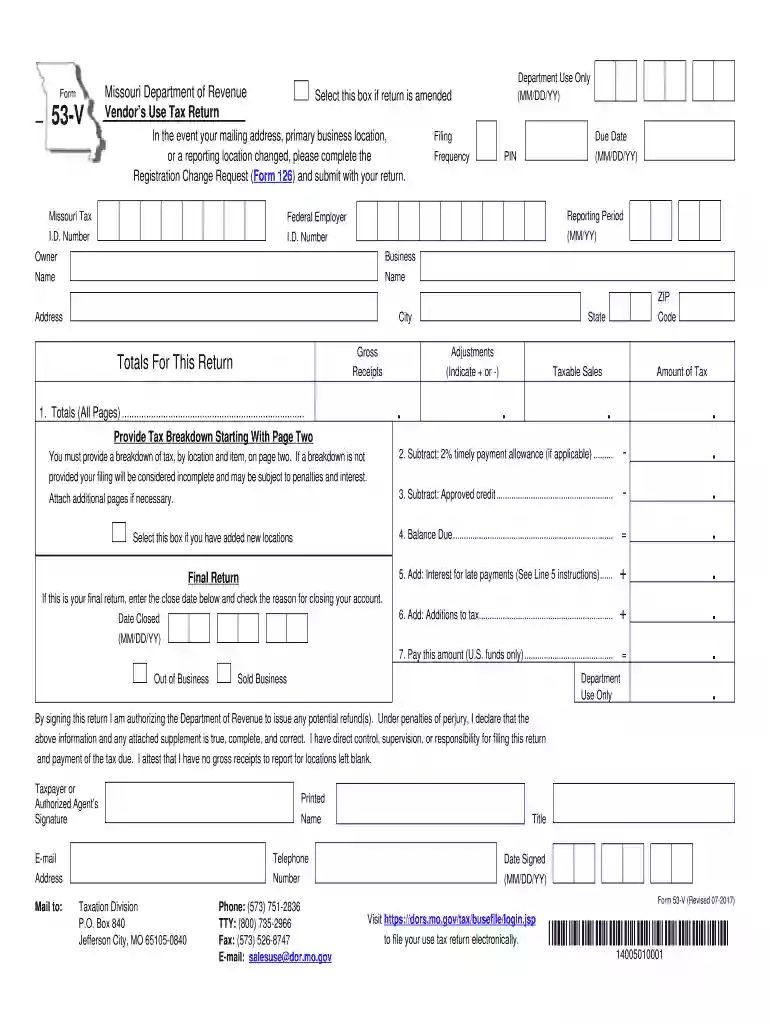
Missouri form 53 v 2025

Get Form
form 53 land registry Preview on Page 1

Here's how it works

01. Edit your form 53 land registry online
Type text, add images, blackout confidential details, add comments, highlights and more.

02. Sign it in a few clicks
Draw your signature, type it, upload its image, or use your mobile device as a signature pad.

03. Share your form with others
Send missouri sales tax form via email, link, or fax. You can also download it, export it or print it out.

How to use or fill out Missouri Form 53-V with our platform

Form edit decoration
9.5
Ease of Setup
DocHub User Ratings on G2
9.0
Ease of Use
DocHub User Ratings on G2
  1. Click ‘Get Form’ to open Missouri Form 53-V in the editor.
  2. Begin by entering your Missouri Tax I.D. Number and Federal Employer I.D. Number at the top of the form. Ensure that you also specify your filing frequency and due date.
  3. Fill in your business name, address, city, state, and ZIP code. If there are any changes to your mailing address or business location, complete the Registration Change Request (Form 126) and attach it.
  4. In Line 1, provide totals for gross receipts, adjustments, taxable sales, and tax due for all pages. Remember to include a breakdown per location on page two.
  5. If applicable, subtract the 2% timely payment allowance in Line 2 and any approved credits in Line 3 from your total tax amount.
  6. Complete Lines 4 through 7 by calculating any balance due and adding interest for late payments if necessary. Make sure to sign and date the form before submission.

Start using our platform today to easily fill out Missouri Form 53-V for free!

See more missouri form 53 v versions

We've got more versions of the missouri form 53 v form. Select the right missouri form 53 v version from the list and start editing it straight away!
Versions Form popularity Fillable & printable
2023 4.6 Satisfied (31 Votes)
2022 4.8 Satisfied (31 Votes)
2020 4.8 Satisfied (257 Votes)
2017 4.2 Satisfied (96 Votes)
2014 4.2 Satisfied (60 Votes)
be ready to get more

Complete this form in 5 minutes or less

Get form

Got questions?

We have answers to the most popular questions from our customers. If you can't find an answer to your question, please contact us.
Contact us
0:18 3:27 Tax you wont have to pay it. Again youll need to submit a gift statement signed by the donor.MoreTax you wont have to pay it. Again youll need to submit a gift statement signed by the donor. Including the year make and identification number of the vehicle.
How To Complete Schedule 1 (Form 1040): A Step-by-Step Guide Step 1: Gather the necessary documents. Step 2: Fill out your personal information. Step 3: Report additional income. Step 4: Calculate adjustments to income. Step 5: Report other tax credits. Step 6: Calculate other payments and refundable credits.
You must allocate your Missouri source income on Form MO-NRI and complete Form MO-1040. You must include a copy of your federal return with your state return.
How to fill out the Missouri Sales Tax Return Form 53-1 Instructions? Collect all relevant financial documents related to sales. Fill in your business information including name, address, and tax ID. Provide totals for gross receipts and taxable sales. Complete the detailed breakdown of tax by location.
When no sales tax return has been filed, you should calculate your penalty by multiplying the tax amount due by 5 percent for each month you are late. This penalty increases each month you fail to file the return. The maximum amount of penalty is 25 percent.
be ready to get more

Complete this form in 5 minutes or less

Get form

People also ask

To register, a Missouri Tax Registration Application (Form 2643), should be completed and submitted or register online at . The Department sends preprinted returns to the business upon registration of vendors use tax.
If you choose not to e-file, you may print any Missouri tax form from our website at dor.mo.gov/forms. Questions? Contact us at Income@dor.mo.gov or PropertyTaxCredit@dor.mo.gov.

Related links