




Here's how it works

01. Edit your self employment income report form online
Type text, add images, blackout confidential details, add comments, highlights and more.

02. Sign it in a few clicks
Draw your signature, type it, upload its image, or use your mobile device as a signature pad.

03. Share your form with others
Send self employment form for food stamps via email, link, or fax. You can also download it, export it or print it out.
How to use or fill out Wisconsin Self Employment Income Report with DocHub

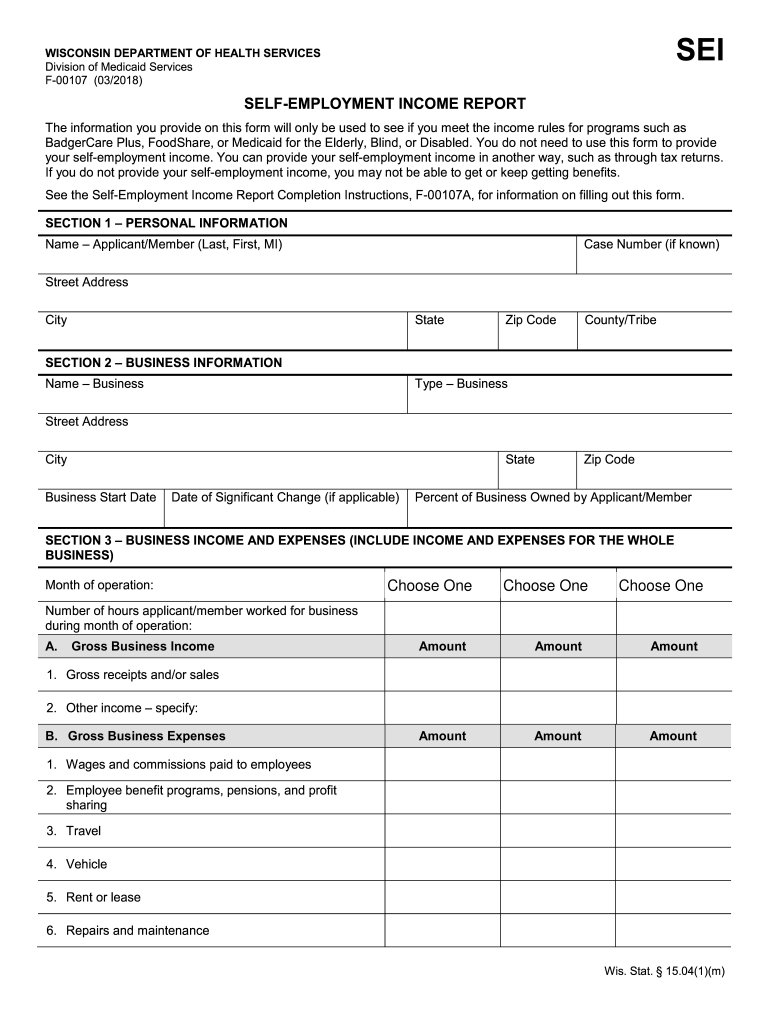
- Click ‘Get Form’ to open the Wisconsin Self Employment Income Report in our platform.
- Begin with SECTION 1 – PERSONAL INFORMATION. Fill in your name, case number, address, city, state, zip code, and county/tribe. Ensure all details are accurate for proper identification.
- Move to SECTION 2 – BUSINESS INFORMATION. Enter your business name, type, address, start date, and any significant changes. Specify the percentage of the business you own.
- In SECTION 3 – BUSINESS INCOME AND EXPENSES, select the month of operation and indicate the number of hours worked. List gross business income including receipts and other income sources.
- Detail your gross business expenses by categorizing them into wages, utilities, materials, and other specified costs. Be thorough to ensure all expenses are accounted for.
- Finally, complete SECTION 4 by signing and dating the form to validate your submission.
Start using our platform today to fill out your Wisconsin Self Employment Income Report easily and for free!
Fill out wisconsin self employment income report online
It's free
It's free
See more wisconsin self employment income report versions
We've got more versions of the wisconsin self employment income report form. Select the right wisconsin self employment income report version from the list and start editing it straight away!
Got questions?
We have answers to the most popular questions from our customers. If you can't find an answer to your question, please contact us.
Contact us
Does Wisconsin have a self-employment tax?
Independent contractors in Wisconsin need to pay the entire 15.3% self-employment tax rate themselves. When working as an employee, an employer typically covers a portion of this. Depending on the type of work you carry out as a contractor, you may have to pay sales tax.
How to fill out a self-employment income report?
There is no W-2 self-employed specific form that you can create. Instead, you must report your self-employment income on Schedule C (Form 1040) to report income or (loss) from any business you operated or profession you practiced as a sole proprietor in which you engaged for profit.
How do I write proof of self-employment?
I, , do hereby docHub that I am self-employed and that for the most current tax year, my net earnings were $. I hereby attach a copy of my individual federal income tax return for the prior calendar year.
How do you report income when self-employed?
To file your annual income tax return, you will need to use Schedule C (Form 1040), Profit or Loss from Business (Sole Proprietorship), to report any income or loss from a business you operated or profession you practiced as a sole proprietor, or gig work performed.
How do you show proof of income being self-employed?
Proof of Income for Self-Employed Individuals Tax Returns. Freelancers, advisors, and other types of self-employed individuals dont receive standard pay stubs, so they have to use alternative proof of income documents. Profit and Loss Statements. Invoices and Contracts. Bank Statements.
Security and compliance
At DocHub, your data security is our priority. We follow HIPAA, SOC2, GDPR, and other standards, so you can work on your documents with confidence.
Learn more


People also ask
What is proof of income for self-employed people?
What documents can be used as proof of income for self-employed individuals? Documents such as tax returns, bank statements, profit and loss statements, and paid invoices can be used to verify a self-employed persons income.
What is proof of employment if you are self-employed?
Payment evidence showing regular income from self-employment, such as client invoices together with corresponding bank statements and/ or official taxation records.