Form 36a 2026

Get Form
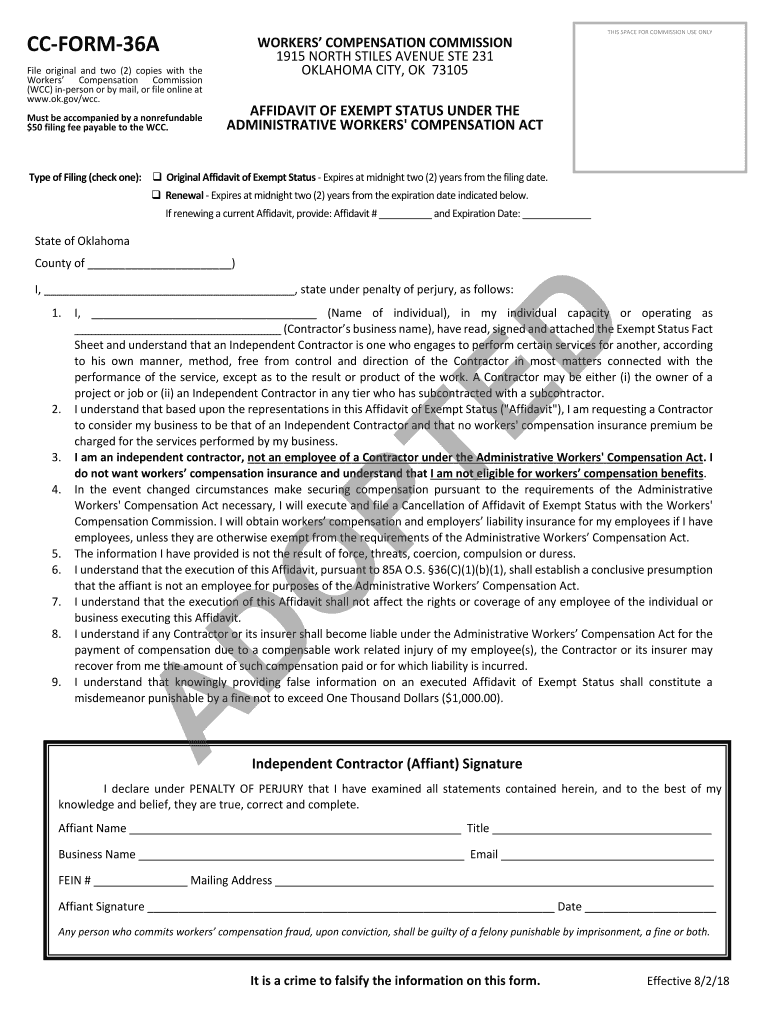
cc form 36a Preview on Page 1

Here's how it works

01. Edit your cc form 36a online
Type text, add images, blackout confidential details, add comments, highlights and more.
02. Sign it in a few clicks
Draw your signature, type it, upload its image, or use your mobile device as a signature pad.
03. Share your form with others
Send form 36 a via email, link, or fax. You can also download it, export it or print it out.

How to use or fill out form 36a with our platform

Form edit decoration
9.5
Ease of Setup
DocHub User Ratings on G2
9.0
Ease of Use
DocHub User Ratings on G2
  1. Click ‘Get Form’ to open it in the editor.
  2. Begin by selecting the type of filing: check either 'Original Affidavit of Exempt Status' or 'Renewal'. If renewing, provide your previous Affidavit number and expiration date.
  3. In the section for personal information, enter your name and business name. Ensure accuracy as this information is crucial for processing.
  4. Complete the affidavit statement by confirming your status as an independent contractor. Carefully read each statement and check the boxes that apply to your situation.
  5. Sign and date the form at the bottom. Make sure to include your title, email, and mailing address for correspondence.
  6. Review all entries for completeness and accuracy before submitting. You can save your progress at any time using our platform's features.

Start filling out form 36a today on our platform for free!

be ready to get more

Complete this form in 5 minutes or less

Get form

Got questions?

We have answers to the most popular questions from our customers. If you can't find an answer to your question, please contact us.
Contact us

Electronic document signing requires a software solution that complies with data protection and eSignature laws. DocHub is a great tool for that, because it fulfills all the previously mentioned requirements. Whatever method you like to sign your form 36a in DocHub, your electronic signature will be legally binding and court-admissible.

In addition to a comprehensive toolset for editing PDFs on mobile phones, DocHub enables you to sign your form 36a in word format along the way. Open our editor in your browser, make changes using DocHub’s toolset, and complete your editing by eSigning the completed form.

Therefore, for the assessee it is advisable that assessee should write to the Tribunal about change of his address and forward a copy of the letter to the AO (Appellant) and also in the office of the Departmental Representative (D/R), ITAT with a request to file a revised Form 36 giving changed address of assessee (
Form No. 36B is used for filing appeals to the Income-tax Appellate Tribunal under the Income-tax (Dispute Resolution Panel) Rules, 2009. It requires details such as the state of assessment, relevant sections, assessment year, declared and computed income, and addresses for communication.
Form 36A: Certificate of Clerk: Form 36A is not a document you fill out yourself. Its a list that checks off all necessary documents like a marriage certificate, draft divorce order, and affidavit forms, to ensure everything is in order before a judge reviews your application.

Security and compliance

At DocHub, your data security is our priority. We follow HIPAA, SOC2, GDPR, and other standards, so you can work on your documents with confidence.

Learn more
ccpa2
pci-dss
gdpr-compliance
hipaa
soc-compliance
be ready to get more

Complete this form in 5 minutes or less

Get form

People also ask

Form No. 36A [See rule 47(2)] Form of memorandum of cross-objections to the Appellate Tribunal In the Income-tax Appellate Tribu.
Form 10-IEA is a declaration made by the return filers for choosing the Opting Out of New Tax Regime. An Individual, HUF, AOP (not being co-operative societies), BOI or Artificial Juridical Person with business or professional income must submit Form 10-IEA if they wish to pay income tax as per the old tax regime.
Form 36 Appeal Fees Rs 500 - when total assessed income is up to Rs 1 Lakh. Rs 1500 - when total assessed income is between Rs 1 Lakh and Rs 2 Lakhs. Rs 10,000 or 1% of assessed income (whichever is less) when total assessed income is above Rs 2 Lakhs.

Related links