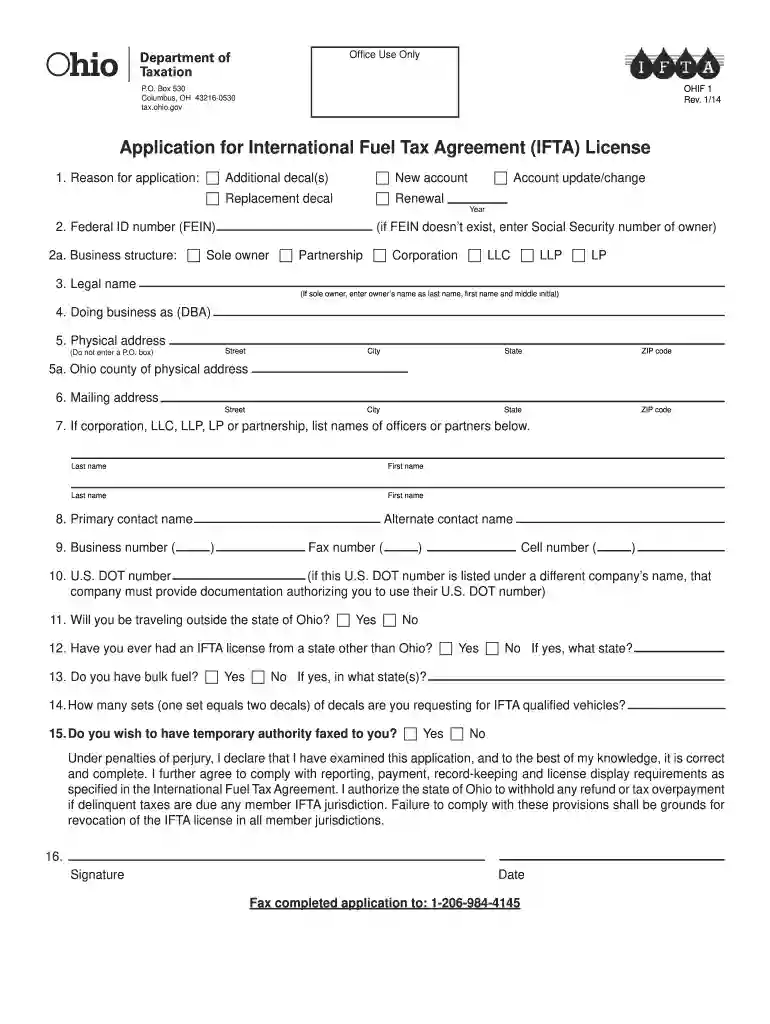
Ohio ifta decal order form 2026

Get Form
ohio ifta phone number Preview on Page 1

Here's how it works

01. Edit your ohio ifta phone number online
Type text, add images, blackout confidential details, add comments, highlights and more.

02. Sign it in a few clicks
Draw your signature, type it, upload its image, or use your mobile device as a signature pad.

03. Share your form with others
Send ifta ohio via email, link, or fax. You can also download it, export it or print it out.

How to use or fill out ohio ifta decal order form with our platform

Form edit decoration
9.5
Ease of Setup
DocHub User Ratings on G2
9.0
Ease of Use
DocHub User Ratings on G2
  1. Click ‘Get Form’ to open the ohio ifta decal order form in the editor.
  2. Begin by selecting the reason for your application. Check the appropriate box for additional decals, replacement decals, new account, account update/change, or renewal.
  3. Enter your Federal ID number (FEIN) or Social Security number if you are a sole owner. Ensure accuracy as this is crucial for processing.
  4. Indicate your business structure by selecting from options such as Sole Owner, Partnership, Corporation, LLC, LLP, or LP.
  5. Fill in your legal name and Doing Business As (DBA) name if applicable. Make sure these match official records.
  6. Provide your physical address without using a P.O. Box. Include city, state, ZIP code, and Ohio county of physical address.
  7. If applicable, list the names of officers or partners associated with your business.
  8. Enter primary and alternate contact names along with their respective phone numbers.
  9. Complete sections regarding U.S. DOT number and whether you will be traveling outside Ohio.
  10. Finally, sign and date the application before submitting it via fax to ensure it is processed correctly.

Start filling out your ohio ifta decal order form online for free today!

See more ohio ifta decal order form versions

We've got more versions of the ohio ifta decal order form form. Select the right ohio ifta decal order form version from the list and start editing it straight away!
Versions Form popularity Fillable & printable
2023 4.1 Satisfied (29 Votes)
2022 4.3 Satisfied (40 Votes)
2020 4.8 Satisfied (203 Votes)
2020 4.2 Satisfied (111 Votes)
2020 4.3 Satisfied (35 Votes)
2014 4.4 Satisfied (109 Votes)
2013 4.8 Satisfied (49 Votes)
2012 4.1 Satisfied (55 Votes)
be ready to get more

Complete this form in 5 minutes or less

Get form

Got questions?

We have answers to the most popular questions from our customers. If you can't find an answer to your question, please contact us.
Contact us
IFTA sticker application process Acquiring an IFTA sticker is a relatively simple process: Fill out an application with your home states department of transportation. For example, California would apply here on CA.gov. Once approved, IFTA decals will be issued and mailed for the current year.
There are no fees associated with IFTA registration, licenses or decals. Failure to file and/or pay your quarterly return by the due date will result in penalties ($50 minimum or 10% of the tax due whichever is greater), interest, and a notice of proposed revocation will be issued.
If you operate a qualified motor vehicle without carrying a copy of your current, valid IFTA license, you may be subject to a citation, fine, penalty, and possible seizure and sale of your vehicle. In addition, you may be required to purchase fuel trip permits to travel into or through each member jurisdiction.
You may obtain an application for an IFTA license (see pages A-2 and A-3) by contacting the Ohio Department of Taxation at (614) 466-3921, contacting any of the offices specified on page A-1, or going to our Web site at .ohio.gov/tax.
You will need to complete an Ohio application form and submit by mail, fax or in person to the Department of Taxation. There is no fee for decals. You will need one set per qualified vehicle. You should receive your decals within 5-7 business days.
be ready to get more

Complete this form in 5 minutes or less

Get form