Type text, add images, blackout confidential details, add comments, highlights and more.
02. Sign it in a few clicks
Draw your signature, type it, upload its image, or use your mobile device as a signature pad.
03. Share your form with others
Send residential water meter size calculator via email, link, or fax. You can also download it, export it or print it out.
How to use or fill out residential water meter size calculator with our platform
Ease of Setup
DocHub User Ratings on G2
Ease of Use
DocHub User Ratings on G2
Click ‘Get Form’ to open the residential water meter size calculator in the editor.
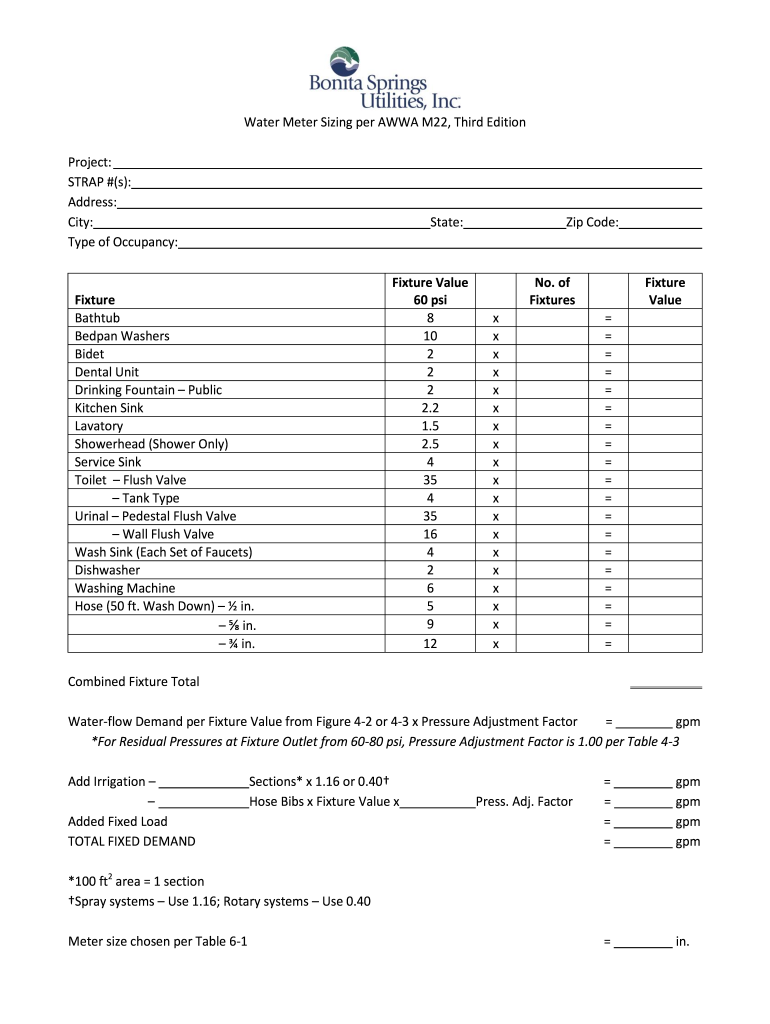
Begin by entering your project details, including the STRAP number, address, city, and state. This information is crucial for accurate calculations.
In the 'Fixture' section, select each type of fixture you have in your residence from the provided list. For each selected fixture, input the corresponding number of fixtures in the 'No. of Fixtures' column.
Next, calculate the 'Combined Fixture Total' by multiplying the number of fixtures by their respective fixture values based on a pressure of 60 psi. Ensure all calculations are accurately reflected in the designated fields.
Add any additional irrigation or fixed loads as necessary. Use the appropriate formulas provided to determine total fixed demand.
Finally, refer to Table 6-1 to choose your meter size based on your calculated total demand. Make sure all entries are correct before finalizing.
Start using our platform today for free and streamline your document editing experience!
Fill out residential water meter size calculator online It's free
Residential water meter size calculator usaWater Meter Sizing CalculatorResidential water meter size calculator texasResidential water meter size calculator californiaWater meter size for commercialWater meter size for residentialAWWA Water Meter sizing chartWater line size Calculator
Security and compliance
At DocHub, your data security is our priority. We follow HIPAA, SOC2, GDPR, and other standards, so you can work on your documents with confidence.
This can be used to size pumps, water meters, or design irrigation systems. Go here to estimate the design capacity from historical crop water useRead more
▻ Minimize water use and preserve water quality. ▻ Conserve material resources and minimize waste. ▻ Protect land and ecosystem services. Where and When to UseRead more
Cookie consent notice
This site uses cookies to enhance site navigation and personalize your experience.
By using this site you agree to our use of cookies as described in our Privacy Notice.
You can modify your selections by visiting our Cookie and Advertising Notice.