Type text, add images, blackout confidential details, add comments, highlights and more.
02. Sign it in a few clicks
Draw your signature, type it, upload its image, or use your mobile device as a signature pad.
03. Share your form with others
Send dbr form via email, link, or fax. You can also download it, export it or print it out.
How to use or fill out Direct Behavior Rating (DBR) Form Fill-in Behaviors - SSWPLC
Ease of Setup
DocHub User Ratings on G2
Ease of Use
DocHub User Ratings on G2
Click ‘Get Form’ to open it in the editor.
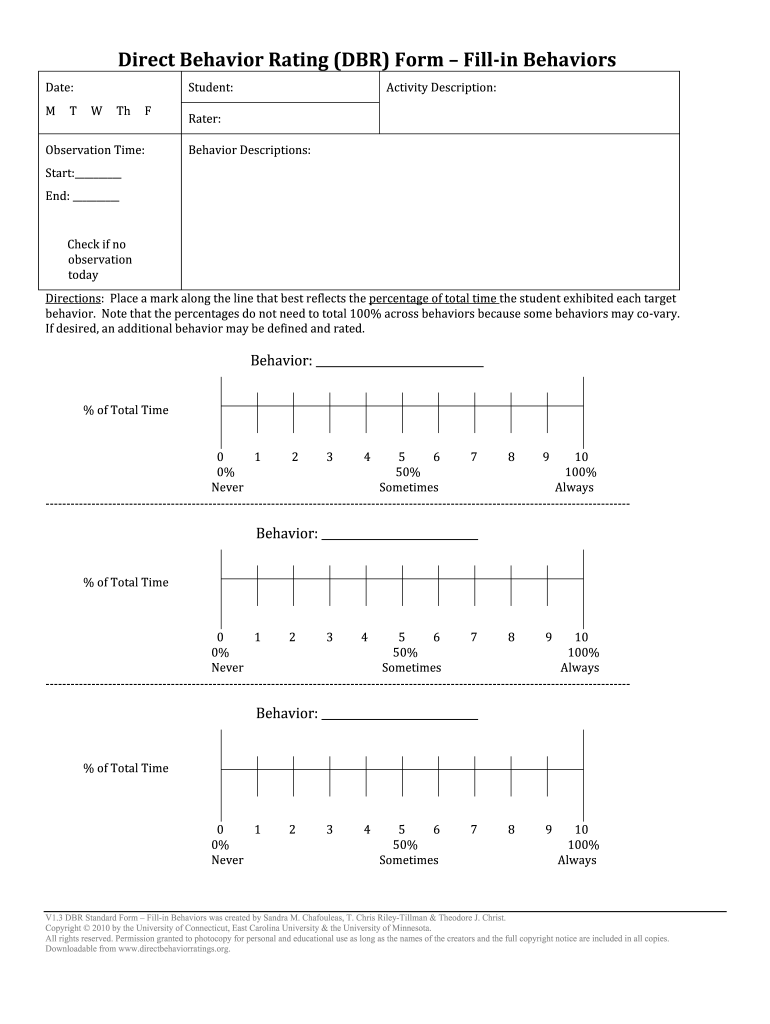
Begin by entering the date at the top of the form. This helps in tracking observations over time.
Fill in the student's name and specify the observation time. This information is crucial for accurate behavior assessment.
In the 'Activity Description' section, provide a brief overview of the activity being observed. This context is important for understanding behavior.
For each behavior you observe, mark along the line that best reflects the percentage of total time exhibited. Remember, percentages do not need to total 100% across behaviors.
If necessary, define and rate an additional behavior by filling in the corresponding fields provided on the form.
Start using our platform today to streamline your DBR form completion for free!
Fill out Direct Behavior Rating (DBR) Form Fill-in Behaviors - SSWPLC online It's free
DBR is a method for collecting data on student behavior that merges a rating scale approach and direct observation. The presentation describes: (a) considerations before using the DBR, (b) completing the DBR and (c) using the DBR to monitor progress and evaluate behavior.
What is the BRS rating scale?
The BRS is a single-page activity where you assign a score between 1 and 5 to a series of statements. The scores (added and divided by the number of statements) determine your personal BRS score. The higher the score, the higher your resiliency.
What is the behavior rating scale BRS?
The BRS is a form for the evaluator to rate the childs behavior throughout testing, including the ability to pay attention, social engagement, affect and emotions, and the quality of movement and motor control.
How do you record and report behavior?
Divide the observation period into equal intervals (usually between five and fifteen seconds long). 2. At the end of each interval, record whether or not the behavior occurred. Note: For whole interval recording, the behavior must occur for the entire interval.
What is the behavior rating profile?
The Behavior Rating Profile Second Edition (BRP-2) is a standardized assessment that focuses on behavior and emotional problems in children and adolescents aged 2 to 18. It was developed to provide a reliable and valid assessment of both typical and atypical behavior patterns.
direct behavior rating
Direct behavior assessmentDirect Behavior Rating formsDBR assessment
Security and compliance
At DocHub, your data security is our priority. We follow HIPAA, SOC2, GDPR, and other standards, so you can work on your documents with confidence.
Step 1: Initial Screening for Possible SSW Service (Referral Form and ... The Child Behavior Checklist, Direct Behavior Rating (DBR) and SDQ are both ...
Cookie consent notice
This site uses cookies to enhance site navigation and personalize your experience.
By using this site you agree to our use of cookies as described in our Privacy Notice.
You can modify your selections by visiting our Cookie and Advertising Notice.